
The delivery tracker was on your Lock Screen an hour ago. Now there is nothing there, and reopening the app does not bring it back.
Apple does not publish a troubleshooting page for this at all, which is why most of the advice you will find is guesswork.
What I can tell you is what genuinely ends one of these, and the commonest cause is something you did without realising you had done it.
Swiping it off the Lock Screen ends it
Not for now. For good.
Apple's Live Activities documentation for developers is blunt about what that swipe does: "A person can remove your Live Activity from their Lock Screen at any time. This ends the Live Activity, but it doesn't end or cancel the person's action that started it."
It then gives the example that makes it land: "a person may remove the Live Activity for their pizza delivery from the Lock Screen, but this doesn't cancel the pizza order."
So the food still arrives and that card does not come back, because as far as the system is concerned you told it you were finished. Reopening the app will not restore it.
Only the app can start a fresh one, and an app generally does that when a new order, timer or workout begins rather than on demand.
If you cleared your Lock Screen in a hurry and the tracker went with it, you have your answer.
Open Settings, tap Apps, then tap the app you are missing
The row you want is one tap further in, and it is not where most advice sends you.
Tap Live Activities.
Apple gives that route on its Lock Screen page and repeats it on a separate page about controlling the same thing from a Mac, so it is the route to trust.
The line under it ends a lot of searches: "Note: Not all apps have a Live Activities setting."
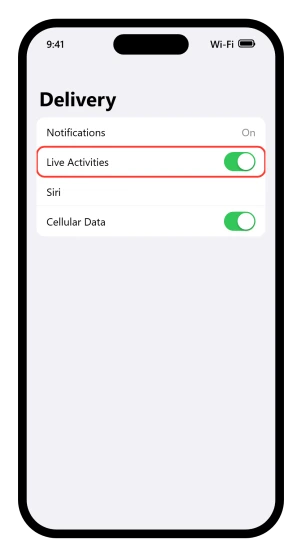
If that row is not there, the app never built one. Toggling Notifications, Background App Refresh or Do Not Disturb will not conjure it, and its absence tells you nothing is wrong with your phone.
The row existing is not a guarantee either.
Our guide to the Apple TV remote appearing on your Lock Screen collects owners who switched Live Activities off for the TV app and still got the card.
That screen is not always a single switch, either. For Apple's own Sports app it also carries update-rate controls, so open it even if you are sure it is on.
Who is actually holding the pen
"Runs in its own sandbox." That phrase from Apple's developer documentation is why your Settings app has so little to offer here.
A Live Activity is not something iOS produces on its own.
The design guidance for developers describes what it is for, "A Live Activity lets people track the progress of an activity, event, or task at a glance", and the filling is the app's job.
It cannot reach the network or receive location updates by itself. Updates arrive either from the app while it is running, or from the app maker's server by push.
So the checklist on your side is short. Confirm the app offers Live Activities at all, confirm the row exists under Settings > Apps and is on, and confirm any switch inside the app itself is on.
There is also a device-wide limit on how many can run at once.
The number is not published, only that "starting a Live Activity may fail because a person's device may have reached its limit of active and scheduled Live Activities".
Ones you have merely scheduled, such as games queued up in Sports for later, count toward it. A new one can therefore fail to appear with nothing shown to you.
The ETA has said eleven minutes for half an hour
The card is right there and the number will not move. That is a different fault from one that never appeared.
Low Power Mode does not switch Live Activities off.
What its support article lists is "Background app refresh: turned off", which starves an activity that relies on the app waking up.
The result is a card sitting on a stale figure rather than a card that disappears.
Two things make that more likely than it used to be.
On iPhone 17, iPhone 17 Pro, iPhone 17 Pro Max and iPhone Air, "Adaptive Power is on by default", and Adaptive Power can "limit background activity" and switch Low Power Mode on by itself when the battery gets low.
So a new phone limits background work without anyone choosing it.
Our guide to iPhone battery drain on iOS 26 tells you to switch Adaptive Power on to stretch the battery, and a card frozen on an old ETA is part of the bill for that.
One more cause is out of reach entirely.
iOS rations how often an app's server may push updates: "The system allows for a certain budget of ActivityKit push notifications per hour", and "if you exceed the budget, the system may throttle your ActivityKit push notifications." A delivery app that updates too eagerly gets slowed down by the phone itself.
No setting on your phone affects that.
Widgets sitting on old data run on those same two switches plus a few of their own, and our guide to iOS 26 widgets not updating works through the rest.
If that is what you are looking at, the app is the thing to chase rather than your phone, and I would not waste an evening in Settings over it.
You board an early flight with the tracker running
By the time you land there is nothing on the screen. There is a time limit, and it is not generous.
The developer documentation gives it directly: "A Live Activity can be active for up to eight hours unless its app or a person ends it before this limit." After that the system ends it and clears it from the Dynamic Island.
The Lock Screen keeps it a while longer. The system removes it "automatically four hours after it ended", which is why a finished activity lingers and then quietly goes.
Apple's design guidance tells developers to aim inside that window, calling Live Activities best for tracking things "that don't exceed eight hours".
So an all-day flight, a long drive or an overnight delivery sits outside what the feature was built for, and its vanishing is the design working rather than failing.
Read these before you spend an evening on them
Apple connects none of the popular fixes for this to Live Activities. Its Focus pages and its notification settings page do not mention them at all.
- Turning Do Not Disturb or a Focus off. A Focus can genuinely change what you see, but only indirectly, by darkening the Lock Screen or by swapping to a different Lock Screen entirely. If your Lock Screen is changing on you, our guide to a Lock Screen wallpaper that keeps changing names the triggers: "You can schedule a Focus to turn on at certain times, when you're at a particular location, or when you open a specific app."
- Turning notifications off and on for the app. A different system with a different switch.
- Restarting the phone. Nothing documented ties a restart to starting a Live Activity. It does help stale widgets, which is a different thing on the same screen.
- Resetting all settings. This clears real preferences you will have to rebuild, with no documented link to this feature.
None of that promises they never help. It is that no Apple page supports them, so treat them as guesses and try the documented checks first.
If the row exists, the switch is on and the app still never starts one, three things are left and all of them are yours.
Update the app, because a tracker that worked last month and stopped is usually the app's own build. Delete and reinstall it, which gives it a clean entry in that Live Activities list.
Then tell whoever wrote it, through the support link on its App Store page, because nothing else on your phone reaches this.
Status: written against iOS 26.6. The route comes from Apple's iPhone guide. The rules on ending, timing and updates come from its developer documentation, which is where they live.
Why did my Live Activity disappear from the Lock Screen?
Most often because it was swiped away, which ends it rather than hiding it, and only the app can start a fresh one. Otherwise it hit the time limit, which is up to eight hours active, then removal about four hours after it ends.
How do I turn Live Activities on for an app?
Go to Settings, tap Apps, tap the app, then tap Live Activities. Not all apps have that setting. If the row is missing, the app never built the feature and nothing else in Settings will add it. Some apps also carry their own switch inside the app.
Does Low Power Mode stop Live Activities?
Not according to any Apple page. The Low Power Mode list says background app refresh is turned off, which starves an activity that relies on the app waking up. The usual result is a card frozen on old information rather than one that disappears.
Why is my Live Activity stuck on the same information?
Two reasons. Background app refresh may be off, which Low Power Mode does for you, and you can check it at Settings, General, Background App Refresh. Or the app's server has exceeded the hourly budget for update pushes, which iOS may throttle. Both leave the card visible but stale.
The Short Version
- Swiping it away ends it, and only the app can start a new one.
- Removing it does not cancel the underlying order, so your delivery still arrives.
- The only Settings control is Settings > Apps > [app] > Live Activities.
- Not all apps have that row, which Apple states outright, so a missing one is normal.
- The app starts and feeds it, because a Live Activity cannot reach the network by itself.
- There is a device-wide limit with no published number, and scheduled ones count toward it.
- About eight hours active, then roughly four more on the Lock Screen.
- Low Power Mode freezes rather than removes, by turning background app refresh off.
- A restart, a Focus toggle and a notification reset are not documented fixes, so try the one Settings row first.
- Update the app, then reinstall it. Those are the two things on your side that Settings cannot do.
Where to Next
The hard part of this one is that swiping the card away ends the activity for good, and only the app can start another. Nothing you do in Settings brings it back.
So the habit worth forming is to leave them alone until they finish on their own.
If yours are disappearing without you touching them, say so below and include the app, because that is a different problem and worth knowing about.

Isaac Smith is the founder and editor of PC Glance, a website that covers computers, laptops, and technology. He is a tech enthusiast and a computer geek who loves to share his insights and help his readers make smart choices when buying tech gadgets or laptops. He is always curious and updated about the latest tech trends.