

You open Copilot and get a white rectangle. No error. No spinner. Nothing to click. Or the sign-in box takes your email, thinks about it, and hands you back an empty popup.
Staring at a blank rectangle with nothing to act on is its own small misery, so let me give you one test that cuts the problem in half.
Nothing about that tells you where to start, which is why people end up clearing caches and reinstalling Windows apps for an afternoon.
There is a thirty second test that narrows it enormously, and hardly anybody runs it.
The test: sign out and load it again
Open Copilot in your browser while signed out of your Microsoft account. A private window is the quickest way.
If it works signed out and breaks signed in, that is the specific fault this page is about. Your browser, your machine and your network are all fine, and you can skip the whole standard list.
That inversion is the useful part. You will be sent to clear the cache and reinstall the app, but if it loads perfectly until you sign in, none of that can be the cause.
If it is broken both ways, this is a different problem, and the last two sections are yours.
What owners actually reported
Reported by an owner on Microsoft's boards in April 2024, describing it exactly:
"Copilot.microsoft.com shows as a blank white page when signed into a microsoft account. However, if not signed in the page loads fine and can be used as intended. This happens in Microsoft Edge and Chrome."
Another owner tested it much further, and his account is the most useful thing on the thread if yours behaves the same way.
In his words: "I tried changing my browser, clearing the cookies, but it didn't help. It does work in the edge sidebar, but neither in the windows app, nor the website (on any browser) when I sign in. If I don't, its all right. It even works fine on my phone app."
And the detail that names the mechanism: "When I clear my cookies and restart the browser, it works, until I sign back in. This happens with any account I sign in, not just the one that I am always signed into."
Any account, two different browsers, and the phone app still fine: that combination rules out the account, the browser and the machine, and leaves something in the signed-in session itself.
The workaround somebody confirmed
Confirmed by an owner in July 2024, and it is simpler than anything you have tried above.
In his words: "Instead of signing in from another account, I logged off with my account and then logged back in. That worked for CoPilot."
Not out of the browser. Out of your Microsoft account itself, at account.microsoft.com, then back in. That drops the stale session Copilot is choking on.
It is a workaround rather than a repair, and I am labelling it that way here. It clears the session you have, and it does not stop a new one going wrong.
Third-party cookies, which nobody thinks to check
Signing out and back in did not hold? Then this is next, and it is genuinely obscure.
Reported by advisers on Microsoft's boards: Copilot and the Microsoft 365 web apps need third-party cookies to complete sign-in.
If your browser blocks them, or a privacy extension does, sign-in half-completes and you get a blank page rather than an error.
In Chrome or Edge, open your cookie settings and either allow third-party cookies or add exceptions for the Microsoft domains: microsoft.com, microsoftonline.com, cloud.microsoft and office.com.
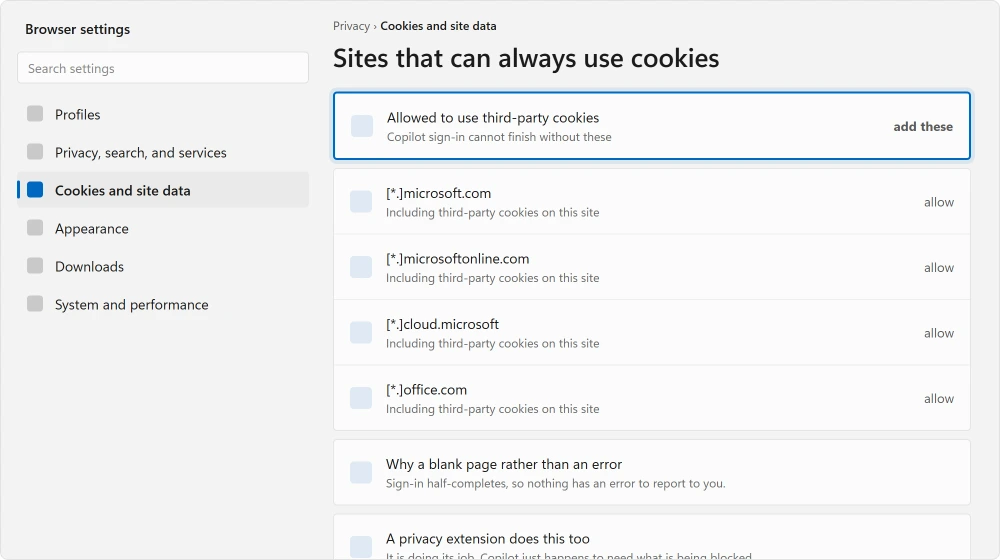
This is why an ad blocker or a privacy extension can break Copilot while breaking nothing else you use. The block is doing its job. Copilot's sign-in just happens to need the thing being blocked.
If it is broken signed out too
Then it is your end after all. The ordinary list applies.
Repair the app first, not reset. Go to Settings, Apps, Installed apps, find Copilot, open Advanced options, and choose Repair. It keeps your data. Reset is the harder version and removes it.
Then try a different browser entirely, and a fresh profile in the one you use. If Copilot works in a clean profile, an extension or cached data in your normal profile is the cause and you can hunt it from there.
Then check for a Windows update, because the Copilot app ships through the Store and a version mismatch produces exactly this.
Where the Store itself is misbehaving, the Snipping Tool refusing to open covers a Store fault with a confirmed fix.
If you are signed into two accounts
This one catches people at work, and you may be one of them. The symptom is a sign-in that never finishes.
Reported by advisers: being signed into both a personal account and a work or school account at the same time can cause validation to fail. Sign out of one and try again with a single account.
And if your whole machine feels slow rather than one app, what is really slowing it down measures rather than guesses.
Ours, and marked as ours: the tell here is that it works at home and not at the office, or in one browser profile and not another. That is almost always two identities rather than a broken app.
Where this leaves you
Nobody on the thread I read got an official fix, and a Microsoft Community Support Specialist ended up asking the owner to send feedback through the app.
What that thread does show is scale. Multiple people arrived over eight months with the identical description on different machines and new computers, and one wrote simply: "New computer, same issue."
Ours, and marked as ours: when a web app breaks for many people in the same way, on hardware that has nothing in common, the odds that your machine is at fault are low.
Do the sign-out test, try the cookie exceptions, and then let it be rather than reinstalling Windows over it.
If Copilot is an app you no longer use, choose its supported removal control instead of repairing it. Editor features and the desktop package have different settings.
Status: written 22 August 2026. Working signed out and blank signed in rules out browser, machine and network. One owner confirmed signing out of his Microsoft account fixed it.
Why is Copilot a blank white page?
Most often a stale signed-in session. Load it signed out, in a private window.
If it works that way and breaks once you sign in, your browser and machine are fine and the problem is the session, which signing out of your Microsoft account and back in can clear.
Does clearing cookies fix Copilot?
Temporarily. One owner found it worked every time until he signed back in, on any account and in any browser. That is worth knowing, because it means cookie clearing treats the symptom rather than the cause.
Do I need third-party cookies for Copilot?
Yes, for sign-in to complete. Advisers on Microsoft's boards note that Copilot and the Microsoft 365 web apps need them, so a privacy extension or a blanket block produces a blank page rather than a useful error.
Adding exceptions for the Microsoft domains is enough.
Should I repair or reset the Copilot app?
Repair first, in Settings, Apps, Installed apps, Advanced options. It keeps your data. Reset removes it and is the harder option.
Neither helps at all if Copilot loads fine when you are signed out, because then the app is not what is broken.
The Short Version
- Load Copilot signed out. Working there and blank signed in changes everything you should try.
- That result rules out your browser, your machine and your network in thirty seconds.
- One owner confirmed signing out of his Microsoft account and back in restored it.
- Another found cookie clearing worked every time, until he signed back in.
- Copilot sign-in needs third-party cookies, so privacy extensions can break it alone.
- Two accounts signed in at once, personal and work, can stop sign-in completing.
Where to Next
The other feature people ask about in the same breath is the one that takes snapshots of your screen. Whether it can even run on your PC is a hardware question.
Open a private window and load Copilot without signing in. Thirty seconds there tells you whether anything on your machine is worth touching at all.
If other Microsoft apps are misbehaving too, the Snipping Tool refusing to open had a mass outage with a confirmed fix that was not the one everybody suggested.
For the other Copilot-era feature people want a straight answer about, Recall is opt in and most PCs cannot run it.
Found something else behind yours? Post it below. This one is clearly widespread and badly documented, and I would rather collect real cases than guess at them.

Isaac Smith is the founder and editor of PC Glance, a website that covers computers, laptops, and technology. He is a tech enthusiast and a computer geek who loves to share his insights and help his readers make smart choices when buying tech gadgets or laptops. He is always curious and updated about the latest tech trends.