
You set a medication in the Health app for every other day, and it reminded you two days in a row. Or it skipped a day it should not have. With some medicines, a wrong day is not a small thing.
I read the forum thread about it, open since February with 27 Me too clicks. Two owners found a way to reset the schedule without deleting anything, and Apple's own guide shows you how to check what you actually took.
What owners are reporting
The first report was about an every-other-day medicine. In their words, "Health will intermittently tell me to take this medication on consecutive days".
Their warning was blunt. "Someone could get seriously injured if they rely on the health apps medication schedule and reminders."
Other intervals slip too. An every-3-days user wrote: "sometimes it'll remind me 2 days in a row, sometimes every second day, and sometimes not until 4 days!"
It has lasted. One owner wrote that it "still hasn't been fixed as of August 2026". Another was "worried that I might forget when I last took my every other day meds".
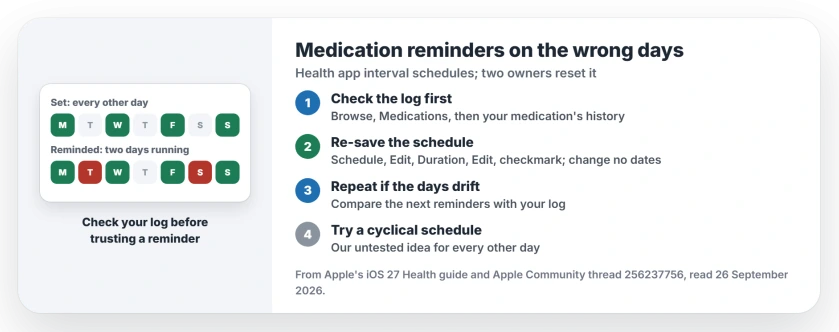
Status: Health app medications, reports from iOS 26.2 to 26.6.2, checked 26 September 2026. Interval schedules can remind on the wrong days. Re-saving the schedule reset it for two owners.
1. Check the log before you take a dose
Do this first, every time a reminder looks off. Apple's Health guide says: "To review your history of taking the medication, tap Browse, tap Medications, then tap the medication".
The log shows the days you marked as Taken. If it says you took it yesterday, the reminder is wrong, not your memory.
Apple is clear on where the app stops: "The Medications feature is not a substitute for professional medical judgment." If you are unsure about a dose, ask your pharmacist. That advice is ours. No setting beats it.
2. Re-save the schedule without changing it
A forum owner posted the steps that fixed an every-4-days schedule, and you can follow them in a minute. Open Health, tap Browse, then Medications, and tap your medication.
Scroll to Schedule and tap Edit, then scroll to Duration and tap Edit again. Now "do not change the Start Date or End Date". "Simply tap the blue checkmark" to save, then tap the checkmark on the Edit Schedule screen too.
Their result: "Ever since doing this, my reminders snapped back to the exact 4-day cadence and have been alerting properly on my wrist."
A second owner does the same with the start date: "To fix it I have to go into edit schedule, edit the start date, don't actually change anything but click the check sign."
Apple says the same Schedule, Edit route is how you change a schedule. So you are using a normal menu, not a hack.
3. Repeat it when the days drift again
The re-save is a reset, not a cure. The second owner's words, "I have to go into edit schedule", suggest they do it whenever the reminders slip.
Our suggestion: note the date you re-saved, then watch the next few reminders against your log. If one lands on the wrong day, re-save again.
4. Try a different schedule type
Apple lets you pick how the schedule repeats. Its guide says to tap Change under the "When will you take this?" question "to choose a different schedule type, like On a Cyclical Schedule, or Every Few Days".
Our untested idea: an every-other-day medicine could also be set as a cycle of one day on and one day off.
If the Every Few Days type keeps slipping for you, a cyclical schedule may count days differently. Nobody in the thread has tried it yet.
5. Keep your iPhone and Apple Watch in step
The owner with the fix also saw the reminders drift between iPhone and Apple Watch. Apple's sync rule has three parts: one Apple Account on both, a working internet connection, and the latest software on each.
So update both. Then check that your watch shows the same schedule as your iPhone after you re-save.
Other Health app reminder problems
If reminders do not arrive at all, rather than on the wrong days, the medication reminders page covers Critical Alerts and the other switches. And if Health is not counting your steps, the step counting page goes through that.
Why does the Health app remind me on the wrong day?
Apple has not said. The reports in the thread involve interval schedules such as every other day, every 3 days and every 4 days, on iOS 26.
How do I fix medication reminders in the Health app?
Edit the medication's Schedule, open Duration, and save it with the checkmark without changing any dates. It reset the timing for two owners.
Will deleting the medication fix the schedule?
Nobody in the thread needed to. The owner who posted the fix wrote to keep your medication and history and re-save the schedule instead.
Can I trust the Health app for medication timing?
Use it as a reminder, and check the log before each dose. Apple's own guide warns against using it in place of medical advice.
The Short Version
- Interval schedules can remind on the wrong days.
- Check the medication's log before each dose.
- Edit Schedule, then Duration, then tap the checkmark.
- Do not change any dates while you do it.
- Repeat the re-save if the days drift again.
- Keep iPhone and Apple Watch updated and in step.
Where to Next
Open the medication in Health now and re-save its schedule, then compare the next reminder with your log.
Which interval do you use, and did the re-save hold? Tell me in the comments. I will add each result here for the next reader.

Isaac Smith is the founder and editor of PC Glance, a website that covers computers, laptops, and technology. He is a tech enthusiast and a computer geek who loves to share his insights and help his readers make smart choices when buying tech gadgets or laptops. He is always curious and updated about the latest tech trends.