
Zero steps. A walk to work. A walk back. A supermarket trip in between. And the Health app shows a flat line for the whole day, as though you never got off the sofa. I know how deflating that is when you are actually trying to move more.
Straight with you before you start. Two of the six are quick and fix real cases, and three tell you what is broken rather than repair it.
The sixth is there because a large group of owners never found a permanent fix.
Pretending otherwise would waste your afternoon.
So work down these, and if you land at the bottom still on zero, at least you will know where you stand.
1. The phone has to be on you, and that is a bigger deal than it sounds
Start with the boring one, because Apple documents where the count comes from and it accounts for more zero days than any setting.
Apple, in Intro to Health data on iPhone: "Built-in sensors on your iPhone capture the number of steps you take, the number of flights of stairs you climb, your walking speed, and more."
Sensors in the phone. So a bag on a pram is not you. Nor is a coat over your arm. Nor a car cupholder. Apple's own wording elsewhere on the same page describes the phone travelling "in your pocket" or worn "near your waist".
Left it charging on a desk while you walked the office corridors? That is a real zero. Not a fault. The same sensors feed both.
Our page on why your iPhone says your walking steadiness is low goes into what carrying position does to these numbers.
2. Check that Health is allowed to use motion data
One screen, and it is the commonest genuine fault.
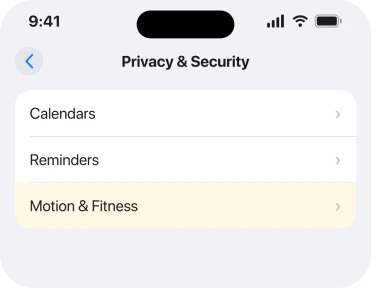
Apple, in Control access to information in apps on iPhone: "Go to Settings > Privacy & Security. Tap a category of information, such as Calendars, Reminders, or Motion & Fitness."
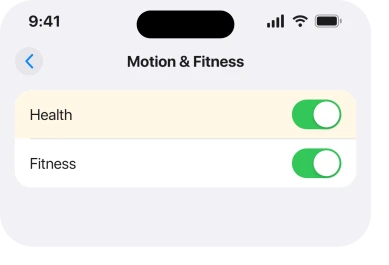
Go there and open Motion & Fitness. Apple describes what you will see: "A list appears showing the apps that requested access. You can turn access on or off for any app on the list."
Make sure motion tracking is on. Then check that Health itself is allowed. If the whole screen is off, nothing is being recorded at all, and every app that reads steps will show you a flat line.
3. Restart the phone, then toggle that permission off and on
Now the fix that most owners report landing on, with the caveat it deserves.
Power the phone all the way off and back on. Then go back to Settings > Privacy & Security > Motion & Fitness, turn the tracking off, wait a moment, and turn it on again.
jeroenspeak described exactly this as their routine, on a thread carrying 61 Me Too votes. Restart the phone. Toggle Motion and Fitness off and on. The step data comes back.
And then it goes again. Their own account is that the fix "restores step data temporarily before the problem recurs days later". So treat this as a way to get your history readable rather than as a repair.
If yours never comes back at all after the toggle, that is a different and worse case, and check 6 is where you are.
4. Look in the Fitness app as well, because it counts too
This one takes ten seconds and it tells you which piece is broken.
Apple, in Get started with Fitness on iPhone: "Open the Fitness app to see a summary of your Activity rings, the number of steps you've taken, distance traveled, trends, and more."
Two apps, one number underneath.
Fitness has today and Health has nothing? Then the sensor is fine. The problem is in how Health stores or shows it. If both are empty, go back to check 1 and check 2, because nothing is being recorded at all.
And if the number is only wrong on your Home Screen, that is a third thing entirely. A stale figure in a widget is covered in widgets not updating on iOS 26.
5. Check which range you are actually looking at
Easy to miss, and it has fooled people into thinking every day is empty when only the summary is.
The owner in check 3 was specific about where the gap showed. The Health app said "no data" on the yearly and monthly summaries. The day itself looked normal.
So tap into today before you judge it. Then step out to the week, the month and the year in turn and note which view goes blank.
A missing year with a healthy today is a display or aggregation fault, and it is worth knowing that before you start resetting anything.
6. Report it, because a lot of people are stuck exactly here
I would rather tell you this than pad the list out with resets that nobody has confirmed.
Two Apple Community threads on this symptom carry 765 and 61 Me Too votes between them. The larger one closed with no solution posted at all.
On the smaller one, TheLittles, a Level 10 member with over 207,000 points, acknowledged multiple similar reports. Their words for it: "a bug that is going around".
Their advice was the iPhone Feedback form. Choose Bug Report. Say when it started and what you have already tried. Nobody on either thread came back to confirm that any step fixed it permanently.
That is not a satisfying ending and I am not going to dress it up. If checks 1 to 5 have not done it, you are in a group that has been waiting across several iOS releases. Volume of reports is what moves it.
What does not help
- Reinstalling Health. It is not removable in the way people expect, and the data is not held in the app icon.
- Erasing and restoring the phone. Owners on both threads went a long way down that road without a result.
- Toggling every switch you can find. One owner reported having "toggled everything I could think of" and restarted phone and watch repeatedly, with no change.
- Blaming a case or a screen protector. Nothing in the reports points at them, and the motion sensors are not on the surface of the phone.
Status: iOS 26.6.1, checked 18 August 2026. Reported across iOS 17, 18 and 26 with no confirmed permanent fix. The sensor and permission wording is Apple's own from the current guide.
Why is my iPhone not counting steps?
Most often the phone was not on your body, or Health has lost its Motion and Fitness permission. Beyond those two there is a long running fault. The count stops on its own. A restart with a permission toggle brings it back, and only for a while.
Where is the step tracking setting on iPhone?
Settings, then Privacy and Security, then Motion and Fitness. Apple names that route in its own instructions. The screen lists every app that has asked for motion data, so you can switch each one on or off.
Does the iPhone count steps if it is in my bag?
Not reliably. Apple describes the count coming from sensors inside the phone as you carry it in a pocket or near your waist, so a bag swinging beside you is not measuring your stride.
Why does Health show no data for the month but steps for today?
That pattern is reported specifically on the monthly and yearly summaries while the day itself looks normal. It points at how the data is being aggregated rather than at the sensor, so check the day view before assuming nothing is recording.
The Short Version
- The sensors are in the phone, so the phone has to be on you.
- Health needs permission under Settings, Privacy and Security, Motion and Fitness.
- A restart plus a permission toggle restores the count for most people.
- That fix is reported as temporary, coming back days later.
- Compare Health against Fitness to see which half is broken.
- Two threads carrying 765 and 61 Me Too votes have no confirmed permanent fix.
Where to Next
Popular advice and what the threads actually show point in different directions here. Every page on the subject lists the same toggles. The people who actually ran them keep coming back to say the count stopped again a few days later.
So do checks 1 and 2 properly, because they are real and they solve real cases. Then use check 3 knowing what it is: a way to see your data, not a cure.
Where the Health feature that stopped is medication reminders rather than steps, six fixes cover it.
And when those reminders come on the wrong days instead, re-saving the medication schedule is what owners found.
A related reading worries people more than step counts do. Walking steadiness showing low explains what the figure is actually measuring.
One report I could not find anywhere, and I looked hard: somebody whose step count stayed healthy for more than a month after any of this. Say so if that is you, with your model and what you changed, and it goes straight into the page.

Isaac Smith is the founder and editor of PC Glance, a website that covers computers, laptops, and technology. He is a tech enthusiast and a computer geek who loves to share his insights and help his readers make smart choices when buying tech gadgets or laptops. He is always curious and updated about the latest tech trends.