
Your iPhone has told you your walking steadiness is low, and that is an unsettling thing to read about yourself. Before you take it to heart, let me ask you one question.
Where do you keep your phone when you walk?
Apple measures walking steadiness from a phone carried at your waist. In a bag, a backpack or your hand, that reading is describing something else entirely.
What Apple actually requires, in its first sentence
Apple has said the same thing at the top of its walking steadiness page since iOS 15, and the condition is right there in the opening line.
Apple, iOS 26 user guide: "When you carry your iPhone in a pocket or holster near your waist, the Health app uses custom algorithms that assess your balance, strength, and gait."
A trouser pocket qualifies. A holster or belt clip qualifies. A handbag over your shoulder, a rucksack, a coat pocket at chest height and a phone in your hand do not put the sensors where that sentence expects them.
Worth noticing in passing, because it tells you how settled any of this is: that page says the algorithms assess "your balance, strength, and gait", while Apple's announcement of the feature said they assess balance, stability and coordination.
Two Apple triplets, one feature.
Apple does say what happens when you break that condition, though not on this page.
In its research paper on how the iPhone measures walking quality, it says somebody carrying the phone in a good position, "for example, in a pocket close to the hip", gets more frequent estimates than somebody carrying it "in hand or in a backpack or purse".
Read that carefully, because it is a claim about how much data you get, not about the readings being wrong. A bag gives you a thinner record, not a false one.
So this is not a way to dismiss the notification. It is a reason to look at how much the score is standing on before you treat it as a fact about your body.
If your phone does live in your pocket
Then the measurement was taken the way Apple designed it, and the rest of this page is background rather than an escape route.
A single Low reading is not the point.
Apple's own wording is that you can be notified if your steadiness "becomes low or stays low", so the thing worth looking at is whether it has held there across weeks rather than appeared once.
If it has held, that is a conversation for a doctor, who has tests this phone does not.
Apple puts it plainly on the same Health page that carries the twelve month line: "iPhone, iPad, and Apple Watch aren't medical devices."
What the phone can give you is the record. That is the next section, and it is worth having in front of you before you talk to anybody.
Follow the number back to where it came from
Open Health, tap the icon at the bottom right that opens the Health categories, then Mobility. Tap Walking Steadiness, which may need a scroll, then tap Show More Walking Steadiness Data.
Apple printed the word Browse for that bottom-right control through iOS 18 and its iOS 26 pages no longer do, so go by position.
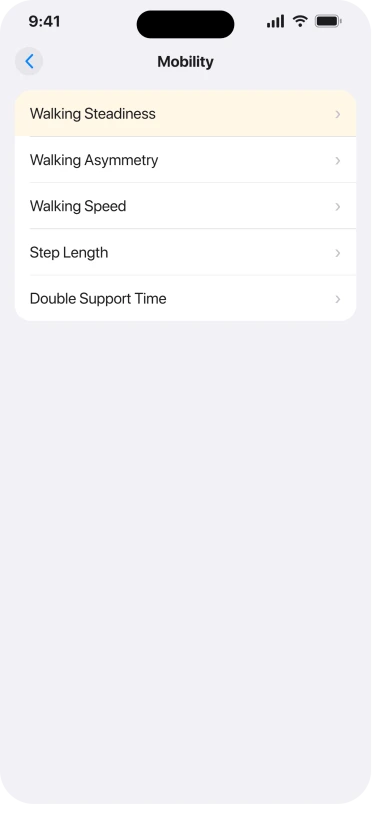
Two things are worth reading off that screen: how far back the record goes, and whether it is continuous.
A handful of readings from a fortnight when the phone lived in a rucksack is a different thing from a steady line across months.
Four things decide whether that record fills up at all, and Apple publishes every one of them somewhere other than the walking steadiness page.
One step in the chain is worth naming: Apple's research paper is about the mobility metrics, walking speed, step length, double support time and walking asymmetry, and Apple states separately that your steadiness is calculated from those.
So these are conditions on the ingredients rather than sentences about the score itself.
- Your height has to be in Health. Apple's research paper says the metrics rest on a model of walking that depends on leg length, which it estimates from the height you enter, and that users should enter it to get the most accurate estimates.
- Only ordinary flat walking counts. The same paper says the metrics are gathered in bouts of valid overground walking, so running and walking uphill do not contribute. A bus journey is not walking either.
- Where the phone rides decides how often you get a reading, as above.
- Wheelchair mode switches the metrics off entirely. If Health is set to wheelchair use, Apple's paper says these metrics are not available at all, which is the one explanation for a permanently empty screen that no amount of walking will fix.
If the record is patchy and you know why, Apple documents how to remove entries, though with a scope worth noticing.
Its page is Manage Health data, and the route is Health, Search, a category, a subcategory, then Show All Data, Edit, and the delete button beside a record.
Two warnings before you use it. Apple introduces those steps with "If you entered incorrect details when manually adding health information", so it is written for data you typed in yourself, and we could not find Apple documenting the removal of readings the phone recorded on its own.
And deleting is final: Apple's own note is that if Health syncs over iCloud, "deleting data on one device removes it from all synced devices".
The three levels are named in public and explained only on your phone
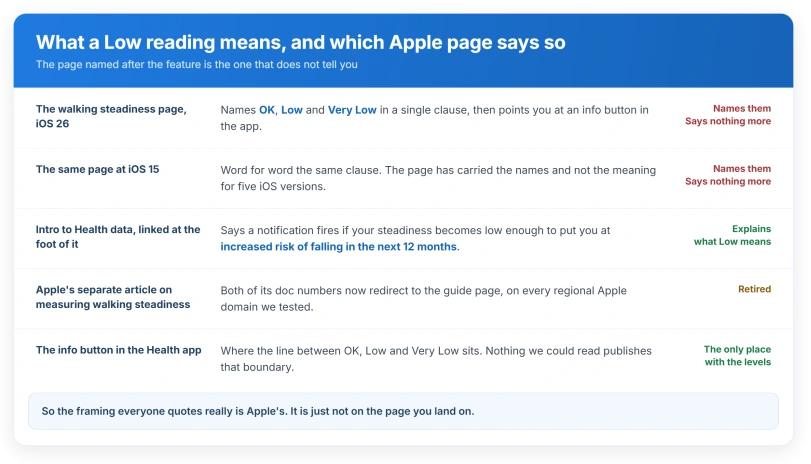
The levels are OK, Low and Very Low. Apple's user guide names all three in a single clause and then sends you into the app for the meaning.
Apple, same page: "To learn about the three steadiness levels (OK, Low, and Very Low), tap" the info button beside the data.
That clause is on the iOS 15 copy of the page, and on the iOS 16, 17, 18 and 26 copies, word for word. In five years, the page named after the feature has never said what Low means.
It also got harder to reach. iOS 26 added the Show More Walking Steadiness Data step, so the button holding the only published boundary between the levels now sits one tap deeper than it did.
The meaning is published, and it is one click away in the same guide, on the page listed at the foot of it under See also.
Apple, Intro to Health data: "You can also receive a notification and share your notification with others if your steadiness becomes low enough to put you at increased risk of falling in the next 12 months."
So the twelve month framing you meet everywhere online is Apple's own, it is current, and it is not folklore. It simply is not on the page you land on.
What Apple does not publish anywhere we could read is the boundary: what separates OK from Low, and Low from Very Low. That sits behind the info button, on the phone.
There used to be a third place to read it.
Apple published a separate article on measuring walking steadiness, at doc HT212503 and doc 102504.
Every regional Apple domain we tested now redirects both of those to the guide page, which is why search results still list a page that is no longer there.
Your Apple Watch is not doing this
Apple documents walking steadiness as an iPhone measurement.
The page sits in the iPhone User Guide, it is titled "Monitor your walking steadiness in Health on iPhone", and it describes work done by a phone carried at your waist.
Apple's Intro to Health data page has a section enumerating what an Apple Watch contributes to Health, and walking steadiness is not in it.
Its page on managing Health data credits a paired Watch with Activity, heart rate and Mindfulness.
That is narrower than saying the Watch does no mobility work at all. Apple publishes a separate paper on the Watch estimating six-minute walk distance.
It is walking steadiness specifically that the Watch does not produce.
So if you have been hunting for it on the Watch, there is nothing to find and no setting missing. The measurement is the phone's.
The Watch does have its own safety features, and they work the other way round: Fall Detection reacts to a fall that has already happened, where walking steadiness is an estimate made before one.
The notification, and who else gets it
Apple: "You can receive a notification if your steadiness becomes low or stays low, and you can automatically share the notification with someone close to you."
Both are described as things you can set up rather than things that are already on, and Apple states no default either way, so we will not tell you one.
If it matters to you what is being shared, that is under sharing in Health rather than in the Mobility screens.
If the idea of your phone messaging somebody on your behalf is what brought you here, what Check In sends to a friend covers the other iOS feature that does it, and covers exactly what leaves the phone.
Apple's route for setting it up is Health, then Summary, then your picture or initials, then Health Checklist, then Set Up for Walking Steadiness Notifications.
Apple also documents where to go back and look at them: the Health categories icon at the bottom right, then Mobility, scroll down, then Walking Steadiness Notifications.
Ours: Apple names no route for switching them back off, and the step it does name is called Set Up for. Those two screens are the places to start, and expect the wording to differ once you are there.
If Walking Steadiness is not on your Mobility screen
Apple gives one hardware qualifier, iPhone 8 or later, and nothing else. It does not say how much walking data a score needs before it appears, or how long you have to have been carrying the phone.
So if the row is missing on a supported iPhone, we cannot tell you why, and neither can Apple's page. The two things worth trying are carrying the phone at your waist for a few weeks and checking the Health Checklist, which is where Apple puts the setup step.
What people actually report
User-reported, and thin enough to say so: the community threads we found on this subject are asking what the measurement is, why it stopped recording, and why some days have no data.
Four threads, none opened, all read as search snippets.
We found nobody establishing that their score was wrong. That cuts the other way and it belongs here. Not recognising yourself in a measurement is not the same as the measurement being mistaken.
The obvious question, how the phone separates real walking from a bus journey or a bag swinging on your shoulder, is half answered by Apple.
Its paper says only bouts of valid flat walking are counted, which handles the bus. For the bag it says only that you will get fewer readings, and stops there.
What Apple offers you to do about it
Apple's own next step is inside the app rather than on a support page. Health, the categories icon at the bottom right, then Mobility, then scroll to Exercises That May Improve Walking Steadiness.
The name is doing careful work. Apple says the exercises may improve it, and attaches no claim beyond that.
Status: iOS 26.6, checked 14 August 2026. Apple explains what Low means on a different page from the one named after the feature, and publishes the boundary between levels only inside the app.
Should you worry about a Low reading?
Treat it as a prompt rather than a verdict, and give it time rather than one reading. If you carry your iPhone at your waist most days and the level has stayed down across weeks, that is worth raising with a doctor. If the phone usually travels in a bag or a hand, check that first, because Apple's own stated condition was not being met.
Does the Apple Watch measure walking steadiness?
Apple documents it only as an iPhone measurement, in the iPhone User Guide, based on carrying the phone near your waist. On Apple's Health data page the Watch is credited with Activity, heart rate and Mindfulness, and not with this. If you have seen it attributed to the Watch, that is a mix-up with the Watch's own fall features.
Why did my walking steadiness suddenly drop?
It can be a real change, and a phone cannot tell you which. Apple publishes no explanation for a score moving, though it does explain why the underlying data thins out: bag or hand rather than pocket, no height entered, or walking that was uphill or on a treadmill rather than flat. If none of that changed, take the drop at face value and talk to a doctor.
I got this notification about a parent. What now?
Sharing is set up on their phone, so the reading came from wherever they keep it. Before reading anything into the level, the useful question to ask them is a practical one: does the phone travel in a pocket, or in a handbag, or on a table at home?
The Short Version
- Apple measures this from a phone carried in a pocket or holster near your waist. That condition is the first thing to check.
- A bag or a hand does not make the reading wrong. Apple says it gives you fewer readings, which is a reason to distrust a thin record rather than a persistent one.
- Your height has to be entered in Health, and only ordinary flat walking counts. Wheelchair mode turns these metrics off altogether.
- If you carry the phone at your waist and the level has stayed down for weeks, that is a reason to talk to a doctor, not a reason to hunt for a setting.
- The twelve month fall-risk framing is genuinely Apple's, on the Health data page linked at the foot of the walking steadiness page.
- The page named after the feature has named OK, Low and Very Low without explaining them for five iOS versions, and the boundary between them is only inside the app.
- It is walking steadiness specifically that no Apple Watch produces.
Where to Next
Before you read anything into that notification, be sure it is describing you and not your handbag. The measurement only means what Apple says it means when the phone rides at your waist.
If it does, and the number is still low, it is worth a conversation with your doctor rather than with your phone.
And if you have been carrying it in a bag all along, put it in a pocket for a few weeks and see what the reading does. I would be interested to hear how it changes.

Isaac Smith is the founder and editor of PC Glance, a website that covers computers, laptops, and technology. He is a tech enthusiast and a computer geek who loves to share his insights and help his readers make smart choices when buying tech gadgets or laptops. He is always curious and updated about the latest tech trends.