
Fall Detection is switched on. You check after a fall it should have caught, and there it is, on, exactly as you left it.
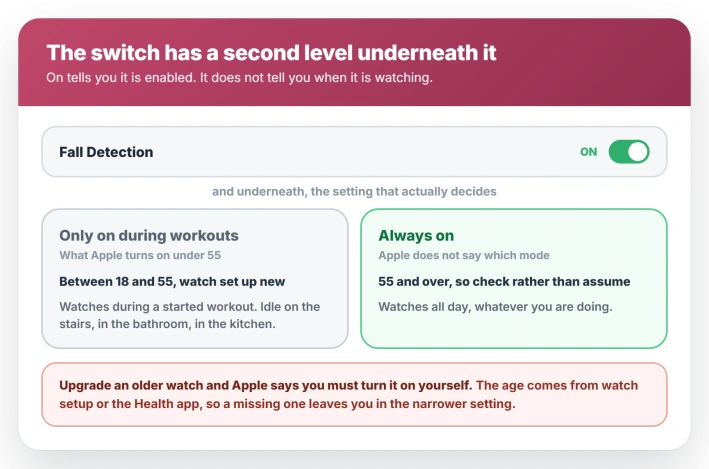
On watchOS 26, a watch set up by anyone under 55 shows on without watching. Apple enables it in a mode that only runs during workouts, so it sits idle for the fall on the stairs or in the bathroom.
Which mode you get follows the age on your account, entered either when you set the watch up or in the iPhone Health app. That is worth knowing before you rely on it, and I will show you how to set the mode you actually want.
Fall Detection has two modes, and the default is workouts only
Fall Detection is not a single toggle.
Underneath it sits a choice of Always on or Only on during workouts, and Apple's own guide treats that second control as the thing that decides when the feature actually runs.
Two defaults do the damage.
- Between 18 and 55, setting up a new watch on watchOS 8.1 or later. Apple turns on Only on during workouts for you. Outside a started workout, it is not looking.
- Aged 55 and over, with your age entered at setup or in the Health app. Apple says the feature turns on automatically. It does not say which mode you get, so check rather than assume.
- Upgrading an existing watch from an older watchOS. Apple says you have to turn it on yourself.
- Under 18. Not available at all.
Apple's own wording overlaps awkwardly at 55, and it never states the mode for older wearers. Whatever your age, open the setting and look at which of the two is selected.
Set the mode you actually want
Two routes, and either works.
On the watch: open Settings, tap SOS, tap Fall Detection, turn it on, then pick Always on or Only on during workouts.
On the iPhone: open the Apple Watch app, tap My Watch, tap Emergency SOS, tap Fall Detection, then choose the mode there.
If you want it running all the time, Always on is the setting.
Fix the date of birth that drives the default
If Fall Detection is grayed out, or it keeps landing in the wrong mode, the age in your Health profile is the thing to check.
Open the Health app on the iPhone, tap Summary, tap your picture at the top right, tap Health Details, tap Edit, and set Date of Birth.
An empty or wrong date of birth is a common reason the feature will not enable, and it is also what decides whether a new watch starts in workout-only or always-on.
Changing it does not retroactively switch the mode for you, so set the date first, then set the mode by hand.
Which Apple Watch models support Fall Detection
Fall Detection needs Apple Watch SE or later, Series 4 or later, or any Apple Watch Ultra. Older models do not have the sensors and no update adds the feature.
Why it did not call for help
Two documented rules govern whether the watch calls on your behalf, and they are the ones people hit first.
They are not the only gates, though. Connectivity and the notification chain have their own failures, so treat these as two rules rather than the whole answer.
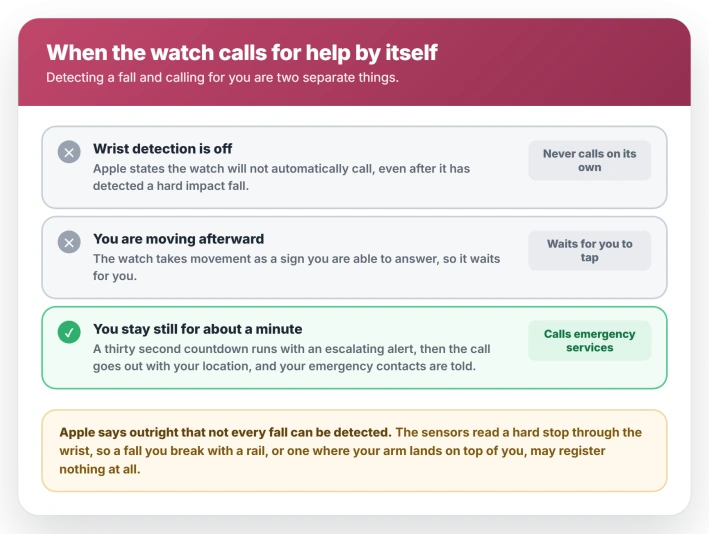
Wrist Detection has to be on. Apple states it plainly: with wrist detection off, the watch will not automatically attempt to call emergency services even after it has detected a hard impact fall.
The setting lives under Settings, Passcode, on the watch.
Movement stops the automatic call. If the watch detects that you are moving after a fall, it waits for you to answer the alert rather than calling on your behalf.
Stay immobile for around a minute and the watch starts a thirty second countdown with an escalating alert, then places the call, shares your location, and notifies your emergency contacts.
What Fall Detection cannot detect
Apple states that Apple Watch cannot detect all falls. It is the most repeated answer across the owner threads, and what Apple support staff have told people directly.
What the watch actually reads is a hard stop through the wrist. Two things defeat that. If your arm lands on top of you rather than on the floor, the deceleration is soft.
If you grab a rail or a countertop on the way down, you have removed the impact the sensors were waiting for.
Owners describe going down a full flight of concrete stairs without a single alert for exactly this reason.
Treat it as a safety net with holes, not a guarantee, and do not let it replace a dedicated medical alert device for anyone at real risk of falling.
It is probably not a faulty watch
Owners reach for a repair booking, and it is rarely the answer.
One owner in the threads took a missed fall to Apple Support, who ran diagnostics and cleared the watch, and others checked their settings afterward and found them correct all along.
So work through the mode, the age, wrist detection and wear position first. A watch that misses a fall is usually behaving the way the feature is built rather than the way a broken one does.
Do book service if something else points at the sensors too: no heart rate during workouts, a compass that will not settle, or a hard knock or crack that came before the trouble.
If it fires on a knock but missed the real fall
The watch prompts when you bang it on a door frame or drop it on a desk, then stays silent through a fall that put you in the hospital.
It is the same hard-stop rule from the other side.
A sharp bang into the watch body delivers the exact spike the sensors look for, and a heavy fall where your arm ends up cushioned does not, however much worse it was for you.
How you wear it matters, though not in the way it is usually told. Apple asks for the watch snug, with the back in skin contact, and worn above the wrist bone toward the elbow rather than sitting on the bone.
Apple ties that fit to wrist detection rather than to fall sensing, which is exactly why it still matters here.
A loose watch loses wrist detection, and without wrist detection the watch will never place the emergency call by itself.
If it detected the fall but nobody was told
Detection and notification are two separate stages, and the second one has its own failure.
Apple documents the requirement plainly: the call needs a cellular connection, or Wi-Fi Calling with an internet connection, from the watch or a nearby iPhone.
On a watch without cellular that means the phone in range, and either way it means usable coverage where you fell. Indoors is where that tends to fail.
There is a second, quieter hole. Apple states that your emergency contacts will not be notified automatically if Messages is not your selected text messaging app, or has been deleted.
Set a third-party app as your default and the call can go out while nobody who loves you hears a thing.
Check whether it detected anything at all. Falls get logged. Open the Health app, tap Browse, tap Other Data, then Number of Times Fallen.
If the fall is listed, detection worked and the problem is the notification chain. If it is not, the watch never saw it.
So check connectivity rather than the Fall Detection settings, and make sure your emergency contacts exist: Health app, your picture, Medical ID, Edit, Emergency Contacts.
What the owner threads tried that changed nothing
- Restarting the watch. It changes none of the things that decide the outcome: the mode, the age, or wrist detection.
- Unpairing, pairing again, or a factory reset. High cost, and pairing afresh can leave you in the case Apple does not switch on for you.
- Updating watchOS. Worth doing anyway, but no release note has changed how detection behaves, and owners on watchOS 8 through 11 report identical misses.
Status: on watchOS 26 the Fall Detection switch can say on while set to workouts only, the default under 55. Wrist detection must also be on for the watch to call emergency services itself.
If it goes off when you have not fallen
The inverse problem shows up just as often in the threads, and the fix is the same control used the other way.
If an alert is counting down at you right now, tap it and choose the option saying you are fine. That cancels the call. The same alert carries the Emergency SOS slider if it turns out you do want help.
High impact activity gets misread. A ball strike, a hard drop of the watch onto a desk, clapping, and heavy manual work such as hammering or chopping all set it off.
The common advice is to switch to Only on during workouts, and it carries a real cost. It stops the false alarms by stopping the watching, for the whole of the rest of the day.
Apple does not present it as a remedy at all, it simply describes both modes.
It is also the wrong tool for half the triggers. Gym work and anything else you log as a workout still sets it off in that mode, so you lose all-day cover and keep the alarms.
For an older or at-risk wearer, go at the trigger first. Tighten the band so it sits snug on top of the wrist, and if one particular activity sets it off, switch modes for that activity and switch back afterward.
If the alerts are also draining the battery, do not trade a safety feature for battery life, and battery drain has better targets.
Fall Detection versus Crash Detection and Emergency SOS
- Crash Detection is separate. Different sensors, different models, and its own control called Call After Severe Crash. Turning one off does not affect the other.
- The Emergency SOS side button. Holding the side button is a manual call rather than a detected fall, and it is easy to trigger by accident, which the side button behavior covers.
- Medical ID. It is what gets shared during a call rather than something that triggers one.
Why did my Apple Watch not detect my fall?
Most often because Fall Detection was set to Only on during workouts, which is what Apple turns on for wearers between 18 and 55, so it was not active outside a workout.
The other reason is the nature of the fall. Apple says outright that not all falls can be detected, and owners who have compared notes point to falls that roll or slide rather than stopping hard.
Why did it detect the fall but not call anyone?
Either wrist detection was off, which stops the automatic call entirely, or the watch saw you moving afterward and waited for you to respond instead.
Where is Fall Detection on Apple Watch?
On the watch, Settings, then SOS, then Fall Detection. On the iPhone, the Apple Watch app, My Watch, Emergency SOS, then Fall Detection. The mode sits directly beneath the toggle.
Why is Fall Detection grayed out?
Usually a missing or incorrect date of birth in the Health app, or a wearer under 18, for whom the feature is unavailable. An unsupported model shows no option at all rather than a grayed one.
The Short Version
- The toggle reading on does not mean it is watching. Under 55, the default is Only on during workouts.
- Set the mode explicitly: Settings, SOS, Fall Detection on the watch, or Watch app, Emergency SOS on the iPhone.
- Your date of birth in the Health app decides the default, and a missing one can gray the feature out.
- Wrist detection must be on or the watch will never place the emergency call by itself.
- If you are moving after a fall, the watch waits for you instead of calling. The automatic call is for someone who stays still.
- Apple says not all falls can be detected. Rolling and sliding falls often go unnoticed.
- It is a safety net with holes rather than a guarantee, and it does not replace a dedicated medical alert device for anyone at real risk of falling.
Where to Next
Alerts during exercise fail in their own way. Workout voice alerts going silent on watchOS 26 is a separate switch from this one.
A gesture that stopped responding has its own set of causes. Double Tap not working on watchOS 26 covers what has to be enabled for it.
- The side button and accidental emergency calls: Apple Watch Control Center and the side button
- Safety features and battery life: Apple Watch battery draining fast
- Heart alerts that never arrive: hypertension notifications not showing

Isaac Smith is the founder and editor of PC Glance, a website that covers computers, laptops, and technology. He is a tech enthusiast and a computer geek who loves to share his insights and help his readers make smart choices when buying tech gadgets or laptops. He is always curious and updated about the latest tech trends.