A broken AirPods Max charging or audio cable can be replaced. A damaged wire inside an ear cup, swivel, or headband needs a repair assessment. First check whether the damage is on a detachable lead or the headphones themselves.
Unplug a cable with exposed wires, a split connector, or obvious damage. Don't keep bending it until charging or sound returns. The replacement has to match both the headphone port and the job you want it to do.
In this guide
1. Identify the damaged part before ordering anything
Look at the cable without pulling on its damaged section. A separate lead connected underneath the right-hand ear cup is replaceable. A tear where an ear cup joins the rest of the headphones needs a different kind of repair.
Record the model and port type. AirPods Max 1 came in Lightning and USB-C versions; AirPods Max 2 uses USB-C. A Lightning plug won't fit a USB-C socket, and the model name alone can miss that important distinction.

Explain what failed: charging, wired sound, sound over Bluetooth, or more than one of them. If the problem followed a snag, drop, or twisted joint, tell the service team rather than describing it as Bluetooth trouble.
If there is visible damage to the headphones, skip the cable checks and arrange inspection. For intact headphones that simply won't pair, the AirPods Max connection guide covers a separate software and pairing route.
I'd replace a visibly damaged detachable lead before spending time on resets. It's a direct repair to the failed part, and it avoids erasing the pairing information for a problem outside the headphones.
2. Replace a damaged charging cable with the right type
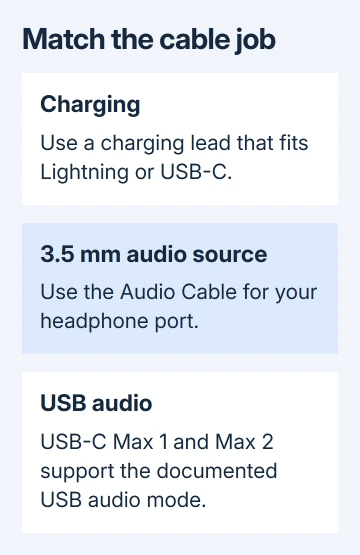
For a Lightning AirPods Max, use a USB-to-Lightning or USB-C-to-Lightning charging cable with a suitable power source. For a USB-C model, use USB-C-to-USB-C or a suitable USB-to-USB-C cable.
Connect the replacement lead to the charging socket underneath the right ear cup. Connect its USB end to a suitable power adapter or powered USB port. Inside the Smart Case, align its cutout with the charging socket.
Apple says to match the lead to the headphone port in its AirPods Max charging instructions. Use an undamaged cable and a working power source, then check whether the headphones report charge. A snug plug alone isn't enough.
Press the listening mode button while connected to power. The light is green at 95% charge or more; at a lower charge, AirPods Max 1 shows amber and AirPods Max 2 briefly pulses amber. Amber doesn't mean the new cable failed.
If charging works with the replacement, retire the damaged lead. If a cable and power source you know work still won't charge the headphones, tell the service team what you tried and whether the socket feels loose.
3. Use an audio cable that supports your connection
Charging and wired listening aren't interchangeable cable jobs. A cable that supplies power can still be the wrong accessory for the audio source you want to use. Identify the source socket as well as the headphone socket.
For a 3.5 mm audio source, Lightning AirPods Max 1 uses a Lightning to 3.5 mm Audio Cable. AirPods Max 1 with USB-C and AirPods Max 2 use a USB-C to 3.5 mm Audio Cable for that connection.
A small headphone-jack adapter designed to connect ordinary headphones to a phone isn't automatically the correct input cable for AirPods Max. Match what the accessory is designed to do to these headphones before ordering another lead.
For lossless and ultra-low-latency USB audio, the USB-C AirPods Max 1 and AirPods Max 2 support a USB-C-to-USB-C connection to a compatible USB-C iPhone, iPad, or Mac. Keep the device software and headphone firmware current.
A Mac with USB-A can use the documented USB-C-to-USB-A cable route. The Lightning model doesn't gain this USB audio mode simply because its charging lead has USB-C at the charger end.
After connecting an undamaged replacement audio cable, select the intended sound output on the source device and start with the volume low. Check the wired connection instructions for the exact model and source combination.
4. Use Bluetooth only when the headphones are undamaged
If the separate audio lead broke but the headphones remain intact, Bluetooth can let you listen while replacing that lead. Disconnect the damaged cable and select AirPods Max as the sound output on the paired device.
Successful Bluetooth playback means the headphones can still produce sound wirelessly. Wired operation still depends on the audio lead, socket, and internal connections being intact. Tell the service team which connections work.
If wireless listening also fails, don't assume an external cable replacement will repair everything. Note whether one or both sides are silent and whether the headphones still connect. That helps the technician choose what to examine.
Don't keep rotating a damaged ear cup or tugging the headband to bring sound back. Sound returning briefly when a broken area moves doesn't mean it's fixed. Leave the joint as it is for the service team to check.
5. Arrange service for a wire inside the headphones
Visible internal wiring, a torn flexible cable, or a damaged swivel needs physical inspection. Don't cut the wire, solder through the opening, or tape it up and keep wearing the damaged headphones.
Request AirPods service for physical damage to AirPods Max. Give the model, affected side, symptoms after the incident, and any separate cable damage. Ask for an estimate before authorizing work.
Your coverage and final repair charge depend on what the inspection shows. Ask whether they'll repair your headphones or replace them, and what service coverage you'll have afterward. Keep any repair reference and estimate together.
For ordinary storage after the issue is resolved, our AirPods Max Smart Case guide explains their power-saving behavior. Proper storage reduces battery use; it doesn't reconnect a broken internal lead.
If a service center can't repair the damaged part, request the available replacement options and compare the total cost with replacing the headphones. There isn't a software setting that makes a severed wire reliable again.
The Short Version
Replace a broken detachable lead with the correct charging or audio cable for Lightning or USB-C. Check charging and sound separately. A damaged internal wire, ear-cup joint, or socket needs inspection and a repair or replacement estimate.
Checked November 16, 2026.