
You pinch your finger and thumb together twice and your Apple Watch does nothing at all. If you have just updated, it is very easy to assume watchOS has broken it.
Before anything else I want to check that your watch is one that supports the gesture, because several models simply do not.
Then we can work through the reasons it stops on the ones that do.
Why the Double Tap switch will not hold
Apple's first instruction is to open Settings, tap Gestures, then tap Double Tap. Attached to that instruction is an asterisk, and the footnote says:
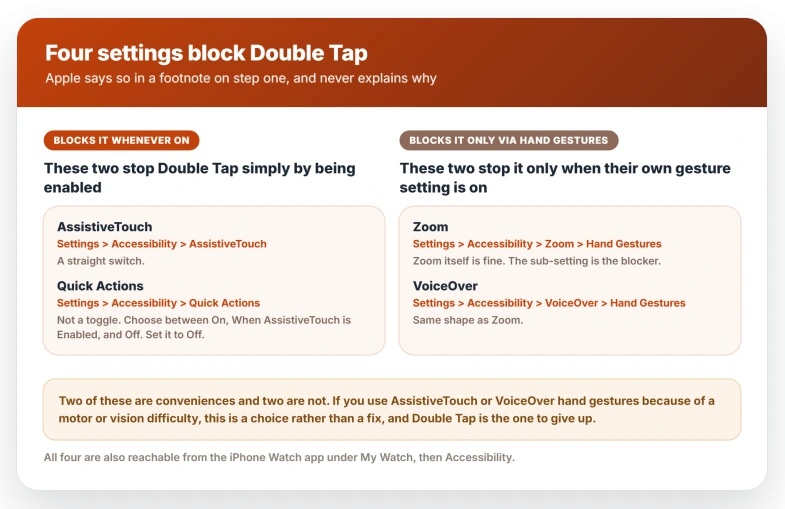
> "You can't turn on double tap when these accessibility settings are on: AssistiveTouch, Quick Actions, Zoom with Hand Gestures, or VoiceOver with Hand Gestures."
Apple states the restriction and never explains it.
All four of those features use pinch or clench gestures of their own, so contention over the same finger movement is the likeliest reason, but that is an inference rather than something Apple says.
Apple also does not document what the failure looks like, so reports vary between a switch that will not tap on and one that flips back by itself.
All four sit under Settings, then Accessibility, but they are not the same shape.
- AssistiveTouch blocks Double Tap whenever it is on at all. Settings, Accessibility, AssistiveTouch.
- Quick Actions also blocks it whenever it is on, and it is not a simple switch. Settings, Accessibility, Quick Actions offers On, When AssistiveTouch is Enabled, and Off. Set it to Off.
- Zoom blocks it only when Zoom's own hand gestures are on. Settings, Accessibility, Zoom, then Hand Gestures.
- VoiceOver is the same shape. Settings, Accessibility, VoiceOver, then Hand Gestures.
All four are also reachable from the iPhone Watch app under My Watch, then Accessibility.
Two of these are conveniences and two are not.
If you use AssistiveTouch or VoiceOver hand gestures because of a motor or vision difficulty, watchOS is not offering you a fix here, it is offering a choice, and Double Tap is the one to give up.
Quick Actions and Zoom's hand gestures are the easier two to trade away.
Apple does not say whether re-enabling one of those features later switches Double Tap back off on its own, so if you use an accommodation only some of the time, expect to check the gesture again afterwards.
Where is the Double Tap setting on Apple Watch
Both gestures sit at Settings, then Gestures, on the watch.
Double Tap can also be reached from the iPhone Watch app under My Watch, then Settings, then Gestures, then Double Tap. Apple documents Wrist Flick only on the watch itself.
That screen also holds Cover to Mute, the palm-on-the-display gesture, which is a third thing entirely and is covered as part of Apple Watch notifications not arriving.
Apple states that Wrist Flick is turned on by default, and so is Cover to Mute. That matters for diagnosis: if a wrist flick does nothing, you are probably not looking at a switch someone turned off.
Cover to Mute also has no model restriction in Apple's guide, so an older watch that cannot do either of the other two gestures still has that one.
What else stops Double Tap from working
Apple's troubleshooting page puts the mechanical requirements before the settings.
- Wrist Detection must be on. Settings, then Passcode.
- Wake on Wrist Raise must be on. Settings, then Display & Brightness.
- Low Power Mode, Sleep Focus, Theater Mode and Water Lock must all be off. All four live in Control Center, and if Control Center will not open on your watch you cannot check any of them.
- The watch must be unlocked and fit snugly.
- Raise your wrist to wake the screen first, then make the gesture.
- Match the pace. Apple describes it as tapping index finger and thumb together twice "at the same pace as double clicking a mouse", which is faster than it sounds.
- Stand or sit still while testing.
Two more are about you rather than the watch. Apple says that if you have a tattoo on the wrist where you wear your watch, try the other wrist.
And a watch set up using Apple Watch For Your Kids, formerly Family Setup, does not get the gesture at all.
If none of that moves it, Apple's next steps are to update the watch, restart it, and turn Double Tap off and back on.
Then check that the wrist setting matches the wrist you wear it on, at Settings, then General, then Orientation.
On an Ultra 4, a slow flashlight from the Action button is a separate fault, and Control Center is the workaround for now.
What the shaking icon means
Apple documents an on-screen signal in a single sentence near the bottom of its page.
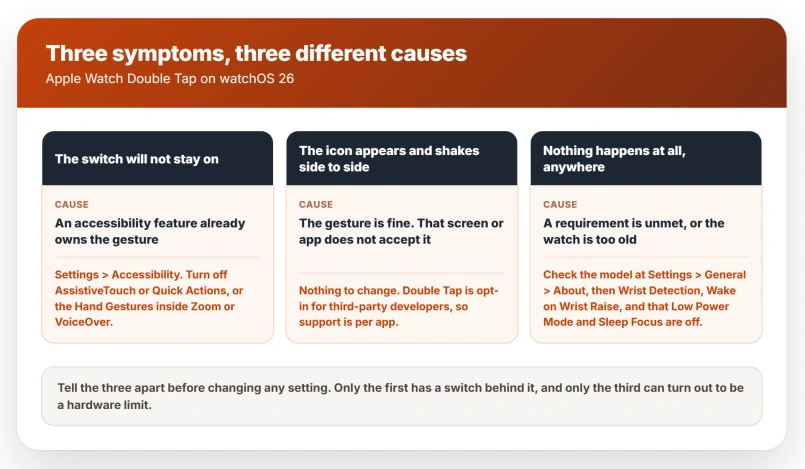
> "If the double tap icon appears and shakes from side to side, then double tap isn't available for that screen or third-party app."
That is the watch telling you the gesture is fine and this particular screen does not accept it.
It also tells you something about third-party apps. Apple makes Double Tap opt-in for developers, so support is per-app rather than system-wide.
If the gesture works in Now Playing and shakes in some other app, that app has not adopted it and no setting on your watch will change that.
Apple publishes the full list of what Double Tap covers, and it is shorter than the feature's reputation: playing and pausing media in Now Playing, answering or ending a call, stopping a timer, replying to a message, opening the Smart Stack and scrolling widgets, scrolling supported apps, snoozing an alarm, taking a photo in Camera Remote, recording a voice memo, pausing a stopwatch, and switching flashlight modes.
Apple also states it is not available while using the Depth app or taking an ECG.
If Double Tap fires when you did not mean it
The opposite complaint is documented too, and Apple's answer is blunter than expected.
Apple says some activities can evoke the gesture unintentionally, and the remedy it offers is to turn Double Tap off for the duration and back on afterwards, at Settings, Gestures, Double Tap.
There is no sensitivity slider and no per-app exclusion, so switching it off for that stretch is the supported answer rather than a workaround.
Double Tap is also configurable, which the troubleshooting page never mentions. The same screen lets you set Playback to Play/Pause or Skip, and Smart Stack to Advance or Select.
If the gesture fires but does the wrong thing, that is the screen to change.
One thing narrows the exposure. Apple's user guide lists an unlocked watch and a woken screen among the conditions, so the gesture is not listening while the watch sits asleep on your wrist.
If it is Wrist Flick that does nothing
Wrist Flick is the newer gesture and its job is narrower.
Apple's watch user guide describes it as quickly turning your wrist over and back to dismiss whatever is on screen and return to the watch face, including muting an incoming call or stopping a timer.
It shares the model list with Double Tap and the same Settings > Gestures screen.
Apple's accessibility restriction is written about Double Tap specifically and says nothing about Wrist Flick either way, so do not assume a Double Tap fix moves it.
Because Apple ships it switched on, a flick that does nothing is more likely the motion than the setting.
Apple's word is quickly: turn the wrist away from you and straight back, faster than feels natural. It is not a slow rotation, not a shake, and not a raise.
Note what the gesture is for. Apple's page is titled around muting notifications, and Wrist Flick gets a notification off the screen rather than marking it read.
On watchOS 26 that distinction matters, because a notification cleared by a gesture can stay unread and sync that way to your other devices, which is the subject of Apple Watch notifications that will not clear.
The evidence on genuine breakage is thin and points both ways. A nine-post MacRumors thread from September 2025 went looking for a bug and concluded the gesture was working as designed.
One Apple Community post from October 2025, on an Ultra 2, reported the flick doing nothing for alarms and timers, leaving only snooze or covering the display.
Six people marked Me Too, nobody replied, and the thread closed unanswered.
What does not help
- Re-pairing the watch. Nothing about a gesture veto or a model limit is a pairing state, and re-pairing costs you a full restore.
- Turning the toggle off and on repeatedly once you have tried it once. Apple lists it as a step, but if an accessibility setting holds the veto the switch cannot stay on however many attempts you make.
- Testing while walking. Apple explicitly says to try while sitting or standing still, so a failed test in motion proves nothing.
- Assuming a tattoo is a myth. Apple names it directly as a reason to try the other wrist.
- Hunting for the gesture in a third-party app that shakes the icon. That is the app's decision, not a setting you can reach.
Status: watchOS 26.6 shipped 27 July 2026 with bug fixes and security updates, no gesture changes. Apple's Double Tap page of 23 March 2026 still carries the restriction.
Why can't I turn on Double Tap on my Apple Watch?
Because another feature already owns the gesture. Apple states you cannot turn on double tap while AssistiveTouch, Quick Actions, Zoom with Hand Gestures, or VoiceOver with Hand Gestures is on.
Go to Settings, then Accessibility, switch the relevant one off, then return to Settings, Gestures, Double Tap.
Which Apple Watch models support Double Tap and Wrist Flick?
Apple Watch Series 9 or later, Apple Watch Ultra 2 or later, and Apple Watch SE 3. Both gestures use the same list.
The original Apple Watch Ultra from 2022 is excluded, as are Series 8 and earlier and both earlier SE models, so no update will add the feature to them.
What does it mean when the Double Tap icon shakes?
It means the gesture is working and the screen you are on does not accept it. Apple documents the side-to-side shake as the signal that double tap is unavailable for that screen or third-party app.
There is no setting for it and no way to make that screen take the gesture.
The Short Version
- Both gestures need Series 9 or later, Ultra 2 or later, or SE 3. Check at Settings, General, About. The first Apple Watch Ultra gets neither.
- If the Double Tap switch will not hold, an accessibility feature is blocking it: AssistiveTouch, Quick Actions, Zoom with Hand Gestures or VoiceOver with Hand Gestures, all under Settings > Accessibility.
- If you rely on AssistiveTouch or VoiceOver gestures, that is a trade rather than a fix, and Double Tap is the one to lose.
- Both live at Settings > Gestures on the watch. Double Tap is also in the iPhone Watch app under My Watch > Settings > Gestures.
- Wrist Detection and Wake on Wrist Raise must be on, and Low Power Mode, Sleep Focus, Theater Mode and Water Lock all have to be off.
- Match Apple's pace: two taps as fast as a mouse double click, standing still, after raising your wrist.
- A shaking icon means that screen, not the gesture. Double Tap is opt-in for third-party developers.
- Apple ships Wrist Flick on by default, so a flick doing nothing is more likely the motion than a setting.
Where to Next
Start with whether your watch supports the gesture at all, because no amount of fiddling with settings will add it to a model that never had it.
If it does support it and it has stopped, work down from the wrist detection and the fit before anything else.
If the gesture works sometimes and not others, tell me in the comments whether it fails more when your hands are cold or wet, because that is a real pattern.

Isaac Smith is the founder and editor of PC Glance, a website that covers computers, laptops, and technology. He is a tech enthusiast and a computer geek who loves to share his insights and help his readers make smart choices when buying tech gadgets or laptops. He is always curious and updated about the latest tech trends.