
It is dark, you press the Action button on your new Ultra 4 for the flashlight, and nothing happens. Several seconds later the light finally comes on. Or it never does, and you press again.
On a watch you bought partly for moments like that, it is worrying. I will cover what owners have found so far, the quickest way to get light every time, and whether an exchange makes sense.
The pattern owners found
The Me too count in the forum thread stands at eight. The first owner described "long delays when pressing the action button if the screen is in standby mode for longer than a minute or so".
With your screen awake, the flashlight comes on straight away. Another owner put the standby problem more bluntly: "it does not work half the time".
It looks tied to the new watch. Your older Ultra is probably fine. One owner wrote: "It didn't happen on my Ultra 3 running WatchOS 27". And the first owner reported after the latest update: "This is not fixed with the latest AW update".
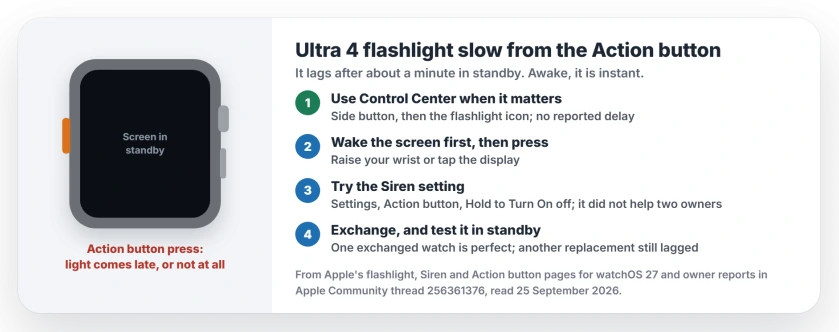
Status: watchOS 27 on Apple Watch Ultra 4, checked 25 September 2026. No fix yet. One owner's exchanged watch works perfectly; another owner's replacement still had the delay.
1. Use the flashlight in Control Center when it matters
This is the reliable route while the button lags. In its flashlight steps, Apple says the side button opens Control Center, where you tap the flashlight icon.
Swipe left or right to switch between white, flashing white and red light, and turn the Digital Crown for brightness.
It is two steps instead of one. But no reply in the thread reports a delay this way.
2. Wake the screen first, then press
Owners report the lag only after standby. I would build a habit here, and the idea is ours: raise your wrist or tap the screen first, then press the Action button.
If the screen is already awake, the button responds at once. That turns a lag you cannot predict into a half second you can.
3. Try the Siren setting
A Level 9 volunteer had a theory about the delay: the watch may be "waiting to see if you are performing a prolonged press to activate the emergency siren".
Apple's Siren page says how to switch that off. Open Settings on the watch, tap Action button, then turn off Hold to Turn On, listed under Siren.
It did not help two owners. One reported that "the fix with the 'siren' did not work for me". It takes seconds to test, though. If you turn it off, remember you can still start the Siren from the side button.
4. Should you exchange the watch?
The reports split on this. One owner went back to the store: "So I returned my brand new ULTRA 4 and bought another one. The new one is perfect".
The first owner was less lucky. They had tried re-pairing, setting up as new, and a replacement at an Apple Store, and the delay stayed. Their summary: "Yup wasted my time and it messed up my trade in".
My view: if your return window is still open, an exchange is a fair gamble. Test the new one in standby. Do it before you walk out of the store.
5. Tell Apple
One owner has already "opened up a ticket regarding the issue" with Apple Support. More reports make a fix more likely, so do the same, or send it through the Apple Watch feedback page.
Other Apple Watch problems
If double tap stopped responding after an update, that has its own fixes. And if your watch refuses to install the latest watchOS, start with the update checks.
Why is my Apple Watch Ultra 4 flashlight slow from the Action button?
Owners see it when the screen has been in standby for about a minute. A Level 9 volunteer thinks the watch waits to see whether you mean the Siren long press, though that fix did not help two owners.
Is there a faster way to get light on an Ultra 4?
Open Control Center with the side button and tap the flashlight. Or wake the screen first, then press the Action button.
Does turning off the Siren fix the Action button delay?
Two owners said it did not. It is still a ten-second test: Settings, Action button, then turn off Hold to Turn On under Siren.
Will Apple replace my Ultra 4 for the flashlight delay?
One owner's exchanged watch works perfectly. Another owner's replacement still had the delay, so an exchange is not guaranteed to cure it.
The Short Version
- Your delay shows up after the screen has been in standby for a minute or so.
- Control Center's flashlight is your reliable fallback.
- Wake your screen first, then press the Action button.
- Turning off Hold to Turn On for Siren is a quick test for you, though it helped no owner in the thread.
- An exchange may fix yours; it did for one owner, not another.
- Report it to Apple.
Where to Next
Try the Control Center route tonight, so it is muscle memory before you need it.
If you exchange your Ultra 4, add a comment saying whether the new one lags in standby. That answer would help every other owner deciding the same thing.

Isaac Smith is the founder and editor of PC Glance, a website that covers computers, laptops, and technology. He is a tech enthusiast and a computer geek who loves to share his insights and help his readers make smart choices when buying tech gadgets or laptops. He is always curious and updated about the latest tech trends.