

You use your mouse left-handed, and after the macOS 27 update you cannot find where to swap the buttons. You look under Accessibility, and the option is not there either.
It still exists, just not where you are looking. I compared one owner's thread with Apple's Mouse settings guide, and the swap takes one menu.
What the owner was looking for
The owner explained their setup, in their words: "I'm left-handed and I use the bouton on the right to click, and the bouton on the left to Right-click".
Then the problem: "In OS 27 Golden Gate, the mouse panel is under Accessibility". And the part that stopped them, which four people have since pressed Me too on: "But I don't see where we can switch the clicks".
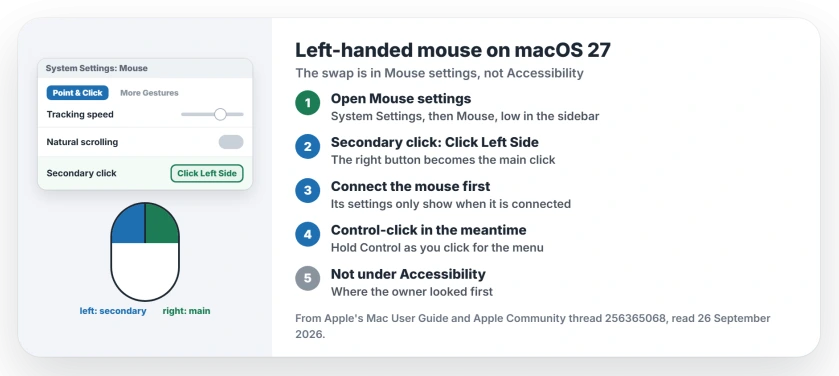
Status: macOS 27, checked 26 September 2026. The click swap lives in Mouse settings, not Accessibility. Set Secondary click to Click Left Side, as two Level 9 volunteers explained.
1. Open Mouse settings, not Accessibility
Apple's Mouse settings guide gives the route: choose the Apple menu, then System Settings, then click Mouse in the sidebar, which sits low in the list.
A Level 9 volunteer gave the same path, adding where to look: "System Settings > Mouse (near the bottom) > Point & Click tab, set the Secondary Click option to Click Left Side".
2. Set Secondary click to Click Left Side
Apple describes the setting as choosing "which side of the mouse to click for a secondary click", so pick the left side.
Another Level 9 volunteer spelled out the effect: "Choose Click left side to swap the primary and secondary functions for your left hand". Your right button then does the ordinary click.
3. Connect the mouse first
If Mouse does not appear, or its options are missing, check the connection, because Apple notes that a wireless mouse must be connected for its settings to show.
Turn the mouse on and make sure it shows as connected in Bluetooth settings, then open Mouse settings again.
4. Other ways to right-click while you set it up
Until the swap is in place, you can still reach shortcut menus, since Apple says holding the Control key as you click opens them.
Apple also puts it simply for mice: "On a mouse, you can choose to click the right or left side of the mouse surface, whichever is most comfortable for you".
5. Check tracking and scrolling while you are there
The same Point & Click tab holds tracking speed and natural scrolling. Left-handed users often move the mouse differently, so it can help to adjust tracking speed too. That suggestion is ours.
Other Mac mouse problems
If your Magic Mouse connects but does nothing on macOS 27, the Magic Mouse page has the fix. And if you are setting up a new wireless mouse, the wireless mouse page explains the two kinds.
How do I swap mouse buttons on macOS 27?
Open System Settings, click Mouse, and set Secondary click to Click Left Side, so the right button does the primary click.
Where is the left-handed mouse setting on a Mac?
In Mouse settings, under Point & Click, as the Secondary click option. It is not in the Accessibility panel.
Why can't I see my mouse settings on a Mac?
Apple says a wireless mouse must be connected for its settings to show. Turn it on and check Bluetooth.
Can I right-click without changing the setting?
Yes. Hold the Control key while you click, and the shortcut menu opens, Apple says.
The Short Version
- The swap is in Mouse settings.
- It is not under Accessibility.
- Set Secondary click to Click Left Side.
- The right button then does the main click.
- Connect a wireless mouse first.
- Control-click works in the meantime.
Where to Next
Open Mouse settings now and make the switch. Try a right-click on your desktop to check it took.
Using a trackpad or a third-party mouse? Say in a comment which options your Mac shows, and I will add them for other left-handed readers.

Isaac Smith is the founder and editor of PC Glance, a website that covers computers, laptops, and technology. He is a tech enthusiast and a computer geek who loves to share his insights and help his readers make smart choices when buying tech gadgets or laptops. He is always curious and updated about the latest tech trends.