

You open a Word file called Invoice_220 in Pages, and when you save it, Pages offers a new name of its own. Do that with twenty files, and every name has to be typed back by hand.
The renaming comes from a new Apple Intelligence feature in macOS 27, not from Pages itself. I read the thread where the owner found the switch, and a Level 9 volunteer confirmed it. Apple's Mac guide names the same setting.
What the owner was fighting
The owner, on a MacBook Pro with macOS 27, asked it straight out: "How do I turn off suggested filenames?"
The problem was volume, not one file. In their words: "It wouldn't matter for just one file, but when I am dealing with 20 then it becomes a pain".
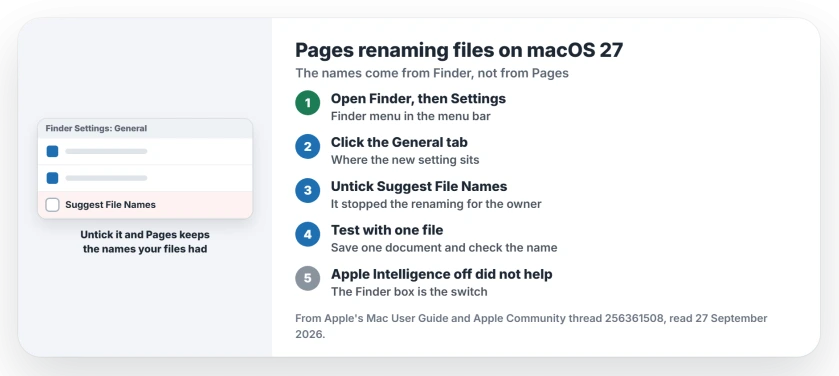
Status: macOS 27, checked 27 September 2026. The new names come from Finder's Suggest File Names setting. Unticking it stopped the renaming for the owner.
1. Untick Suggest File Names in Finder
The owner found it after a week of trying, and their reply opened with "Got it!"
Their steps: open Finder, click Finder in the menu bar, choose Settings, open the General tab, and untick the option labeled Suggest File Names. Pages then kept the names the files already had.
Apple's Mac guide on renaming explains where the names come from: "With Apple Intelligence, Finder can suggest filenames when creating or renaming documents".
To switch it on, Apple says to "choose Finder > Settings, then turn on Suggest File Names", so turning it off is the same route.
2. Save one test file before the next batch
Open a single Word file in Pages and save it. If the name stays as it was, the setting has taken. That quick test is ours, and it saves you finding out twenty files in.
3. Skip the bigger switches
Two volunteers suggested bigger switches first. One pointed at Siri's settings for Pages, and another at turning Apple Intelligence off altogether.
A third owner followed the Apple Intelligence guide and found that Pages still insisted on choosing names for their new documents.
Nobody reported trying the Siri switch, and the Finder box made it unnecessary.
4. Rename a batch back in one go
If files are already renamed, Finder can fix many at once. Select them, Control-click one, and choose Rename.
Apple's guide then lets you "choose to replace text in the names, add text to the names, or change the name format". Replace text suits undoing one wrong word across all of them.
More macOS 27 annoyances
If Apple Intelligence tools stop working instead, the Writing Tools page covers the switch that brings them back. And if Finder itself misbehaves in column view, the Finder column view page has the workarounds.
If My Templates came up empty in the new Pages or Numbers, the missing templates page shows where the old ones sit and how to bring them over.
Why does Pages rename my files on macOS 27?
Finder's Suggest File Names setting offers new names when documents are created or renamed. It is an Apple Intelligence feature, and Pages uses it when you save.
Can I turn off suggested file names on a Mac?
Open Finder, choose Finder then Settings, click General, and untick Suggest File Names.
Does turning off Apple Intelligence stop the renaming?
It did not for one owner in the thread. The Finder setting is what stopped it.
Can I rename many files at once on a Mac?
Yes. Select the files in Finder, Control-click one, choose Rename, then replace text, add text or change the name format.
The Short Version
- The names come from Finder, not Pages.
- Open Finder, then Settings, then General.
- Untick Suggest File Names.
- Test with one file first.
- Turning off Apple Intelligence did not.
- Rename a batch back with Control-click.
Where to Next
Open Finder settings now and untick Suggest File Names. Then save one file from Pages and check the name held.
Seeing renamed files from another app too? Name it in a comment, and I will check whether the same setting covers it.

Isaac Smith is the founder and editor of PC Glance, a website that covers computers, laptops, and technology. He is a tech enthusiast and a computer geek who loves to share his insights and help his readers make smart choices when buying tech gadgets or laptops. He is always curious and updated about the latest tech trends.