
You open the new Numbers or Pages and My Templates is empty. The templates you built are not lost. They are still with the old app, which the new version never replaced.
I read Apple's note on the 15.1 apps and two threads where a Level 10 volunteer traced where the files sit. You can bring them over by hand, or let iCloud do it.
New app, empty template list
An owner with a 2024 iMac put it plainly: "Just updated Numbers and all my templates are gone." They asked how to get them back.
In the Pages forum, an owner on macOS 27 hit the settings side. Their apps used to open one chosen blank template.
Now each launch shows a What's new panel, and then "I am taken to the templates list not to the specific blank template indicated".
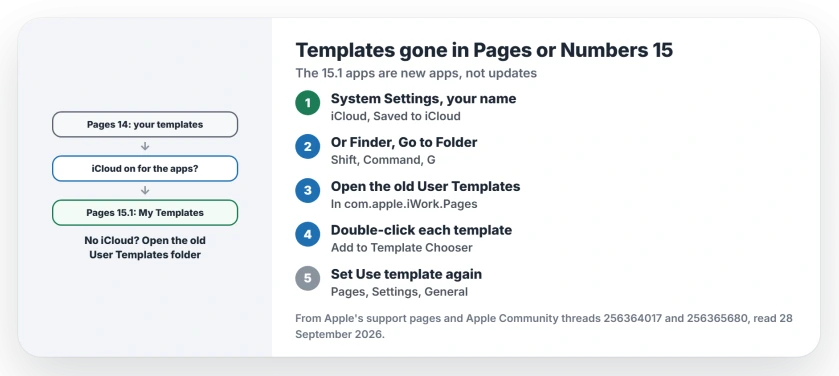
Status: Pages and Numbers 15, checked 28 September 2026. The 15.1 apps are new apps. Custom templates move over only when iCloud is on for the apps; otherwise they stay with the old version.
1. Why the templates stayed behind
Apple says: "Keynote, Pages, and Numbers 15.1 on Mac are available as new apps rather than as updates to the existing apps." So each new app starts with its own settings and its own template list.
Apple documents when templates follow you: "If you have iCloud enabled for the apps". Then "custom shapes and templates that you've saved migrate". Without iCloud, they stay in the old app's folder.
A Level 10 volunteer said the same about Pages: "Installing the new Pages does not replace the older Pages applications". The old templates are still on your Mac.
2. Check iCloud for Pages and Numbers
Apple's route starts at Apple menu, System Settings, then your name, then iCloud. There, "Under Saved to iCloud, click to choose which apps you want to use with iCloud."
"If you don't see an app, click See All for the full list." Turn on Pages and Numbers, and Keynote if you use it, as the iCloud apps page shows.
No owner in either thread has said whether switching iCloud on now brings old templates across. So keep the next section ready if My Templates stays empty.
3. Copy them from the old folder
The same volunteer posted where Pages keeps them. In Finder, choose Go, then Go to Folder, or press Shift-Command-G, and paste the old path:
~/Library/Containers/com.apple.iWork.Pages/Data/Library/Application Support/User Templates
The new Pages reads its own folder: ~/Library/Containers/com.apple.Pages/Data/Library/Application Support/User Templates
You can copy the files across, as the volunteer describes. Or double-click each one, since Apple's template guide says to double-click a template file, "then click Add to Template Chooser."
Numbers templates end in .nmbtemplate, and install the same way. The volunteer also wrote a script that can "copy the respective v14. application's user-defined templates to the v15. user template location".
It covers Pages, Numbers and Keynote. The Numbers and Keynote folders should follow the same pattern with their own names. That reading is ours, so check the folder exists first.
4. Set your default template again
Apple still offers the setting the macOS 27 owner lost: "You can change a setting in Pages to always open a new document in a particular template instead of from the template chooser."
Choose Pages, then Settings, click General, and select Use template. Click Change Template, pick yours, then click Choose. The owner used the same setting in Numbers. Set it there too.
The What's new panel should appear only once, the volunteer said. For that owner it came back at every launch.
Their way round it: "The only way I can avoid the pop-ups is to sync Pages with iCloud Drive". That is user-reported, and it is one more reason to turn iCloud on.
Other Pages and document problems on macOS 27
If Pages keeps renaming your files, the renaming page shows the Finder setting behind it. Writing Tools trouble inside Pages is covered on the Writing Tools page, which starts with Siri AI.
Where did my Pages templates go?
They are still with the old Pages app. Version 15.1 is a new app, and its template list starts empty.
Do I need iCloud for templates to carry over?
Apple says they migrate when iCloud is on for the apps. Without it, copy them yourself from the old folder.
Can I delete the old Pages 14 app?
Apple says you can drag the 14.5 versions to the Trash to save space. I would bring your templates over first.
Does this affect Keynote too?
Yes. Apple's note covers Keynote, Pages and Numbers, and the volunteer's script handles all three.
The Short Version
- The 15.1 apps are new apps.
- Templates move only with iCloud on.
- Turn on iCloud for Pages and Numbers.
- Or open the old User Templates folder.
- Double-click each template to add it.
- Then set Use template again.
Where to Next
Open Pages, choose File, then New, and look at My Templates. If it is empty, work through sections 2 and 3 in order.
If a template still will not appear after you add it, leave its file name ending with your comment, and I will work out what went wrong.

Isaac Smith is the founder and editor of PC Glance, a website that covers computers, laptops, and technology. He is a tech enthusiast and a computer geek who loves to share his insights and help his readers make smart choices when buying tech gadgets or laptops. He is always curious and updated about the latest tech trends.