
You tap Caps Lock, start typing, and the letters still come out small. A firmer press works. On a Mac, that pause can be changed with one Terminal command, in either direction.
An owner posted the command in the macOS 27 forum, and two Level 10 volunteers answered it. I checked Apple's keyboard pages as well, for the settings that change how Caps Lock behaves.
A light tap that does nothing
The owner called it the "capslock delay that apple calls a feature". On their M3 MacBook Air, "lighter, quicker presses on the caps lock wouldn't activate it."
A Level 9 volunteer first thought the delay belonged to much older Macs. Once the owner explained, they changed their mind: "Got it, and in that case, good fix!"
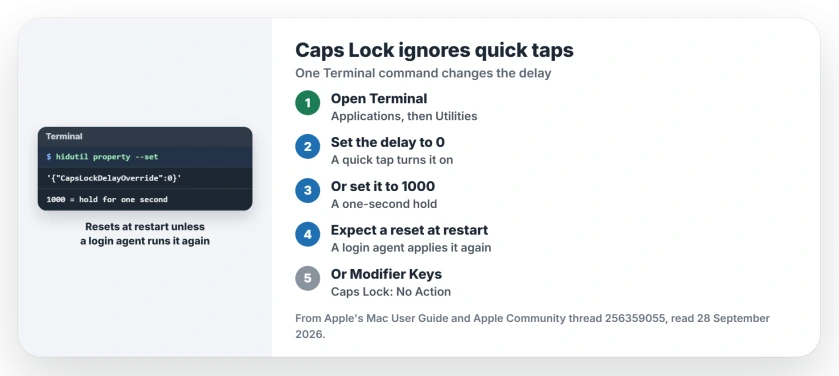
Status: macOS 27, checked 28 September 2026. A Terminal command from an owner removes the Caps Lock delay or makes it longer. A Level 10 volunteer who tried it reported that it works.
1. Remove the delay in Terminal
Open Terminal from Applications, then Utilities. Paste the owner's command exactly. Then press Return:
hidutil property --set '{"CapsLockDelayOverride":0}'
A quick tap should now turn Caps Lock on. That result is user-reported, from the owner who posted it. Nobody else in the thread tested the zero setting and reported back.
2. Or make the delay longer
A Level 10 volunteer wanted the opposite: a hold, so a stray brush of the key does nothing. The owner posted a second value for that:
hidutil property --set '{"CapsLockDelayOverride":1000}'
With it, "you have to press and hold the capslock for one second to actually activate it". The volunteer's verdict: "Works great. Now I don't accidentally enable it when I'm too lazy to home my fingers correctly."
So the number sets the wait, and 1000 is one second, going by the owner's note. Values between the two should give a shorter hold; that reading is ours.
3. Keep it after a restart
Apple's note on hidutil says: "Key remappings are lost when the system is restarted". I would expect this setting to reset the same way. The link is ours.
The owner posted a small login agent in the thread that applies the setting again on its own. If you install it and change your mind, their two removal commands are:
launchctl bootout gui/$(id -u) ~/Library/LaunchAgents/com.local.capslock-delay.plist
rm ~/Library/LaunchAgents/com.local.capslock-delay.plist
4. Check the language switch setting
If you type in a second script, such as Chinese or Korean, check one more setting. Open System Settings, then Keyboard, then Text Input, and click Edit.
Apple's Input Sources page describes an option that lets Caps Lock switch languages. With it on, Apple says: "To activate continuous uppercase typing, press and hold the key until the Caps Lock symbol appears."
So on those Macs, a tap changes language and a hold turns on capitals. Turn the option off if you want Caps Lock to do only one job.
5. Or switch Caps Lock off
If you never want capitals from that key, Apple has a switch for it. Open System Settings, then Keyboard, click Keyboard Shortcuts, then Modifier Keys.
Apple's modifier keys page says to pick an action for the key, "or choose No Action." You can also give Caps Lock the Control key's job.
Other Mac keyboard problems
If a giant arrow appears when you press Shift, the Sticky Keys page turns it off. And if your Mac stops taking typing in every window, the phantom focus page gets the keyboard back.
A different nag, the install box for the command line developer tools, has its own page with the fixes owners confirmed.
Why does Caps Lock not turn on when I tap it?
A short delay ignores light, quick taps. The owner in the thread saw it on an M3 MacBook Air, and a Terminal command removed it.
How do I remove the Caps Lock delay on a Mac?
Run the hidutil command from section 1 in Terminal, with CapsLockDelayOverride set to 0.
Does the setting survive a restart?
Probably not. Apple says key remappings made with hidutil are lost at restart, and the owner's login agent exists to apply it again.
How do I undo it?
If you only ran the command, a restart should undo it, going by Apple's note. If you installed the login agent, run the owner's two removal commands.
The Short Version
- Light Caps Lock taps get ignored.
- One Terminal command sets the delay.
- 0 removes it; 1000 needs a one-second hold.
- Expect it to reset at restart.
- A language option can add a hold too.
- Modifier Keys can switch Caps Lock off.
Where to Next
Open Terminal and run the command from section 1, then tap Caps Lock and type a word. If you prefer a firm hold, use 1000.
If Caps Lock still ignores a tap after that, say which Mac you have in the comments. The next owner report goes on this page.

Isaac Smith is the founder and editor of PC Glance, a website that covers computers, laptops, and technology. He is a tech enthusiast and a computer geek who loves to share his insights and help his readers make smart choices when buying tech gadgets or laptops. He is always curious and updated about the latest tech trends.