

A box keeps popping up on your Mac, saying the git command needs the command line developer tools. You install them, and the box comes back anyway. You never typed git in your life, so it is annoying to be nagged.
A Tahoe owner finally got rid of it in a MacRumors thread, and I read that alongside Apple's note on the command line tools. Two causes turned up, and each has a fix.
What the loop looks like
The owner described it plainly: "I keep getting this dialog from MacOS Tahoe". The box said the "git command requires command line developer tools to be installed".
Installing did not help. In their words: "I click install, it goes through successfully. Then it pops up again." They even deleted the tools folder and reinstalled.
Cancel did not help either: "I click Cancel instead of install. But it stills pops up."
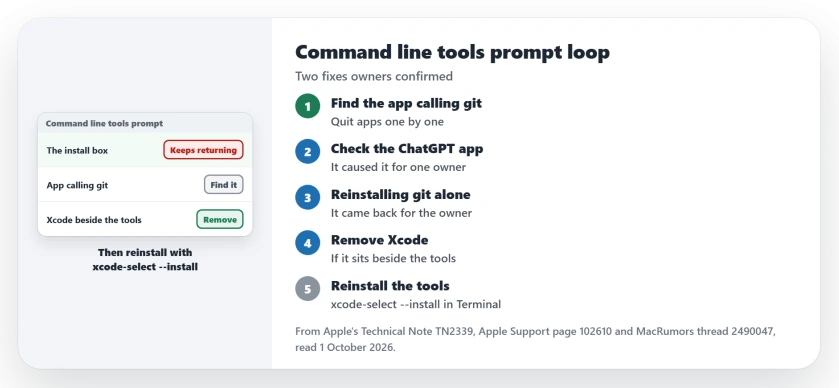
Status: checked 1 October 2026. Removing Xcode and reinstalling the command line tools ended the loop for the opening owner. For another owner, the ChatGPT desktop app was the trigger.
Why one app can set it off
Apple's technical note explains the plumbing. It says "macOS 10.9 and later includes shims or wrapper executables" in a system folder, and these stand in for tools such as git.
So when any app on your Mac asks for git, the stand-in answers first. As I read Apple's note, when it cannot pass git on to working tools, you get the install box. That is why it can appear with no window of your own open.
1. Find the app that is asking
Do this first, before installing anything. A member warned: "I don't think its wise blindly installing something if you don't know what for, what app requested it".
The owner had plenty of suspects. They ran Homebrew, ChatGPT, Claude, GitHub Desktop, Sublime Text and Zed, and wrote: "They all use git, probably."
Quit them one by one and wait. When the box stops coming back, you have found the app that keeps asking for the tools.
2. Try the ChatGPT desktop app first
One owner had a quick answer. They asked about "the desktop version of ChatGPT", and added: "For me ChatGPT for some reason was causing that".
If you use it, quit it for a day.
3. Reinstalling git alone may not hold
The owner first reinstalled git through Homebrew. They wrote: "I uninstalled and reinstalled git via brew. That seems to have stopped it."
It did not last, and their next post said only: "Nope, it's back". So keep going if you get a short break.
4. Remove Xcode, then reinstall the tools
The opening owner ended the loop this way. The fix is user-reported, not Apple's. In their words, they "finally just uninstalled xcode and re-installed command line dev tools. That seems to have done the trick finally."
Apple's note explains why the two can clash. It says "Xcode comes bundled with all your command-line tools." As I read it, a Mac with both has two places to look.
Delete Xcode the way Apple's uninstall page describes. "If the app is currently open, quit the app before continuing." Then drag it to the Trash.
Then reinstall the tools. Apple says: "You can install the Command Line Tools package by running the xcode-select --install command." Type xcode-select --install in Terminal and follow the box.
5. Keep the tools where Apple puts them
Apple says the tools are installed in the "/Library/Developer/CommandLineTools" folder. The owner deleted and rebuilt that folder.
If you need Xcode later for development, reinstall it then, and if you only use apps, you may not need it at all.
If you like Terminal fixes, the CUPS page has two more for macOS 27. And for a keyboard quirk with its own command, see the Caps Lock delay page.
And if SSH in Terminal started printing a post-quantum warning after a macOS update, you can quiet it for a single server.
A Java app that stops because it cannot find a Java Runtime has a similar stub behind it, and installing a JDK in the folder the Mac reads is what clears it.
A tool that zsh rejects over its CPU type was built for another processor, and installing Rosetta or a native build sorts that out.
Why does my Mac keep asking to install command line tools?
An app on your Mac keeps calling git or a similar developer tool in the background. One owner traced it to the ChatGPT desktop app, and another to Xcode sitting beside the tools.
Is it safe to install the command line developer tools?
They come from Apple, but a member advised finding out which app asked before you install anything.
How do I stop the git command line tools pop-up?
Find and quit the app that calls git. If Xcode is installed, removing it and reinstalling the tools ended the loop for one owner.
The Short Version
- A box keeps asking for the command line tools.
- An app on your Mac is calling git.
- Find it by quitting apps one at a time.
- The ChatGPT desktop app caused it for one owner.
- Reinstalling git through Homebrew did not hold.
- Removing Xcode and reinstalling the tools did.
- Use xcode-select --install to reinstall them.
Where to Next
Quit your coding and chat apps one by one today and watch for the box on your screen. If Xcode is installed and you do not use it, remove it and reinstall the tools.
If the box still returns, list the apps you run and your macOS version in a comment. Every trigger owners find goes onto this page.

Isaac Smith is the founder and editor of PC Glance, a website that covers computers, laptops, and technology. He is a tech enthusiast and a computer geek who loves to share his insights and help his readers make smart choices when buying tech gadgets or laptops. He is always curious and updated about the latest tech trends.