

You open a Java app on your Mac, or type java in Terminal, and get "Unable to locate a Java Runtime" with a pointer to java.com.
The trap is that the java.com download does not fix it. I would skip that page and install a JDK instead. The java command on a Mac looks in one folder only. That runtime is not in it.
Asked on Super User in March 2021, this error has 313,672 views there.
Why your Mac says it has no Java
Every Mac has a file at /usr/bin/java, even with no Java on it. An Ask Different answerer called it "a program supplied by Apple that chooses one of several Java JREs to be used if any are installed".
That chooser looks for JDKs in /Library/Java/JavaVirtualMachines. If it is empty, you get the error. Nothing else you downloaded counts.
Homebrew documents the same rule from the other side. Its openjdk package tells you "For the system Java wrappers to find this JDK, symlink it with" a command that points into that folder.
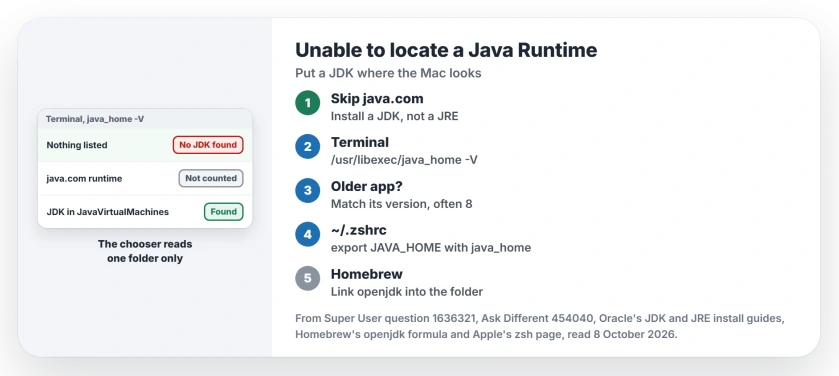
Status: checked 8 October 2026. A Mac's java command only finds a JDK in /Library/Java/JavaVirtualMachines. Install a JDK there, match the version the app asks for, then set JAVA_HOME.
Ours: there is no Mac on the desk for this one. We read Oracle's JDK 25 install page and Homebrew's openjdk entry, at version 27 on 8 October 2026. Both put the JDK, or a link to it, in that one folder.
1. Install a JDK, not the java.com runtime
java.com's Mac page walks you through a jre .dmg, the plain runtime. Oracle's own install guide says "Installing a JRE from Oracle will not update java -version symlinks or add java to your path".
That runtime goes into /Library/Internet Plug-Ins instead, where the chooser never looks. It is documented by the vendor, and the next sentence in that guide gives the fix: install the JDK.
One owner found exactly this in 2022: the trouble was having the runtime rather than the developer kit. A commenter replied "Yes it's exactly this" and thanked them.
Get a JDK as a .dmg. Oracle names its files by chip, with aarch64 for Apple silicon and x64 for Intel. Free builds such as Temurin and Amazon Corretto install into the same folder.
Then open Terminal and run this. It lists every JDK your Mac can see, with its path:
/usr/libexec/java_home -VIf it prints the same error, the JDK went somewhere else. Check that you opened the installer and not only the download.
2. Match the version the app asks for
The asker was running Caver Analyst with Java 15 installed. An answerer read Caver's site as asking for Java 1.8. They got an error with Java 16, and Java 11 worked.
Older apps often want Java 8. A newer JDK may not do. One owner installed Java 8, pointed JAVA_HOME at it, and removed the other JDKs from that folder.
Their words on the last step: "It did not work until I removed other-versioned jdks". Two commenters confirmed it, one in 2023 and one in 2024 on an M3 MacBook Pro.
Before deleting anything, try pointing JAVA_HOME at that version. This line picks Java 8 out of the installed list:
export JAVA_HOME=$(/usr/libexec/java_home -v 1.8)Put it at the end of the .zshrc file in your home folder. Apple says "Starting with macOS 10.15, your Mac uses zsh as the default login shell and interactive shell" on its zsh support page. So that is the file Terminal reads.
The Homebrew cask in that 2023 answer is gone. A commenter noted it "has been replaced by temurin", so install Temurin 8 or another Java 8 build instead.
3. Homebrew and SDKMAN need a link
On a supported Mac, complete Homebrew installation and shell configuration before using its package commands. The Java registration step remains separate.
Homebrew's openjdk lands under the Homebrew folder, not in /Library/Java/JavaVirtualMachines. Its own note gives the link to make:
sudo ln -sfn $HOMEBREW_PREFIX/opt/openjdk/libexec/openjdk.jdk /Library/Java/JavaVirtualMachines/openjdk.jdkSDKMAN keeps its Java inside your home folder. That fits a commenter who installed Java that way and still could not run the app. Point JAVA_HOME at it, or install one JDK the normal way.
Why JAVA_HOME alone did not help
The first answer on Super User was to set JAVA_HOME. Two people tried it. It failed for both, and one had set it to /usr/bin/java, which is the chooser itself.
JAVA_HOME has to point at a JDK's Contents/Home folder. java_home prints exactly that.
A correct value can still fail. In another answer, the app called /usr/libexec/java_home itself, so with no JDK in the folder it "refused to run".
A Mac shows the same kind of stub for git and make, and our Command Line Tools prompt page covers the loop that one can get into.
Windows plays a similar trick with Python, and the Python was not found message comes from an empty shortcut that runs first.
Leave /usr/bin alone
Oracle is clear: "Do not attempt to uninstall Java by removing the Java tools from /usr/bin". It adds that Apple resets that folder at the next macOS update anyway.
To remove a JDK, delete its folder from /Library/Java/JavaVirtualMachines with sudo. If you are in Terminal for SSH work too, our post-quantum SSH warning page covers the other message a Mac now shows there.
The Short Version
- /usr/bin/java is Apple's chooser. It only finds JDKs in /Library/Java/JavaVirtualMachines.
- The java.com runtime does not count. Install a JDK.
- Match the version the app wants, often Java 8, and set JAVA_HOME with java_home -v.
- Homebrew's openjdk needs the symlink its note gives.
- Never delete the files in /usr/bin.
Where to Next
Run java_home -V after the install. If your JDK is in the list and the app still fails, leave its name and the Java version it asks for in a comment. I'll look at how its launcher finds Java.

Isaac Smith is the founder and editor of PC Glance, a website that covers computers, laptops, and technology. He is a tech enthusiast and a computer geek who loves to share his insights and help his readers make smart choices when buying tech gadgets or laptops. He is always curious and updated about the latest tech trends.