
You type python in a terminal, and Windows answers: "Python was not found; run without arguments to install from the Microsoft Store, or disable this shortcut from Settings > Apps > Advanced app settings > App execution aliases."
I would check which python.exe Windows runs before flipping any switch. The fix depends on how Python got onto your PC. And the old advice breaks Python's new installer. One Stack Overflow question on it counts 1,919,540 views.
Where the message comes from
Windows carries two empty shortcuts, python.exe and python3.exe.
Microsoft says why: "To help new users find a good installation of Python, we added a shortcut to Windows that will take you directly to the latest version of the community's package published in the Microsoft Store."
Run on its own, the shortcut opens the Store. Add anything after it and you get the message instead.
In Microsoft's words, "Running the shortcut executable with any command-line arguments will return an error code to indicate that Python was not installed."
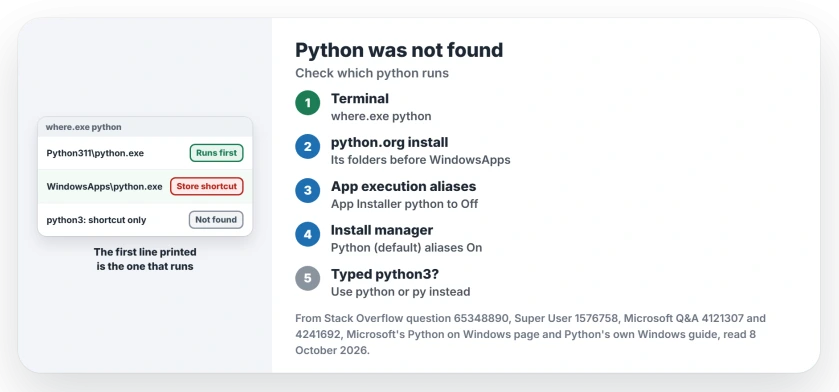
Status: checked 8 October 2026. Run where.exe python first. A python.org install must come before the WindowsApps shortcut. Python's new install manager needs its aliases on.
Ours: on this laptop both shortcuts sit in AppData\Local\Microsoft\WindowsApps, each 0 bytes. python3 printed the message with exit code 9009, while python printed Python 3.11.4.
That profile folder is not the locked one under Program Files. Changed the permissions on that other WindowsApps? Its own rules and owner have to go back.
1. Ask Windows which python it finds
Open Command Prompt or PowerShell on your PC and type:
where.exe python
where.exe python3
Windows runs the first match on your list. Ours: python listed the Python311 folder first and the shortcut second, so it worked. python3 listed only the shortcut. It failed.
A Microsoft Q&A poster ran the same check: "When I run 'where python' in command line, it showed two directories". Their thread shows 80+ under Same question. They moved the right folder up, or deleted the shortcut.
2. Installed from python.org? Put it first
Microsoft's Python page says that with the add to PATH box ticked, "the new python command will take priority over the shortcut". Then a warning: "Note that other installers may add python at a lower priority than the built-in shortcut."
Missed that box? One owner's tip: "Launch the python installer again and in Modify it offers to add it to the path". You can also add the Python3xx folder and its Scripts folder yourself.
Search Start for Edit environment variables for your account. Order matters in that list. Another owner's change only worked once the Python entries sat higher than the WindowsApps one.
Then switch the shortcuts off. Open Manage app execution aliases from Start. Find the App Installer entries for python.exe and python3.exe, and set both to Off.
Microsoft notes that "You can disable the shortcuts without installing Python" this way.
Close every terminal afterwards. One owner "had to first terminate all python.exe processes" before the change took. Another added: "don't forget to restart your machine after putting in the paths".
3. Using Python's install manager? Turn the aliases on
Python 3.14 moved Windows users to the Python install manager, from the Store or from python.org. The old full installer "is deprecated since 3.14 and will not be produced for Python 3.16 or later", in Python's own documentation.
The install manager runs through aliases of its own, named Python (default). So switching every Python alias off breaks it. Its troubleshooting table tells you to check that those aliases are on.
Already on? Python's table goes on: "If they already are, try disabling and re-enabling to refresh the command."
It also needs the WindowsApps folder on your PATH. Python's page reminds you that "The operating system includes this entry once by default, after other user paths."
Typed python3?
Your classic python.org install has no python3.exe at all. A Super User answer explains that "the Python 3.x executable is usually just python (python.exe)". So python3 reaches only the Store shortcut. That is exactly what happened here.
Type python or py instead. One owner on Python 3.13.2 wrote: "But, py filename.py just worked like magic." The install manager does add a python3 command. Python says it "mimics the python command".
Aliases that will not switch off
Do your toggles spring back or change nothing? Owners report both. "When I turn it off it kept shown as turned on," one wrote. Another found "This setting needed redoing after a reboot."
Their way out was to delete the two empty shortcuts. In PowerShell:
Remove-Item $env:LOCALAPPDATA\Microsoft\WindowsApps\python.exe
Remove-Item $env:LOCALAPPDATA\Microsoft\WindowsApps\python3.exe
"And it finally make it possible to run python from command line anywhere!" an owner wrote after running exactly that. A Microsoft Q&A owner deleted them too: "After that 'junk' was gone, it worked like a charm again!"
Do this only for a python.org install. The install manager needs its own entries in that folder.
Now it says python is not recognized
Then the shortcut is out of the way, but your own Python is not on PATH. One owner turned the aliases off and got "'python' is not recognized as an internal or external command". Go back to step 2.
Another owner in that thread found that "what worked for me is by just restarting my machine". New PATH entries only reach a terminal that starts after them.
ssh can fail the same way even with a correct PATH. There, a 32-bit PowerShell window was the cause for the asker.
Should I install Python from the Microsoft Store?
For learning, it is the quickest fix. Microsoft's page says the Store version "automatically configures your PATH and provides automatic updates". Need several versions side by side? The install manager handles that through py.
If the Store itself will not open, our Microsoft Store page fixes that first. Macs play a similar trick with Java, where the command exists before Java does. Our page on the Java Runtime message shows that one.
The Short Version
- The message comes from an empty python.exe shortcut in WindowsApps.
- Run where.exe python and see which one comes first.
- python.org install: put its folders ahead of WindowsApps, then turn the App Installer aliases off.
- Python install manager: keep the Python (default) aliases on.
- python3 hits the shortcut on a classic install; type python or py.
- Toggles that will not stick? Delete the two empty shortcuts.
Where to Next
Post what where.exe python printed, and say how you installed Python. I will tell you which line wins and what to move.

Isaac Smith is the founder and editor of PC Glance, a website that covers computers, laptops, and technology. He is a tech enthusiast and a computer geek who loves to share his insights and help his readers make smart choices when buying tech gadgets or laptops. He is always curious and updated about the latest tech trends.