
You set up your clock, calendar and weather widgets just the way you like them. Then your Pixel restarts, and they are gone. They are not even in the list to add back. That is frustrating, and it is not something your settings caused.
I read Google's September update notes and the two biggest threads on Google's Pixel forum. Google has fixed it, and owners found a way to bring the widgets back while you wait.
Gone from the screen and from the list
It started with Android 17 in June. The first poster in the biggest thread wrote that after the first reboot, "all my previously set widgets disappeared from the home screen and they are not in the widget selector".
A Pixel 9 Pro owner found the widget list half empty: "the default clock, google keep, calendar widgets are not showing up at all." Others had it on a Pixel 6a and a Pixel 10 Pro XL.
That second part is what makes it strange. A widget you remove by mistake stays in the list. These left the list too, so you had nothing to add back.
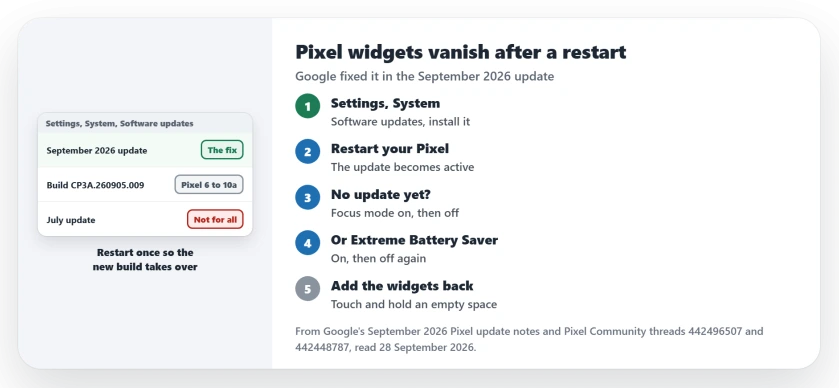
Status: checked on 28 September 2026. Google's September 2026 Pixel update fixes widgets that vanish after a restart, on Pixel 6 to Pixel 10a. A Focus mode toggle brings them back meanwhile.
1. Install the September update
Google's September 2026 update notes list this exact fault: "Fix for an issue where home screen widgets could disappear after restarting the device".
The fix covers every Pixel from the Pixel 6 to the Pixel 10a, the Fold and the Tablet included.
Google began the rollout on 15 September and said it "will continue over the next week in phases, depending on carrier and device." So your Pixel should be offered it by now.
Open Settings, tap System, then Software updates. Google's update page says Pixels "install downloaded Android updates in the background."
Then restart your phone. Google says: "The installed updates become active the next time that you restart your device." That restart is the moment your widgets used to vanish. On the new build, they should stay put.
To confirm, open Settings, then About phone, then Android version, and read Build number. Google lists CP3A.260905.009 for every Pixel in this update.
2. No update yet? Toggle Focus mode
This is the reply the forum marked as a recommended answer. Open Settings, then Digital Wellbeing & parental controls, then Focus mode. Select the apps whose widgets vanished, like Clock or Calendar.
The owner who posted it gave the timing: "Turn Focus Mode ON, wait a few seconds, and then turn it OFF." Then open your widget list again.
Documented by Google on its Digital Wellbeing page: "When Focus mode is on, you can't use these apps and won't get notifications from them."
Pausing the apps and releasing them seems to make your Pixel list their widgets again. That part is my reading, not Google's.
It is reported working by several owners. One wrote: "Thanks for the workaround, it is working".
3. Or toggle Extreme Battery Saver
A second route came from the Pixel 9 Pro thread: "Turn Extreme Battery Saver on, then turn it off again. The widgets should reappear." Another owner tried both and confirmed: "Both methods worked."
Google's Battery Saver page hints at why. Among the changes, Google lists "Most apps pause." and "Your work profile turns off."
That second line matters. Salim, a Diamond Product Expert on Google's forum, called it "a known issue currently affecting work profiles". If your employer set up a work profile on your phone, you are the likeliest to see it.
4. Put the widgets back on your screen
Once they show in the list, add them the normal way. Google's steps start: "On a Home screen, touch and hold an empty space." Tap Widgets and find the app.
Touch and hold the widget you want, slide it into place and lift your finger. Google's widgets page has the full list.
Why the workaround does not last
Both toggles fix the list, not the fault. One owner found that "upon restarting the phone, the widgets disappear again." Salim was plain about it: "it's a workaround until the fix is released next month."
Next month came late. On 8 July that first poster wrote that "the latest July update has finally fixed the problem". Two days later another owner said: "After my July update, my widgets disappeared again".
Google's written fix only came in September, so that is the update you want.
Other Android problems after an update
If the update left your phone slow as well, the slow Android page separates storage from memory. And before you try anything drastic, the Android backup page shows what Google saves for you and what it does not.
Why did my Pixel widgets disappear after a restart?
A bug that arrived with Android 17 in June. Google lists the fix in its September 2026 Pixel update.
Which Pixel phones get the fix?
Google names every Pixel from the Pixel 6 to the Pixel 10a, plus the Pixel Fold and the Pixel Tablet.
How do I get my widgets back without the update?
Turn Focus mode on and off with the missing apps selected, or do the same with Extreme Battery Saver. Either lasts only until your next restart.
Did the July update fix it?
Not for everyone. One owner said it did, and another lost the widgets again after installing it.
The Short Version
- Android 17 made Pixel widgets vanish at restart.
- They left the widget list too.
- Google's September update has the fix.
- Install it from Settings, System, Software updates.
- Restart once so it becomes active.
- Meanwhile, toggle Focus mode for the apps.
- Extreme Battery Saver works the same way.
Where to Next
Open Software updates now, install the September update and restart. Your widgets should still be there when your Pixel comes back.
If they still vanish on the new build, tell me which Pixel you have in the comments. I read them, and your report helps me keep this page current.

Isaac Smith is the founder and editor of PC Glance, a website that covers computers, laptops, and technology. He is a tech enthusiast and a computer geek who loves to share his insights and help his readers make smart choices when buying tech gadgets or laptops. He is always curious and updated about the latest tech trends.