
You open Claude Cowork on Windows, its sandbox starts, and then it cannot see a single one of your folders. The log says no Plan9 shares were mounted.
The 8 September Windows update broke how Hyper-V shares folders with Linux sandboxes, and Microsoft fixed it six days later.
Microsoft's release health entry names Claude Cowork outright. I read it alongside a Microsoft Q&A thread and two GitHub reports from people who traced the fault, and this PC already has the fix.
The sandbox starts, the folders do not
The Q&A thread opened with the log line many Cowork users saw: "sandbox-helper: no Plan9 drive shares mounted under /mnt/.virtiofs-root/shared". The virtual machine itself booted normally.
A second poster dug deeper and found the host side reporting success, while inside the sandbox every share failed with "Plan9 mount failed: invalid argument".
One GitHub reporter confirmed the cause by removing the update: "Uninstalling KB5124008 and rebooting fully restores the sandbox."
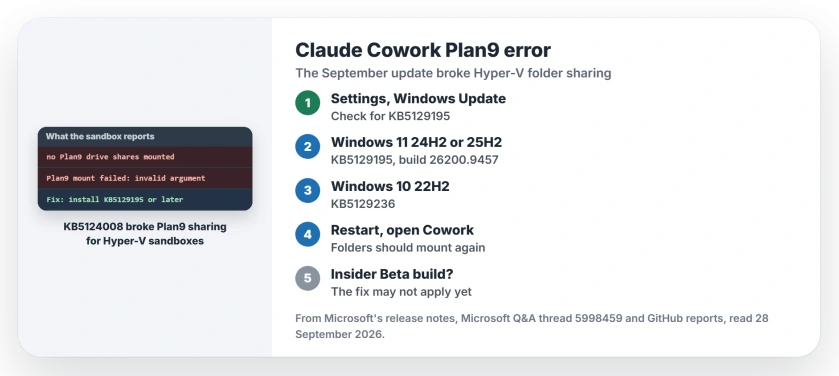
Status: Windows 11 and Windows 10, checked 28 September 2026. KB5124008 broke Plan9 folder sharing for Hyper-V sandboxes such as Claude Cowork. KB5129195, released 14 September, fixed it.
1. Install KB5129195 or anything later
Microsoft says on its release health page: "Claude Cowork and the Windows Subsystem for Linux (WSL) are two of the applications affected by this issue."
The fix shipped in KB5129195. Its notes describe what went wrong: "Some applications that use HCS-managed virtual machines experienced issues when sharing host folder with Linux VMs using Plan9."
Check Windows Update in your Settings for KB5129195. On 25H2 the fixed build is 26200.9457, and every later update includes the fix. This PC reads 26200.9457, a reading that is ours.
Windows 10 22H2 got the same fix as KB5129236, and 26H1 got it as KB5129194. Restart once the update finishes, then start Cowork again.
2. Plain WSL may never have been touched
Microsoft lists WSL as affected, but owners who tested it found otherwise on their machines: "WSL2 is unaffected, only Hyper-V-based Plan9/virtiofs sandbox mounts fail."
The GitHub reporter saw the same thing, with a WSL 2 distro still reaching the Windows drive while the update was installed. So if your WSL works, the fault is limited to sandbox apps on your PC, and the update fixes both either way.
If WSL never installed at all and stops at error 0x80370114, a Windows feature is missing instead. Updates and Virtual Machine Platform fix that one.
3. On a Windows Insider build, the fix may not apply
If you run a Windows Insider Beta build, you may hit the wall one reporter found on build 26220.9472. "Windows Update does not offer KB5129195, and a manual install from the Update Catalog is not applicable."
Their Insider build sits on a different branch from the fix. They kept Cowork working by having it stage files through its cloud container instead of running commands on the PC. That report is user-reported, dated 16 September.
4. Before the fix, owners rolled back
In the first week, removing KB5124008 was the only way back, and it worked. With KB5129195 out, you have no reason to do that now, because a rollback also drops that month's security fixes.
Other September Windows update problems
The same 8 September update left some USB headsets silent, and the USB audio page covers what works. It also stopped File History for some owners, and the File History page points to the 22 September fix.
KB5129195 fixed Remote Desktop hangs from the same update too, and the Remote Desktop page covers checking the host.
Why does Claude Cowork say no Plan9 drive shares mounted?
The 8 September Windows update, KB5124008, broke Plan9 folder sharing into Hyper-V sandboxes. Microsoft fixed it in KB5129195 on 14 September.
Which update fixes the Plan9 error?
KB5129195 on Windows 11 24H2 and 25H2, KB5129194 on 26H1, and KB5129236 on Windows 10 22H2, plus any later update.
Is WSL affected too?
Microsoft names WSL, but owners who checked found WSL 2 kept working on their PCs. If yours works too, only sandbox apps were hit.
If WSL itself will not start and says it cannot find a disk file, look at the path in that message. The fix depends on whose file it is.
What if I am on a Windows Insider build?
One Beta channel reporter could not install KB5129195 at all. They worked around it inside Cowork while waiting for a fix on their branch.
The Short Version
- KB5124008 broke Plan9 shares for Hyper-V sandboxes.
- Claude Cowork could not see your folders.
- KB5129195, from 14 September, fixes it.
- Windows 10 needs KB5129236.
- Owners found WSL 2 still worked.
- Insider Beta builds were not covered.
Where to Next
Check Windows Update for KB5129195 or anything newer, restart, and open Cowork. It should see your folders again.
If the Plan9 error survives a fully updated PC, post your build number in a comment. I will add it next to the Insider report.

Isaac Smith is the founder and editor of PC Glance, a website that covers computers, laptops, and technology. He is a tech enthusiast and a computer geek who loves to share his insights and help his readers make smart choices when buying tech gadgets or laptops. He is always curious and updated about the latest tech trends.