
Your File History ran fine until the September Windows update. Now it asks you to connect a drive that is already plugged in, and the last backup date never moves. Microsoft fixed it in the 22 September update.
I read Microsoft's notes for all three September updates. I also followed a Microsoft Q&A thread where owners traced the fault, rolled back, and then confirmed the fix.
A connected drive it will not see
The first poster saw it on three computers. File History ran, then Windows Update ran, and File History "says to connect a drive". The drive was working: "I could read and write to it".
On the third PC they set File History up fresh and watched it work. "Then I ran Windows Update and it broke it." Another owner found FileHistory.exe crashing in the background, again and again.
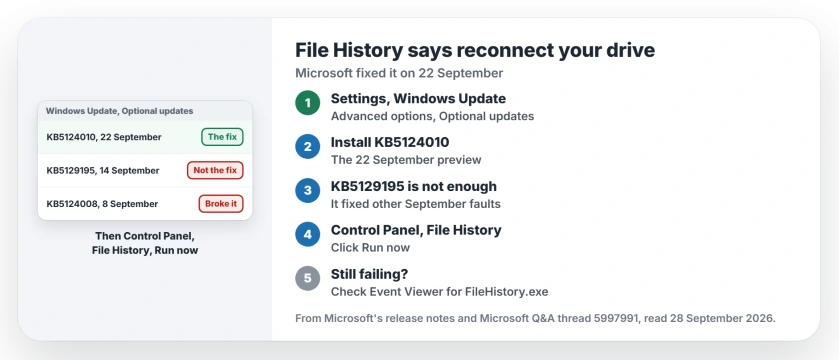
Status: checked on 28 September 2026 for Windows 11 24H2 and 25H2. Microsoft fixed File History in KB5124010 on 22 September. KB5129195 did not fix it. Owners confirmed the fix a day later.
1. Install the 22 September update
Microsoft says some File History users "might be unable to create or update backups" after KB5124008. Its fix note adds that File History "might fail to back up or restore files to an external drive or network location".
The cure for your PC is in the KB5124010 notes: "This issue is resolved in Windows updates released on and after September 22, 2026 such as KB5124010."
KB5124010 is an optional preview, so it does not install on its own. In Settings, go to Windows Update, then Advanced options, then Optional updates.
Microsoft says: "In the Optional updates available area, you will find the link to download and install available updates."
Some owners also say this update got Microsoft Solitaire signing in again, and the 0x8004A97E page has the other fixes.
2. KB5129195 alone does not fix it
If you installed the 14 September out-of-band update, it fixed other September faults, not this one. An owner installed it the same day and reported: "File History still failing with apparently the same symptoms."
This PC runs KB5129195, build 26200.9457, but File History has never been switched on here. So I could not reproduce the fault, and the owners' reports carry this section; that note is ours.
3. Cannot install it yet? Roll back KB5124008
Before the fix, one owner uninstalled the September update on all three machines: "it resolved the issue on all three." Windows Update then offers the same update again, so pause updates afterward.
Rolling back also removes your security fixes for that month. With KB5124010 out, installing the fix beats rolling back, in my view.
4. Run a backup to check
Microsoft's route is Control Panel, then System and Security, then File History. Click Run now. Then watch the date of the last copy change.
The fix is confirmed by owners who installed the 22 September update and reported back the next day. One wrote: "installed the latest updates on Sep. 23rd, and file history back online." Another: "Agreed, all good now."
If it still fails, check Event Viewer. Microsoft says it "might record application crash events referencing FileHistory.exe and KERNELBASE.dll", which confirms you are looking at this fault.
On 24H2 Home or Pro, mind the date
KB5124010 is also the last preview update for 24H2. Microsoft says: "Windows 11, version 24H2 Home and Pro editions will reach end of updates on October 13, 2026."
If that is your version, the 24H2 end of updates page covers the move to 25H2. The File History fix goes with you, since later updates include it.
Other Windows backup problems
If you are unsure what File History keeps compared with Windows Backup, the Windows Backup page explains which covers what. And if a file vanished before your last backup ran, the deleted files page starts with what not to do.
If a domain PC refuses your password after this update, the trust relationship page has the setting to turn off.
Why does File History ask me to reconnect a connected drive?
A bug in KB5124008, the 8 September update. Microsoft lists it as a known issue for Windows 11 24H2 and 25H2, fixed on 22 September.
Did KB5129195 fix File History?
No. An owner who installed it on 14 September found File History still failing.
Where do I find KB5124010?
Settings, Windows Update, Advanced options, then Optional updates. It is a preview, so Windows does not install it by itself.
Is rolling back safer than installing the fix?
No. A rollback removes that month's security fixes, while KB5124010 keeps them and fixes File History.
The Short Version
- KB5124008 broke File History.
- It asks for a drive that is connected.
- KB5129195 does not fix it.
- KB5124010, from 22 September, does.
- Find it under Optional updates.
- Then click Run now to check.
Where to Next
Open Optional updates and install KB5124010, then run File History once. The last backup date should change within a few minutes.
If File History still asks for your drive after that, say which drive you use in a comment. I will add what I find to this page.

Isaac Smith is the founder and editor of PC Glance, a website that covers computers, laptops, and technology. He is a tech enthusiast and a computer geek who loves to share his insights and help his readers make smart choices when buying tech gadgets or laptops. He is always curious and updated about the latest tech trends.