
Your USB headset, speakers or audio interface went quiet after the 8 September Windows update. Device Manager may even show Code 10. Microsoft has confirmed the fault, fixed one part of it, and is still working on the rest.
I read Microsoft's release health entry and two Microsoft Q&A threads. I also checked a USB sound device on this PC, which already runs the patched build.
One update, two ways to go quiet
The first report came a day after the update. "After installing KB5124008 I have no sound through my HyperX Cloud Orbit S headset." The volume slider on the taskbar froze as well.
An owner with a Lexicon Alpha Studio interface got Code 10 instead: "the device is detected and appears in the system, but Windows is unable to start it." It still worked on another computer.
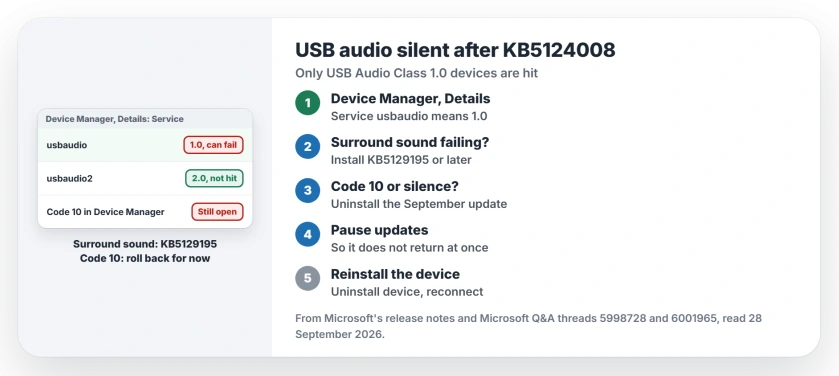
Status: 24H2 and 25H2, checked 28 September 2026. KB5129195 fixed the surround-sound part. Code 10 and silence on USB Audio Class 1.0 devices are still open, per Microsoft.
1. Check which USB audio driver your device uses
Microsoft says on its release health page: "This issue is limited to USB Audio Class 1.0 devices." Windows drives those with Usbaudio.sys. Newer 2.0 devices use a separate driver, and Microsoft documents that it "is named: usbaudio2.sys".
To see yours, open Device Manager, then Sound, video and game controllers. Open your device, choose the Details tab, and pick Service. It reads usbaudio for 1.0, or usbaudio2 for 2.0.
Your 1.0 device may not fail at all, though. On this PC, a C-Media USB sound adapter runs on usbaudio, driver 10.0.26100.9457, and plays normally after the fix. That reading is ours.
2. Surround sound? Install KB5129195
The HyperX owner found the pattern that points at surround sound. "After switching the headset to 2 channel mode the sound returns". Then: "As soon as I switch it back to 7.1 channel there is no sound".
Microsoft fixed that case in KB5129195 on 14 September, and its notes say some 1.0 devices "failed when using multichannel audio features, including 8-channel or 3D audio modes."
So install KB5129195 or anything later from Windows Update in your Settings. On 25H2 it brings the build to 26200.9457. Until then, stereo mode is the stopgap Microsoft mentions.
3. Code 10 or no sound at all: roll back for now
Microsoft's status for the rest has not moved: "Microsoft is working on a resolution and will update this documentation when more information is available." The 22 September update did not fix it either.
Owners found one way out that you can use today. One wrote that "the ONLY fix I can find is uninstalling the update". An Independent Advisor gave the same advice in the accepted answer.
That adviser put it plainly: "the best option is to uninstall that KB5124008 update and pause your updates until Microsoft resolve the problem".
Go to Settings, Windows Update, Update history, then Uninstall updates, and remove the September update listed there. You give up that month's security fixes.
Microsoft's uninstall guide warns: "Before uninstalling a security update, make sure you understand the risks."
One owner could not roll back at all: they had reinstalled Windows from new media that already carried the update.
If you do roll back, pause updates, or it installs itself again. Microsoft says a pause "doesn't permanently turn off automatic updates", so set a date and check back.
4. Reinstall the device after the rollback
One owner needed a second step: "after deleting that update and then uninstalling the headset it works now". In Device Manager, right-click the device, choose Uninstall device, then disconnect it and connect it again.
On its own, that step did not help. The HyperX owner tried it with the update still installed, and the sound stayed off. So roll back first, then reinstall; that order is user-reported.
Other Windows sound problems
If sound fails with no USB device involved, the no sound page works through the eight common fixes in order. And for what Code 10 means on any device, the Device Manager codes page decodes it.
A USB device that keeps chiming as it drops and returns is a different fault, one Windows' own device log can trace.
On work PCs the same update can block sign-in, and the trust relationship page covers Microsoft's workaround.
The 22 September preview added another audio fault, and apps that decode AC-3 sound can now close without warning.
Is Microsoft fixing the USB audio problem?
Yes. Microsoft marks it Mitigated, and KB5129195 already fixed the surround-sound part. The Code 10 and no-sound symptoms are still under investigation.
Update, 30 September 2026: Microsoft's page for the new Windows 11 version 26H2 lists this same USB Audio Class 1.0 fault, still being worked on. So moving to 26H2 does not fix it yet.
Which USB audio devices are affected?
Only USB Audio Class 1.0 devices, per Microsoft. Owners named a HyperX Cloud Orbit S headset and a Lexicon Alpha Studio interface.
Should I uninstall a security update for this?
Only if you depend on the device. You lose that month's security fixes, so pause updates briefly and reinstall once Microsoft ships the fix.
Does the 22 September update fix it?
No. Microsoft still lists the Code 10 fault as a known issue in KB5124010.
The Short Version
- Only USB Audio Class 1.0 devices are hit.
- Check the Service property in Device Manager.
- Surround sound: install KB5129195.
- Code 10 or silence: roll back for now.
- Pause updates after the rollback.
- Then reinstall the device.
Where to Next
Your first check is the Service property of the device in Device Manager. If it says usbaudio and the sound is gone, decide whether the device matters more than this month's fixes.
If you have a fix that keeps the update installed, describe your device in a comment. I will test it against Microsoft's notes and add it here.

Isaac Smith is the founder and editor of PC Glance, a website that covers computers, laptops, and technology. He is a tech enthusiast and a computer geek who loves to share his insights and help his readers make smart choices when buying tech gadgets or laptops. He is always curious and updated about the latest tech trends.