

Your PC plays the USB connect or disconnect chime while your hands are nowhere near it. It might come once an hour, or every 15 seconds. Something is dropping off and coming back, and Windows writes down what it was.
I would read that record before unplugging things at random. One PowerShell line lists each device that vanished, with the time.
Steve Elmer's question about it, posted on Super User in spring 2010, has 438,460 views. On Microsoft Q&A, one thread has 500+ people with the same question, and new ones were still arriving in December 2025.
What the chime is telling you
The sounds are Windows' Device Connect and Device Disconnect events, the same ones a USB stick plays. Ours: this laptop's sound scheme maps them to Windows Hardware Insert.wav and Windows Hardware Remove.wav.
So a device really did vanish for a moment. In the threads I read, the culprit each time was something that reset itself: a worn mouse cable, a monitor with a USB hub inside, a dock, a charging phone or a Bluetooth adapter.
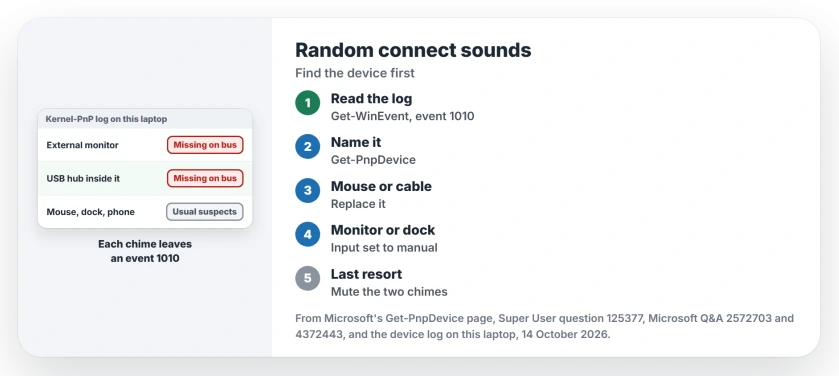
Status: this laptop's log, checked on 14 October 2026, still records every surprise removal, and you can open yours without admin rights.
1. Read Windows' own list of dropped devices
Windows keeps a log of devices that disappear from their connection. Ours: this laptop's copy holds 8,107 such entries since May 2025, and an ordinary PowerShell window read it.
Get-WinEvent -LogName 'Microsoft-Windows-Kernel-PnP/Device Management' -MaxEvents 20 | Where-Object Id -eq 1010 | Format-List TimeCreated, MessageEach entry says a device "has been surprise removed as it is reported as missing on the bus". Match the times to the chimes you heard. The long code after the word Device identifies it.
Prefer clicking? In Event Viewer, the same list sits under Applications and Services Logs, then Microsoft, Windows, Kernel-PnP and Device Management.
2. Turn the code into a name
Copy the start of that code into Get-PnpDevice. Microsoft documents it in the Get-PnpDevice reference, plainly: it "Returns information about PnP devices".
Get-PnpDevice -InstanceId 'USB\VID_0BDA&PID_5411*' | Select-Object FriendlyName, Class, StatusOurs: on 14 October our log showed an external monitor dropping off twice inside one minute. The USB hub and the audio device built into that monitor went with it each time, and Get-PnpDevice named the hub as Generic USB Hub.
Owners report the same pattern. A monitor that sleeps or reconnects takes its hub, its speakers and anything you plugged into it along for the ride.
3. Fix the device that keeps dropping
A mouse or keyboard. JimB found the mouse with a USB logging tool, replaced it, and reported: "Zero occurrences since I replaced the mouse over a week ago". Another owner traced theirs to a broken wire in the cable. Check yours for a kink.
If your log names the mouse, check power saving before the cable: Windows can switch a USB port off to save energy, and one box stops that.
A monitor or dock. One owner switched the monitor's input from auto detect to manual, and wrote that it helped. Another replaced a laptop dock, and the sound went with it.
A phone on charge. One answer found the disconnect sound came from a phone topping up over USB. Unplug yours for an hour and listen.
A Bluetooth adapter or a receiver. The 500+ thread has three accepted answers. One owner read the System log, found a Bluetooth adapter retrying, and disabled it. The asker's own fix was installing the software for a wireless keyboard and mouse receiver.
An update. One owner in July 2025 heard the sound start after KB5062553, and removing that update stopped it.
If Device Manager shows a yellow mark on the device, look up its error code by number before you replace anything.
Or silence the two chimes
Found nothing, or the device works fine? You can mute just these sounds. Open Settings, System, Sound, then More sound settings, and go to the Sounds tab.
Select Device Connect and set Sounds to (None). Do the same for Device Disconnect, then select OK.
I would only do this after step 1. Your chime is often the only sign of a cable that is failing.
A USB drive that drops and never comes back is a different fault. Start with the drive missing from File Explorer, where Disk Management shows whether Windows sees it at all.
The Short Version
- The chime means a device really vanished and came back.
- Read the Kernel-PnP Device Management log for event 1010, a device reported missing on the bus.
- Get-PnpDevice turns the device code into a name.
- Owners traced it to worn mouse cables, monitors with hubs, docks, charging phones and Bluetooth adapters.
- To mute it, set Device Connect and Device Disconnect to (None).
Where to Next
Monitors with USB hubs turned up more often than I expected. Run the command and post the device your log named. I am building a list of the usual suspects.

Isaac Smith is the founder and editor of PC Glance, a website that covers computers, laptops, and technology. He is a tech enthusiast and a computer geek who loves to share his insights and help his readers make smart choices when buying tech gadgets or laptops. He is always curious and updated about the latest tech trends.