
You read that the Windows 11 2026 Update is out, open Windows Update, and find nothing new. Good news: your PC is very likely fine. Microsoft rolls it out in waves, and it names one setting that puts you near the front.
I read Microsoft's release notes for version 26H2 and its how-to post from 29 September. I also checked what this laptop is offered today.
What Microsoft released on 29 September
The release health page is plain about it: "Windows 11, version 26H2 has reached general availability." It is the same release as the Windows 11 2026 Update, just the other name.
Not everyone gets it at once. Microsoft says: "The rollout is phased and will expand over the next few months."
For now it reaches PCs on 25H2 and 24H2 "for users who have turned on the setting" for early updates, which step 2 covers. Everyone else waits for a later wave.
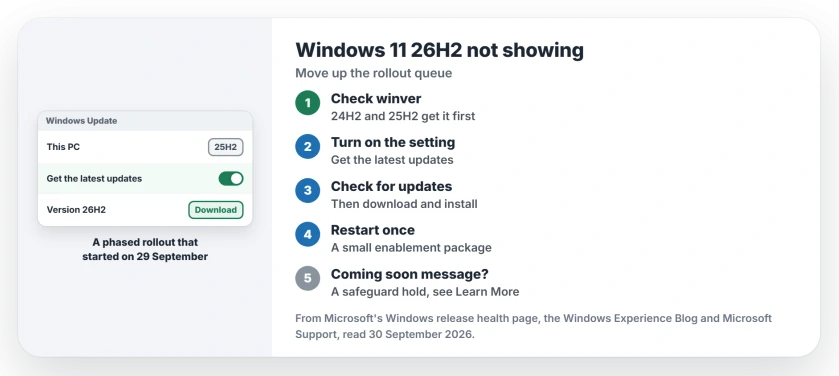
Status: checked 30 September 2026. Windows 11 26H2 reached general availability on 29 September in a phased rollout. The Get the latest updates setting puts a PC first in line.
1. Check that you are on 24H2 or 25H2
Press the Windows key and R, type winver and press Enter. The box shows your version, such as 24H2 or 25H2.
Microsoft's post says 26H2 comes "as an enablement package for eligible devices" already on 25H2 or 24H2. Those two versions get it first.
If your version number looks wrong, the 24H2 end of updates page explains how to read it, and the one number that misleads.
2. Turn on the setting Microsoft names
Microsoft's advice for anyone who wants it now begins: "To be among the first to receive the update". Open Settings, then Windows Update, and turn on Get the latest updates as soon as they're available.
Then choose Check for updates. Microsoft adds: "Once your device is eligible, you'll see the option to download and install Windows 11, version 26H2."
Microsoft's support page for that setting says that once it is on, "your device will be among the first to get the latest non-security updates". You set it once and it stays on.
3. Install it, then restart once
Microsoft says: "If the update is ready for your device, it will download and install automatically, and a single restart will complete the process."
Microsoft states that it should not take long, describing the install as "requiring only a small download and a quick restart". That is because 24H2, 25H2 and 26H2 share the same code underneath.
Save your work before the restart, as with any update. I would still back up first, as you would before any version change.
4. Still nothing? It may be held back
The rollout grows over months, so some PCs simply have not been reached. Checking again every few days is enough.
Your PC may also be on a safeguard hold. Microsoft's post warns: "During rollout, we might place safeguard holds on devices where we detect a known compatibility issue that could impact the update experience."
On an affected PC, Windows Update shows a Coming soon message. Microsoft's page on holds says they keep new versions away from PCs with a known problem, and lift once it is fixed.
The Learn More link under that message lists the hold that applies to your PC.
Known issues on the 26H2 page
Microsoft lists three open issues for 26H2, all marked mitigated. Two affect work setups: domain PCs using Credential Guard, and virtual desktops.
The third affects home users with USB sound devices. Only USB Audio Class 1.0 devices are hit, Microsoft says, and it adds: "We are working to address this issue in a future Windows update".
So moving to 26H2 does not fix that one. If your USB headset or speakers went silent in September, the USB audio page has what works for now.
What the setting changes, and its cost
Security updates arrive either way. Microsoft's words: "you'll still get the regular security updates as usual". The setting only speeds up the other updates, fixes and features.
There is a small cost. Microsoft warns: "There may be more restarts per month". You can turn the setting off again later if the extra restarts bother you.
Why 24H2 users should move soon
For 24H2 Home and Pro, Microsoft's last update date is 13 October 2026. After that, your 24H2 PC stops getting security fixes.
Moving to 26H2 resets the clock. Microsoft says "installing version 26H2 resets the support lifecycle for supported editions of Windows 11", with "24 months of support for Home and Pro editions".
What this laptop shows
Ours, checked on 30 September: this laptop runs 25H2, build 26200.9457, with the 18 September update installed. A Windows Update search run on the machine that day came back with no updates at all.
So 26H2 has not reached it yet. That is what a phased rollout looks like on an ordinary home PC like your own, and the reason the setting exists.
Is Windows 11 26H2 the same as the 2026 Update?
Yes. Microsoft calls it "the Windows 11 2026 Update, also known as Windows 11, version 26H2".
Why is Windows 11 26H2 not showing in Windows Update?
The rollout is phased over months. Turn on the early updates setting in Windows Update to move up, or look for a Coming soon message that means a safeguard hold.
Is the Windows 11 26H2 update a big download?
Not on 24H2 or 25H2. It comes as an enablement package, a small download with one restart.
Do I have to install Windows 11 26H2?
On 24H2 Home or Pro, move before 13 October 2026, when updates end. On 25H2 you can wait for your wave.
The Short Version
- 26H2 reached general availability on 29 September.
- The rollout is phased over months.
- Check winver for 24H2 or 25H2.
- Turn on the Get the latest updates setting.
- Check for updates, install, restart once.
- A Coming soon message means a safeguard hold.
- 24H2 Home and Pro updates end on 13 October.
Where to Next
Turn the setting on in Windows Update now, then check for updates. If 26H2 appears, save your work and install it.
On a Copilot+ PC where Click to Do keeps asking for more updates, 26H2 is what fixed it for one owner, as the Click to Do page explains.
If it does not appear after a week, leave a comment with your version and any Coming soon message. I keep this page current as the rollout widens.

Isaac Smith is the founder and editor of PC Glance, a website that covers computers, laptops, and technology. He is a tech enthusiast and a computer geek who loves to share his insights and help his readers make smart choices when buying tech gadgets or laptops. He is always curious and updated about the latest tech trends.