
Your Remote Desktop session drops after a few minutes, or the host never gets past its configuration screen. That is annoying when work depends on it. I would check which update the host has before you change any settings.
Microsoft traced this to its September security update and shipped a fix six days later. That fix only helps once the PC or server you connect to has installed it.
What Microsoft lists
It started with the 8 September security update, KB5124008. Microsoft says "some organizations might experience issues with Remote Desktop Services (RDS)" after installing it.
The symptoms vary from place to place. Microsoft describes RDS "resulting in RDP connections failing after several minutes", along with sign-in trouble and servers stuck on the Remote Desktop Configuration wait screen.
Other tools on the host can hang as well. Microsoft says the management console, the RDS Licensing Diagnoser and File Explorer "might also become unresponsive".
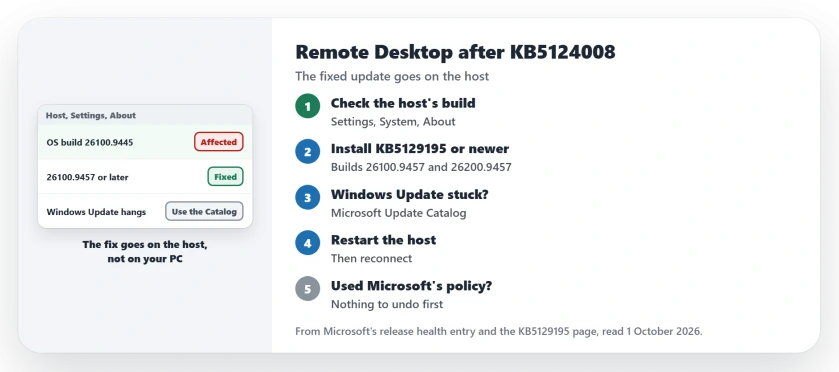
Status: checked 1 October 2026. Microsoft marks it resolved by the update KB5129195 of 14 September and by later updates. Install the newest update on the host, then restart it.
1. Check the build on the host
The fix lives on the machine you connect to, not the one you connect from. On that host, open Settings, then System, then About, and read the OS build under Windows specifications.
Microsoft states that KB5129195 brings OS Builds 26200.9457 and 26100.9457. A host on that build or a higher one already has the fix, so the cause of any drop lies elsewhere.
Ours, for reference: the Home PC used for these checks shows 26200.9457, so the update reached it through Windows Update by itself.
2. Install KB5129195 or anything newer
Microsoft says the issue is resolved by the September 14 update "and in updates released after this date". So the newest host update is enough.
Nothing is lost by going straight to the newest one. In Microsoft's words, "This OOB update is cumulative and includes all improvements and security protections contained in previous Windows updates".
On most hosts it arrives by itself. Microsoft's KB5129195 page says: "This update downloads and installs automatically from Windows Update and Microsoft Update".
3. If Windows Update hangs, use the Catalog
The fault can freeze Windows Update itself. Microsoft says "the Windows Update page might stop responding and continuously display a loading indicator".
There is a second route for that case, documented by Microsoft on the KB5129195 page. You download the standalone packages from the Microsoft Update Catalog and run them on the host.
Install them in the order the page gives, since Microsoft notes that the Catalog may list earlier checkpoint updates that have to go in first, then restart the host.
4. If your IT team used Microsoft's temporary policy
Some companies applied a Group Policy while they waited for the fix, and Microsoft says they "do not need to take any action before installing this OOB update".
That keeps it simple for them. They install the update, restart the host, and leave the policy as it is.
5. Know what this does not touch
Cloud desktops were spared. Microsoft says: "This issue does not affect Windows 365 or Azure Virtual Desktop".
Home PCs are outside it for another reason. Windows 11 Home cannot host Remote Desktop at all, so a Home machine is only ever the one connecting out.
If the connection has always failed for you, the Remote Desktop page starts with the edition check. And for another fault the same update fixed, see the Plan9 error page.
Why does Remote Desktop disconnect after the September 2026 update?
Microsoft says KB5124008 made Remote Desktop Services unstable in some environments, with connections failing after several minutes. KB5129195 and later updates fix it.
How do I fix Remote Desktop after KB5124008?
Install KB5129195, or any newer update, on the host and restart it, and if Windows Update hangs there, use the Microsoft Update Catalog instead.
Does the Remote Desktop bug affect Azure Virtual Desktop?
No. Microsoft says it does not affect Windows 365 or Azure Virtual Desktop.
The Short Version
- KB5124008 broke Remote Desktop for some hosts.
- The fix goes on the host, not your PC.
- Builds 26200.9457 and 26100.9457 have it.
- Any later update includes it too.
- A hung Windows Update page is the same fault.
- The Microsoft Update Catalog is the way round.
- Restart the host, then reconnect.
Where to Next
Ask whoever runs the host to check its OS build today, and if it is lower than 26100.9457 or 26200.9457, update it and restart.
If Remote Desktop still drops on a fully updated host, describe the host and the error in a comment. Your report helps the next reader, and I keep this page updated with what turns up.

Isaac Smith is the founder and editor of PC Glance, a website that covers computers, laptops, and technology. He is a tech enthusiast and a computer geek who loves to share his insights and help his readers make smart choices when buying tech gadgets or laptops. He is always curious and updated about the latest tech trends.