
You switch Wi-Fi off on your Pixel. A while later it is back on and connected again. That is annoying when you turned it off for a reason, like saving battery or staying on your own data plan.
I read Google's Wi-Fi help page and the two Pixel forum threads where owners asked about this after Android 17. Two causes have a switch you can change today, and one is still open.
Off, then back on without asking
A Pixel 8 owner described it after Android 17: "I turn it off, go out of the wifi's range, come back and it connects again." It happened "as soon as there is a connection available."
Pixel 9 owners report a stranger version. One wrote in September: "When I turn on bluetooth then wifi turns on automatically." They added: "I tried all methods but it still happening".
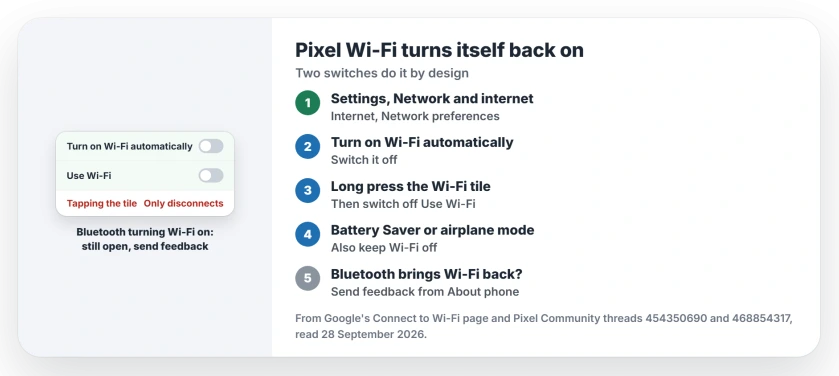
Status: checked on 28 September 2026. Two Pixel settings turn Wi-Fi back on by design. Wi-Fi switching on with Bluetooth on a Pixel 9 has no fix or explanation from Google yet.
1. Switch off Turn on Wi-Fi automatically
This one is a feature you can switch off. Google's Wi-Fi page says: "You can also set your device to automatically turn on Wi-Fi near saved networks."
To stop it, open Settings, then Network & internet, then Internet, then Network preferences. Switch off Turn on Wi-Fi automatically.
A Diamond Product Expert gave the Pixel 8 owner this same route. They also noted that "Many users, myself included, prefer to have this setting toggled on". So if you like arriving home to Wi-Fi, you may want it back on later.
2. Turn Wi-Fi off with Use Wi-Fi, not the tile
Tapping Wi-Fi in the panel you pull down from the top may not switch it off at all. A second Diamond Product Expert explained why.
In their words: "Just tapping the tile will disconnect the current Wi-Fi connection, pause re-connecting, but leave the Wi-Fi module on." So your phone can rejoin a saved network later.
Their fix: "To turn Wi-Fi off, long press the Wi-Fi Quick tile, then turn Use Wi-Fi off." That switch is the real off position.
3. The conditions that block it, from Google
Documented by Google on the same page are the times Wi-Fi "won't turn on automatically". Among them are "Location is off", "Battery saver is on", "Airplane mode is on" and "Background Wi-Fi scanning is off".
So if you want the auto switch but not at certain times, Battery Saver or airplane mode will hold Wi-Fi off. Prefer to turn scanning off? Wi-Fi scanning sits under Settings, Location, then Location services.
4. Bluetooth that brings Wi-Fi with it is still open
The Pixel 9 case does not fit either cause. The thread's first poster wrote that "Wi-Fi is genuinely turned off".
They also have "both Wi-Fi and Bluetooth scanning disabled in location settings." Wi-Fi still came on with Bluetooth. That rules out both switches.
Google's September update notes do not mention it. A Diamond Product Expert replied: "I do not know if what you described is a software bug or intended behavior."
I would send feedback from your phone. That reaches Google, and the forum does not. The same expert pointed to About phone, at the very end of Settings, then Send feedback about this device.
Other Pixel Wi-Fi problems
If your Wi-Fi turns on fine but will not connect, the Android Wi-Fi page has two tests that separate your phone from your router. And if you switch Wi-Fi off to save power, the battery drain page shows which app is really using it.
Why does my Pixel's Wi-Fi turn back on by itself?
Usually because Turn on Wi-Fi automatically is on, or because tapping the Wi-Fi tile only disconnected your Pixel without turning Wi-Fi off.
How do I turn Wi-Fi off completely on a Pixel?
Long press the Wi-Fi tile and switch off Use Wi-Fi. Then switch off Turn on Wi-Fi automatically in Network preferences.
Why does turning on Bluetooth turn on Wi-Fi?
It is reported by owners of the Pixel 9 on Android 17, even with scanning off. Google has not explained it yet, so send feedback from About phone.
Does Battery Saver stop Wi-Fi turning on?
Yes. Google lists Battery Saver as one of the times Wi-Fi will not turn on automatically.
The Short Version
- Two switches bring Pixel Wi-Fi back.
- Turn on Wi-Fi automatically is one.
- Switch it off in Network preferences.
- Tapping the Wi-Fi tile only disconnects.
- Long press it and turn off Use Wi-Fi.
- Bluetooth waking Wi-Fi is still open.
- Send feedback from About phone.
Where to Next
Open Network preferences now and switch off Turn on Wi-Fi automatically, then turn Wi-Fi off with Use Wi-Fi. Your Wi-Fi should stay off until you want it.
If it still comes back on, post a comment saying what happened just before, especially if Bluetooth was involved. Every case helps me pin this down for other Pixel owners.

Isaac Smith is the founder and editor of PC Glance, a website that covers computers, laptops, and technology. He is a tech enthusiast and a computer geek who loves to share his insights and help his readers make smart choices when buying tech gadgets or laptops. He is always curious and updated about the latest tech trends.