
Your Pixel says No Service, or Emergency calls only, and your SIM has not changed. Calls you were waiting for never ring. That is stressful, especially when your old phone still gets a signal in the same spot.
I worked from the notes Google published with its September update, its help page for cellular problems, and the Pixel forum threads where owners reported this after Android 17.
Google lists a fix. I also show what to try until your phone has it.
A signal that comes and goes
A Pixel 9a owner found No Service straight after the upgrade, though "SIM is identify but still". They put the same SIM back in their old phone, and "Cell service is working fine."
On a Pixel 9 Pro Fold, the connection kept dropping "at least 3-4 times a day and went into emergency call only". That owner noticed it happened "silently", so calls were missed without warning.
A Pixel 7 Pro owner saw "the mobile network frequently disconnects and reconnects on its own." For one owner in that thread, a factory reset helped only until the phone restarted.
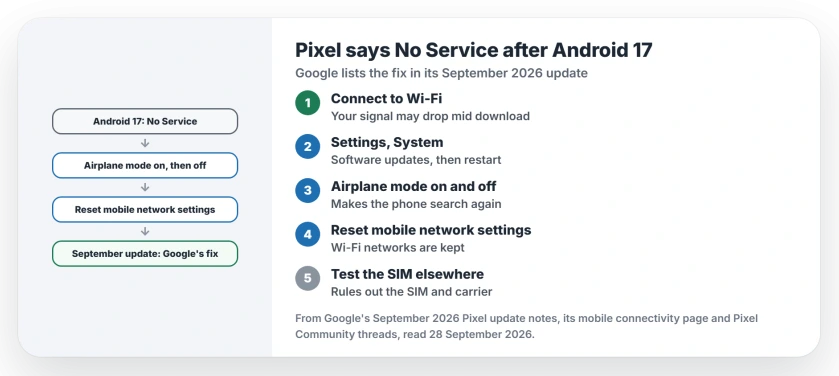
Status: checked on 28 September 2026. Pixels that lose the cellular network get Google's fix in the September 2026 update, every model since the Pixel 6. Three resets help meanwhile.
1. Install the September update
Google's September 2026 update notes promise a fix for a fault that "prevents certain devices from connecting to mobile networks or causes unexpected service interruptions in certain conditions".
Google marks that fix for all Pixel phones back to the Pixel 6, up to the Pixel 10a. Connect to Wi-Fi, since your cellular link may drop mid download. Then look in Settings, under System, for Software updates.
Restart once it installs. A Pixel runs the new build only from that restart, so do not skip it.
2. Cycle airplane mode
This is the quickest way to make your Pixel search for the network again. Google's cellular help page says: "You can also switch the airplane mode on and off to shut down the active processes."
If the bars come back, the fault is intermittent rather than a dead SIM. Keep this for the next drop until the update arrives.
3. Reset mobile network settings
This resets the cellular side only. Google's route is Settings, then System, then Reset options, then Reset mobile network settings.
Google keeps that separate from Wi-Fi and Bluetooth, which have their own reset. So your saved Wi-Fi networks are not part of this one.
4. Test your SIM in another phone
Google suggests it plainly: "install the SIM card into the other phone to see if the issue is with the SIM card." If the SIM works there, as it did for the Pixel 9a owner, your carrier and SIM are fine.
Also check the switches on your Pixel. Under Settings, Network & internet, then SIMs, Google says to make sure "Use SIM" is on. The same screen has the switch for cellular data.
Tell Google, because the forum is not Google
A Diamond Product Expert on the forum made this point firmly: "It is important to leave feedback about issues". The volunteers there do not work for Google, and Google does not routinely read the threads.
So if your signal still drops after the September update, send feedback from Settings, then About phone. I would add the date and the place where it happened, since that is what an engineer needs.
Before you factory reset
For the Pixel 7 Pro owner's thread, a reset was no cure. One owner wrote: "After restarting the same issue happning again." I would try the update and the network reset first.
If you do reset, the Android backup page shows what Google keeps for you. And if your Pixel also runs hot or drains fast since the update, the battery drain page starts with the Battery usage screen.
One more change reached Pixels this month. Google began replacing Google Assistant with Gemini, and the Gemini page covers what you can still set.
And if taps and swipes went strange after the same update, the touchscreen page covers the triple-tap shortcut.
Why does my Pixel say No Service after Android 17?
Google lists a fault that stopped some Pixels connecting to cellular networks or interrupted service. Its September 2026 update fixes it.
Which Pixels get the fix?
All Pixel phones from the 6 series through the Pixel 10a, the Fold models included.
Is my SIM card broken?
Test it in another phone. If it works there, the SIM and your carrier are not the problem.
Will resetting mobile network settings delete my Wi-Fi networks?
No. Google lists Wi-Fi and Bluetooth under a separate reset.
The Short Version
- Some Pixels lost signal after Android 17.
- The September update carries Google's fix.
- It covers Pixel 6 to Pixel 10a.
- Update over Wi-Fi, then restart.
- Meanwhile, toggle airplane mode.
- Or reset mobile network settings.
- Test your SIM in another phone.
Where to Next
Connect to Wi-Fi now and install the September update, then restart. Watch your bars for a day before you try anything else.
If your Pixel still drops to No Service after that, tell me your model and carrier in the comments. I read every one, and owners' reports help me keep this page right.

Isaac Smith is the founder and editor of PC Glance, a website that covers computers, laptops, and technology. He is a tech enthusiast and a computer geek who loves to share his insights and help his readers make smart choices when buying tech gadgets or laptops. He is always curious and updated about the latest tech trends.