

Your Mac runs warm and the battery drops overnight, and Activity Monitor blames two names you have never seen: dasd and appstoreagent. For some owners it starts right at midnight.
It is worrying on a Mac that should be resting. I read a MacRumors thread, the blog post that traced the cause, and two GitHub pages. It comes down to one stuck date.
What happens at midnight
The first poster hit it on both of their MacBooks after installing macOS 27. They left them running with a monitor app and found that "the CPU usage went down exactly at 9 am".
Another owner has it on a Mac Studio and a MacBook Pro. In their words, you might miss the load, "but you will definitely notice your battery running down faster."
A developer traced it with the system log. The App Store's background agent was "trapped in a hyperactive scheduling loop", with an Apple Arcade task firing over and over.
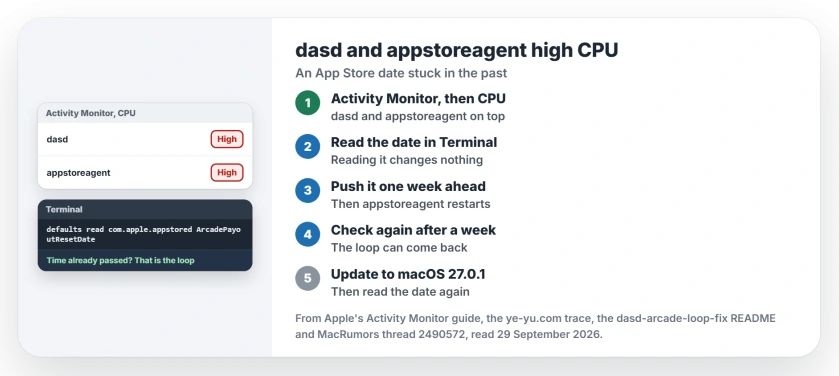
Status: macOS 27.0.1, checked 29 September 2026. Owners traced it to an App Store date stuck in the past. Apple's 27.0.1 note names no fix for it, so check again after updating.
Why the loop happens
A GitHub page puts it plainly. On macOS 27.0, an Apple Arcade background task "repeatedly scheduled itself in the past", which kept dasd and appstoreagent busy.
dasd is the scheduler that decides when background jobs run. Give it a job with a start time that has already passed, and it runs the job at once. The App Store agent then hands it the same old time again. Round and round it goes.
The blog's log shows the date pinned to midnight earlier that day. So the loop starts at midnight. For the first poster it ran until 9 am, and for the blog's author it was still going that afternoon.
1. Check that it is this bug
Open Activity Monitor and click CPU. In its CPU guide, Apple says that "Most of the time, the processor on your Mac uses only a small percentage of its processing power."
If dasd and appstoreagent lead the list while you do nothing, open Terminal and paste this line. It only reads the value and changes nothing:
defaults read com.apple.appstored ArcadePayoutResetDateThe time prints in UTC, marked +0000. Is that time already gone? Then your Mac matches what owners describe.
2. Push the date one week ahead
An owner in the thread posted this line. It writes a date seven days from now, then restarts appstoreagent. The blog's version used three days instead:
defaults write com.apple.appstored ArcadePayoutResetDate -date "$(date -v+7d -u +"%Y-%m-%dT%H:%M:%SZ")" && killall appstoreagentThat owner said it "will fix it immediately". The blog saw dasd fall to 0.0% CPU, and "the system returned to normal without requiring a reboot."
Run it in your own account, not with sudo, because the setting lives in your user's preferences. Wait for any App Store download to finish first, since stopping appstoreagent can interrupt it.
3. Check again after a week
The GitHub author is careful here. It is "a workaround for the observed loop, not a fix to macOS", and "The task may become overdue again the following week."
Run the read line again after a week. If the date sits in the past again and dasd is back at the top, run the fix line once more.
Some posts push the date years ahead instead. The script's author warns that its effect on Arcade records "has not been independently established", so I would stick to one week.
4. Or use the script that checks first
The same author shared a script in the thread. In their words: "The script wont make any changes without user confirmation and it will show you all its workings".
Read it before you run it. Start with its dry run, which only reports. A fix for Macs set to a 12-hour clock was merged on 27 September, so use the current copy.
5. Update to 27.0.1, then look again
Apple's note for macOS 27.0.1 mentions bug fixes without listing any. It does not name this loop.
The thread went quiet before 27.0.1 arrived, so no owner has reported either way. After updating, and before any fix, read the date the morning after. If it has moved into the future by itself, the update handled it.
What will not last
Quitting appstoreagent in Activity Monitor helps briefly. A developer who hit it on 26 September found the loop returns as soon as the agent wakes again, while the date stays in the past.
One reply blamed the App Store's update check and turned automatic updates off. The logs point at the Arcade task instead, so I would not count on that.
Other macOS 27 battery drain
If your MacBook drains overnight and dasd looks calm, our overnight drain page covers outdated apps and network wake-ups. For a Mac that is slow all day, our slow Mac guide starts with Apple's five causes.
What is dasd on a Mac?
It is the macOS background task scheduler, called the Duet Activity Scheduler in the blog's analysis. It decides when background jobs run, so it shows up whenever one of them misbehaves.
Is it safe to change ArcadePayoutResetDate?
Owners report normal CPU with no restart after running it. The one week version is the careful one, because the effect of a far future date on Arcade records is unknown.
Does it happen without Apple Arcade?
It can. The developer who reported the loop on GitHub says it still ran with no Arcade subscription. The script's author says it may depend on your Arcade history.
The Short Version
- The loop comes from an App Store date stuck in the past.
- It starts at midnight and eats CPU for hours.
- Read the date in Terminal first.
- Push it a week ahead, then restart appstoreagent.
- Check again after a week.
- Macs on 27.0.1 still need checking.
Where to Next
Open Activity Monitor tonight just after midnight and click CPU. If dasd sits at the top, run the read line, then the fix line.
If 27.0.1 cleared it on your Mac, leave a comment with the date the read line shows. That is the report this page still needs.

Isaac Smith is the founder and editor of PC Glance, a website that covers computers, laptops, and technology. He is a tech enthusiast and a computer geek who loves to share his insights and help his readers make smart choices when buying tech gadgets or laptops. He is always curious and updated about the latest tech trends.