
You leave your Pixel on the charger and come back to it stuck near 80%, with a notice that charging was limited to protect the battery. It is annoying when you need a full phone, and more so when you switched every battery option off.
Good news: nothing is broken. I read Google's battery pages and a Pixel 8 Pro owner's post from this week. Google documents both the cause and a one-tap way past it.
Why it happens with every setting off
In a forum thread from 28 September, a Pixel 8 Pro owner was sure they had disabled it all. In their words: "I have everything turned off in setting when I click the notification".
It kept going anyway. They wrote: "My phone is currently at 84% and I started with 81% 30 minutes ago". They also noted that "my phone isn't hot".
Google explains why the switches did not help. Its battery page says that "your phone automatically limits charging to about 70%-80% under certain conditions". That protection works on its own, apart from the Charging optimization settings.
Google names two triggers: "Continuous charging for more than a few hours under high temperatures" and "Continuous charging for more than several days". A phone that lives on a charger meets the second one easily.
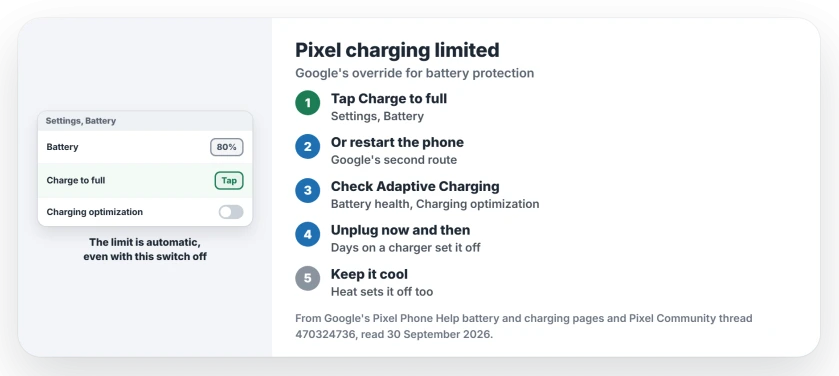
Status: checked 30 September 2026. Pixel phones limit charging to about 70% to 80% by themselves after heat or days on a charger. Google's override is Charge to full in Settings, or a restart.
1. Tap Charge to full
This is Google's own way past it, for the times you need 100%. Google's battery help page covers the case where "you wish to override the battery protection feature and enable the phone to charge to 100%".
Open Settings and tap Battery. Look for the Charge to full link there and tap it.
Google says the Battery screen shows a message when the limit is active: "Charging optimized to protect your battery". The link is on the same Battery screen.
2. Or restart the phone
Google gives a second route in the same sentence: "or restart your Pixel phone". Open the power menu and choose Restart.
After the restart, leave it plugged in. Watch the percentage climb past 80%. I would use this when the Charge to full link does not show.
3. Check Adaptive Charging and Limit to 80%
The owner saw times in their notice, and wrote that "it keeps giving me times from and to". That sounds like Adaptive Charging, a separate feature.
Google explains: "When Adaptive Charging is turned on, a notification shows the time your battery will be fully charged." It holds the charge back overnight and finishes near the time you unplug.
To turn it off, open Settings, then Battery, then Battery health, then Charging optimization. Turn off Use charging optimization. Both Adaptive Charging and Limit to 80% sit under that switch.
4. Unplug now and then, and keep it cool
The two triggers point to the lasting fix. Unplug the phone for a while every day or two, even if it sits on a stand.
Heat matters too. Google's tip: "Your phone warms up when it's plugged in, so don't keep it charging more than needed."
Keep it out of direct sun while it charges. On its charging page, Google adds that "If your phone gets too warm, it might pause charging to protect your battery."
5. On a Pixel 11, try Extreme Charging
If you are short on time, the newest Pixels have a faster mode. Google says: "This feature is available on Pixel 11 and later devices."
It only starts at half charge or lower. Google's words: "Extreme Charging Mode is available for charging only when the current battery charge is 50% or lower and until it's fully charged."
When it charged past 80% instead
Sometimes the surprise goes the other way. Your Pixel goes to 100% even with Limit to 80% turned on.
Google says that is on purpose: "To keep its battery capacity readings accurate, your Pixel needs to fully charge at every 10th cycle." It happens with Limit to 80% on as well.
To let that cycle finish, Google says to "leave your phone plugged in for at least 30 minutes after the screen shows 100%".
It also stops by itself
For the owner, the limit ended on its own. A day later they wrote: "For some reason it stopped now."
A volunteer expert on the forum had told them the phone can override their settings to protect the battery. That fits Google's page, which describes the limit as automatic.
If your phone is also draining fast, the Android battery page has the checks for that. And for why overnight charging is fine, see the overnight charging page.
Why does my Pixel say charging was limited to protect battery?
Google says Pixels limit charging to about 70% to 80% after hours on a charger in heat, or several days on it. That happens even with Charging optimization off.
How do I make my Pixel charge to 100%?
Tap Charge to full in Settings under Battery, or restart the phone. Both are documented by Google.
Why did my Pixel charge to 100% with Limit to 80% on?
Google has Pixels charge fully every 10th cycle to keep their battery readings accurate.
The Short Version
- Pixels limit charging on their own, to about 70% to 80%.
- Heat, or several days on a charger, sets it off.
- Tap Charge to full in Settings, Battery.
- Or restart the phone.
- Adaptive Charging shows a finish time, and turns off separately.
- Unplug now and then, and keep it cool.
- A full charge every 10th cycle is on purpose.
Where to Next
Open Settings, then Battery, and tap Charge to full if you need it today. Then give the phone a break from the charger this week.
If the notice comes back every night, leave a comment with your Pixel model and how you charge it. I add what owners find to this page.

Isaac Smith is the founder and editor of PC Glance, a website that covers computers, laptops, and technology. He is a tech enthusiast and a computer geek who loves to share his insights and help his readers make smart choices when buying tech gadgets or laptops. He is always curious and updated about the latest tech trends.