
You set your new Pixel on the car's charging pad and start Android Auto. Soon the phone is warm and barely charging. Before you worry about the phone, look at the pad.
I read Google's charging pages and a Pixel forum thread where two Pixel 11 owners hit this in September. Google even has a help section for it. The cause is the charging standard.
What owners see
A Pixel 11 Pro owner with a 2025 Kia K4 put it plainly: "My pixel 11 pro doesn't charge on my car charging pad, and in five to ten minutes it starts giving overheating warnings."
They had tested the obvious things. In their words: "I've tried charging with and without a case on." They added: "While charging I'm running Android Auto."
On 29 September a second owner joined. Their Pixel 11 Pro XL, in a 2026 Mazda CX-5, "also doesn't charge, it keeps disconnecting".
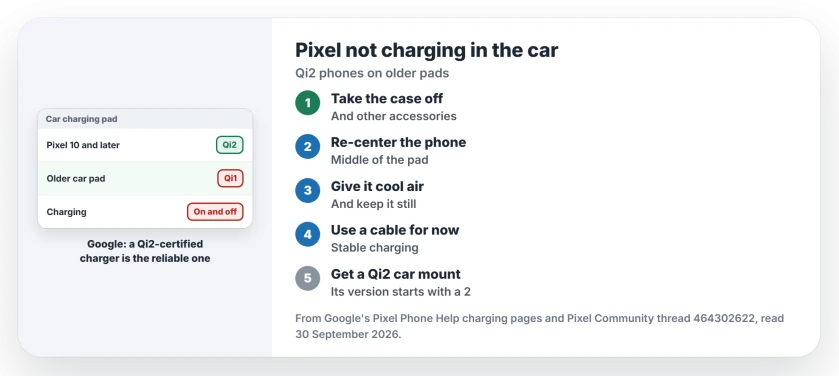
Status: checked 30 September 2026. Pixel 10 and later phones use Qi2, and Google says some older Qi1 car chargers charge them only on and off. Re-center the phone, or use a cable or a Qi2 mount.
Why car pads struggle with new Pixels
Google states: "The Pixel 10 and later devices, excluding Pixel 10a, support Qi2." Qi2 is a magnetic standard. The magnets hold the phone in the right spot.
Older pads still work, but slowly. Google says Qi1 chargers "will still work but they'll charge your phone slower at up to 5W."
Google's troubleshooting page goes further. On its Qi2 Pixel 10 models, it says, on-and-off charging "may be due to certain Qi1-certified in-vehicle wireless chargers". The Pixel 11 owners describe the same thing.
A volunteer expert answered the Kia owner: "The Pixel 11 needs a Qi2 charger, most cars are not equipped with those."
1. Take the case off and re-center the phone
Google's first steps come from its in-vehicle charging section. Lift the phone off the pad, then clear its back.
Google lists what to take off: "Remove any phone case, PopSocket, magnetic attachment, or other accessories from your phone."
Then: "Place your phone back on the center of the charging pad." Wait for the charging sign on the screen before you drive off.
2. Watch the angle on a vertical holder
Some cars hold the phone upright in a slot. That makes it worse. Google warns that "This issue is common with vertical in-vehicle chargers".
The reason is simple. In Google's words, the coils "may not align perfectly." Slide the phone up or down a little. See if charging starts.
3. Give it air, and keep it still
Heat was the Kia owner's first warning sign. Google wants cool air around the phone, "especially when in a vehicle."
Point a cool air vent at it if you can. Shade it from direct sun too.
Movement matters as well. Google says: "Try not to move or use your phone too much while charging wirelessly." It explains: "This can break the connection."
That is hard with Android Auto running, and a good reason to use a cable on a drive.
4. Use a cable for now
Google's plain fallback when the pad keeps failing: "Use a wired connection for stable charging."
I would keep a short USB-C cable in the car. It takes the pad out of the picture while you sort it out.
5. Check the pad, or add a Qi2 mount
Ask your car's maker whether the pad works with Qi2 phones. Google suggests exactly that. Contact the maker "for info about compatibility with Qi2-certified devices."
You can check a charger yourself too. Google's charging page points to the Wireless Power Consortium database. "For Qi2 compatibility, make sure the product's version number in the database starts with a 2."
If the pad is not Qi2, the volunteer had a clear answer. Get "an aftermarket Qi2 compatible car mount with built-in charger."
Google agrees: "For a reliable wireless charging experience, use a Qi2-certified charger."
What this is not
An old Pixel Stand will not help either. Google says: "The Pixel 10 and later devices won't charge wirelessly with the Pixel Stand 1st gen or 2nd gen."
If your Pixel will not charge on a cable either, that is another problem, covered on the Android charging page. To check what any phone supports, see the wireless charging page.
Why won't my Pixel 11 charge on my car's wireless charger?
The car pad may use the older Qi1 standard. Google says some Qi1 car chargers charge Qi2 Pixels only on and off. Re-center the phone, or use a cable.
Do Pixel 10 and 11 phones work with Qi chargers?
Yes, but slowly. Google says older Qi chargers "will still work" at up to 5W. For full speed, use a Qi2 charger.
What makes a Pixel overheat on a car pad?
A pad that does not line up with the coil, plus sun and heat in the car. Google recommends cool air around the phone and a Qi2 charger.
The Short Version
- Pixel 10 and later phones use Qi2, except the Pixel 10a.
- Many car pads are the older Qi1 kind.
- Take off the case and accessories.
- Set the phone back in the center of the pad.
- Keep cool air around it, and keep it still.
- Use a cable while the pad keeps failing.
- For wireless, get a Qi2 certified car mount.
Where to Next
On your next drive, take the case off and re-center the phone first. If it still stops, plug in a cable and look up your car's pad in the Qi database.
Then leave a comment with your car and Pixel model. Every pair that works or fails helps the next owner, and I list them on this page.

Isaac Smith is the founder and editor of PC Glance, a website that covers computers, laptops, and technology. He is a tech enthusiast and a computer geek who loves to share his insights and help his readers make smart choices when buying tech gadgets or laptops. He is always curious and updated about the latest tech trends.