
Someone has handed you a charging pad, or you are standing in a shop holding one. All you want to know is whether your phone will do anything when you put it down on it.
You will not find the answer in your phone's settings, and I know how odd that seems. Wireless charging is hardware. It was either built in at the factory or it was not.
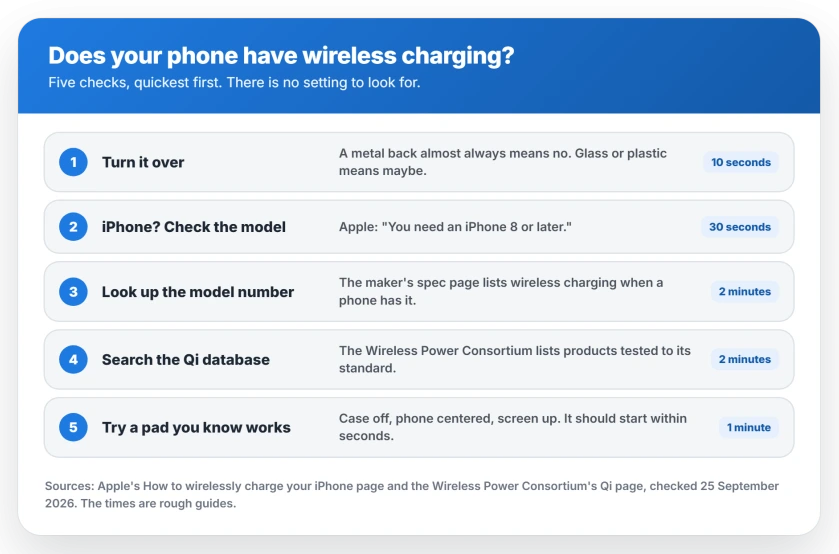
So I have put five checks in order, quickest first. The first two settle it for a lot of phones, and none of them means opening a menu.
1. Turn the phone over
A metal back almost always means no. Wireless charging works through glass and plastic, and a metal shell gets in its way.
Some metal phones have a plastic strip across the back. That strip is usually there for the antennas, not for charging, so treat it as a no until the spec page says otherwise.
Glass or plastic means maybe. Plenty of glass-backed phones support it, but plenty of budget ones do not. So this check can rule your phone out. It cannot rule it in.
2. If it is an iPhone, check the model
This one is easy. Apple says on its wireless charging page: "You need an iPhone 8 or later."
So every iPhone from the iPhone 8 onward has it built in. Apple adds that your iPhone "works with Qi-certified chargers", which is the standard nearly every pad uses.
Not sure which iPhone you have? Go to Settings, General, About, and read the Model Name.
3. Look up your exact model number
For any other phone, the maker's specification page is the certain answer. Search it for your model number rather than the range name, because one name can cover different phones in different countries.
Look for the words wireless charging, and note the wattage while you are there. If the specification never mentions it, your phone almost certainly does not have it. Makers do not hide a selling point.
4. Search the Qi database
Qi is the standard, run by the Wireless Power Consortium. Apple calls it "an open, universal charging standard".
The consortium's own advice is direct: "To be certain that a product has been tested to Qi certification standards, search for it in our database." Phones are listed there as well as chargers.
If your phone is in it, you have your answer. If it is not, go back to check 3, since a phone can support wireless charging without being listed.
5. Try a pad you know works
The final test is the real one. Borrow a pad that charges someone else's phone, and put yours in the middle of it, screen up.
Apple says an iPhone "should start charging a few seconds after you place it on your wireless charger". You should see the charging symbol appear.
If nothing happens after a minute of trying, with the case off, your phone almost certainly does not have it.
What stops it working on a phone that has it
Apple's list is short. If your phone "has a thick case, metal case, or battery case, try removing the case."
Anything else in the gap does the same job.
Apple warns that magnetic mounts, magnetic cases or other objects in the way "might reduce performance or damage magnetic strips or RFID chips like those found in some credit cards."
So take cards out of a wallet case before charging. They can be damaged, not just blocking the charge.
Position matters too. Apple says to place the phone "in the center of the charger", and a phone that sits slightly off the coil charges slowly or not at all.
And a plugged-in cable wins. Apple says an iPhone on a USB cable charges from the cable, not the pad.
Newer Pixels add a twist in the car. The Pixel car charger page covers why a Pixel 10 or 11 can struggle on an older Qi1 car pad.
Why it charges, then stops overnight
Two things usually cause this. The first is movement. When your phone vibrates for a notification, Apple says it can shift far enough that the pad stops powering it.
The second is heat. Apple says that if the battery gets too warm, the software may hold off charging past 80 percent. Your phone carries on once it cools down.
A case that holds heat makes the second one more likely. If your phone will not charge from anything at all, the fault is elsewhere, and the order to check things in starts at the port.
What wireless charging is worse at
This part is ours. On an ordinary pad, wireless charging is usually slower than a good cable. Apple says many Qi chargers charge an iPhone "at rates up to 7.5 watts", far less than a decent wired charger delivers.
It also runs warmer, and heat is what ages a battery. That matters more than any charging schedule.
On a flat pad, picking the phone up stops the charge. So a pad suits a bedside table or a desk. It suits a quick top-up before you go out far less.
The pad is half the purchase
Buy a certified pad. The consortium says that "Only Qi Certified products can display the Qi or Qi2 logo, a reassurance of safety and interoperability."
Qi2 pads add magnets, which fixes the alignment problem from earlier. The Wireless Power Consortium says Qi2 devices "feature magnetic attachment technology which aligns devices and chargers perfectly".
Then give the pad a proper power adapter. Apple says to use the adapter that came with the pad, or one its maker recommends. See which adapter in your house is fastest.
Status: checked 25 September 2026 against Apple's How to wirelessly charge your iPhone page, published April 2024, and the Wireless Power Consortium's Qi page. Apple says you need an iPhone 8 or later. The consortium says only certified products can display the Qi or Qi2 logo, and that its database settles whether a product was tested. No phone or pad was tested for this page.
How can I tell if my phone has wireless charging?
Turn it over first, because a metal back almost always rules it out. Then find your exact model number on its maker's spec sheet and search it for wireless charging. If the specification never mentions it, your phone almost certainly does not have it.
Which iPhones have wireless charging?
Apple says you need an iPhone 8 or later, so every iPhone from the iPhone 8 onward can charge wirelessly. It works with Qi-certified chargers. Check your model under Settings, General, About.
Do all phones with glass backs have wireless charging?
No. A glass back lets wireless charging work, but it does not promise the charging coil is fitted. Plenty of budget phones have a glass back and no coil behind it. Your model's specification page is the certain answer.
Why does my phone charge slowly on a wireless pad?
A thick case, poor position on the pad or a weak power adapter can all slow it down. Apple says many Qi chargers charge an iPhone at up to 7.5 watts, which is slower than a good cable. Heat can also make your phone hold off charging past 80 percent.
Can I use any wireless charger with my phone?
If your phone supports Qi, any Qi-certified charger should work with it. The Wireless Power Consortium says only Qi Certified products can display the Qi or Qi2 logo, and its database confirms which ones were tested.
The Short Version
- There is no setting to check. Wireless charging is hardware.
- A metal back almost always means no. Glass or plastic means maybe.
- Apple says you need an iPhone 8 or later.
- For other phones, search your exact model number's specification page.
- The Qi database confirms phones and chargers that were tested.
- The final test is a pad you know works, with the case off.
- Thick, metal and battery cases can stop it, and cards in the way can be damaged.
- Apple says a warm battery can make the phone hold off charging past 80 percent.
- Qi2 pads use magnets, which keeps the phone lined up.
Where to Next
Start with the back of your phone and its model, because between them they settle it for most phones in under a minute.
If yours does not have it, a pad will never charge it, whatever the box says. Save your money for a good cable and adapter instead.
Found a phone that charges wirelessly when nothing on it suggests so? Post which one it is in the comments, because the next person holding that phone will be wondering the same thing.

Isaac Smith is the founder and editor of PC Glance, a website that covers computers, laptops, and technology. He is a tech enthusiast and a computer geek who loves to share his insights and help his readers make smart choices when buying tech gadgets or laptops. He is always curious and updated about the latest tech trends.