
Your new laptop has a Copilot key where Right Ctrl used to sit, and your shortcuts keep opening Copilot instead. That is annoying when your hands still know the old layout. I would check Windows Update first.
Windows now has a setting for this. It arrived in the 22 September preview, and the steps are documented by Microsoft on its accessibility pages.
Why the key changed
Laptop makers started fitting the new key in 2024. Microsoft says: "This Copilot key sometimes replaces the Right Ctrl key or Context Menu key on select devices."
That hurt some people more than others. Microsoft says those "who rely on the Right Ctrl key or Context menu key for keyboard shortcuts or assistive technologies (such as screen readers) experienced some challenges to their workflows".
Until now, any fix depended on the maker. Microsoft says: "Configuration options vary depending on device manufacturer."
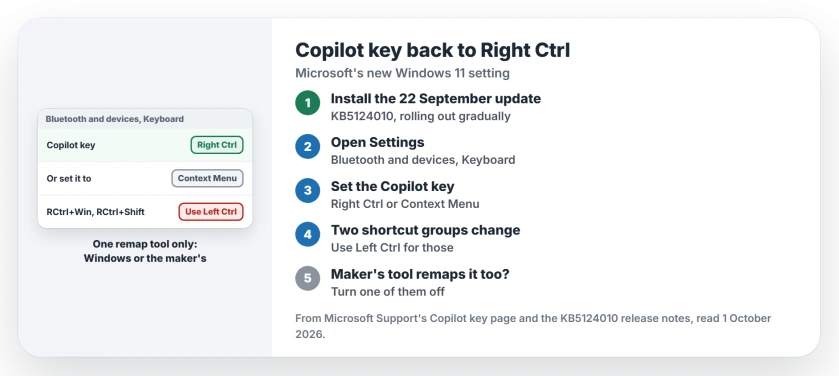
Status: checked 1 October 2026. A new Windows 11 setting from 22 September turns the Copilot key into Right Ctrl or the Context Menu key. It rolls out gradually.
1. Get the update that adds the setting
It ships in KB5124010, the September 22 preview for 24H2, 25H2 and 26H2. Microsoft states that it "lets you remap the Copilot key to function as the Right Ctrl or Context Menu key".
It may not appear at once. Microsoft lists it in a gradual rollout, which it says "delivers an update in phases, so features reach devices over time instead of all at once".
So install what Windows Update offers, restart, and check again in a few days if the option is missing.
2. Find the setting
Microsoft's Copilot key page gives the place. It is in Settings, then Bluetooth & devices, then Keyboard.
Look for the Copilot key option on that page. If you cannot see it, your PC has not received the change yet.
3. Pick Right Ctrl or the Context Menu key
Choose the key your keyboard lost. Microsoft says the setting lets you "remap the Copilot key to act as the Context menu key or Right Ctrl key".
Screen readers are one case Microsoft names, and assistive technology is part of why it built the setting.
4. Know the two shortcuts that change
The remap is not perfect. Once the key acts as Right Control, Microsoft says, "shortcut combinations that include RCtrl+Win and RCtrl+Shift will not work as normal".
Its advice is simple: "Users are recommended to use the Left Control key for these combinations." Microsoft names only those two.
One remapper at a time
Some laptops ship their own key tools. Microsoft's rule for those is to "use either the Windows setting or the device setting", never both at once.
So if your maker's app already changes the Copilot key, switch that off before you use the new Windows option.
If another key on your keyboard stops working, the Windows key page starts with the Fn lock. And if your new laptop is a Copilot+ PC, the Recall page explains what that feature saves.
How do I change the Copilot key back to Right Ctrl?
Install the 22 September Windows 11 update, then open Settings, Bluetooth & devices, Keyboard and set the Copilot key to Right Ctrl.
Why does my laptop have a Copilot key instead of Right Ctrl?
Since 2024, some makers have replaced the Right Ctrl or Context Menu key with a Copilot key. Microsoft says it happens on select devices.
Does remapping the Copilot key break any shortcuts?
Two kinds, Microsoft says. RCtrl+Win and RCtrl+Shift combinations will not work as normal, so use Left Ctrl for those.
The Short Version
- Some laptops replaced Right Ctrl with a Copilot key.
- The 22 September update adds a remap setting.
- It rolls out gradually, so it may take days.
- Find it in Settings, Bluetooth & devices, Keyboard.
- Pick Right Ctrl or the Context Menu key.
- Use Left Ctrl for RCtrl+Win and RCtrl+Shift.
- Turn off any maker tool that remaps the key.
Where to Next
Install any update Windows offers, restart, and open the Keyboard page in Settings. If the Copilot key option is there, set it and test your usual shortcuts.
If the option never shows on your laptop, post the make and model in a comment. I will check that brand and update this page.

Isaac Smith is the founder and editor of PC Glance, a website that covers computers, laptops, and technology. He is a tech enthusiast and a computer geek who loves to share his insights and help his readers make smart choices when buying tech gadgets or laptops. He is always curious and updated about the latest tech trends.