
Your Pixel Watch installed an update, and now it shows nothing but the G logo. That is worrying when it will not even switch off. I would try Google's long restart first, then its reset from Fastboot.
One owner described exactly this on Google's Pixel Watch forum on 26 September, right after the September 2026 update. Google's own help page covers the way out.
What the owner saw
The watch was a Pixel Watch 3, and the update was the September 2026 release. In their words: "Hard Reset doesn't work. Won't turn off."
Letting the battery run flat did not help either. As soon as the owner put it back on the charger, the same G logo came back.
Google lists this exact screen. Its help page names a frozen screen with the G logo among the problems a factory reset can solve.
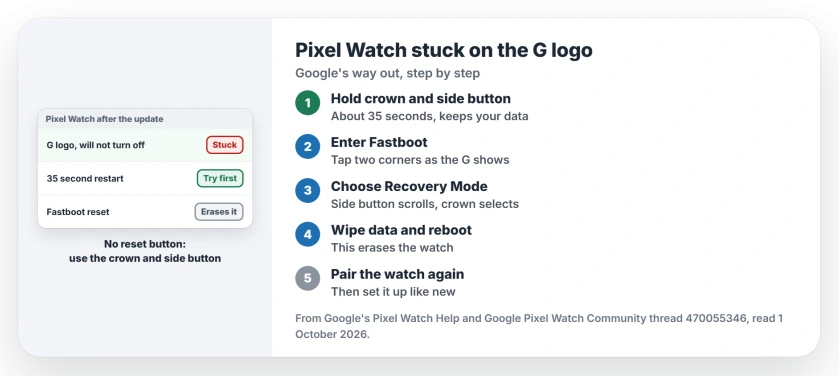
Status: checked 1 October 2026. Google's steps for a watch frozen on the G logo end in a factory reset from Fastboot, which erases the watch. A forum helper pointed the owner to that reset.
1. Try Google's long restart first
Start with the step that keeps your data. Google's help page says to hold the crown and side button for about 35 seconds or longer, until the G logo appears.
Then wait, because Google says: "The watch should restart and be ready to use shortly." If it loops back to the logo again, move on.
2. Know what a reset costs
The next steps wipe the watch. Google says: "When you factory reset your watch, all your apps, settings, and data are erased."
Have your phone ready, too. Google asks you to "Sign in with your most recent PIN or Google Account login when you re-pair your phone and watch after the factory reset."
3. Reset from Fastboot
This route is for a watch that never gets past the logo. I would read the steps through once before you start, because the tap has to land while the G shows.
Google says: "Press and hold the crown and the side button of your Pixel Watch for around 20 seconds."
As soon as the G logo shows, Google says to "tap the upper-left and lower-right edges of the watch face screen at the same time". In its words: "Your watch will enter Fastboot mode."
Press the side button to scroll to Recovery Mode, then press the crown. When the No Command message appears, hold the crown and swipe up at the same time, as Google describes, and a debug screen opens.
Swipe down to the wipe option, then follow Google's step: "Swipe right to factory reset your watch and PIN." When it finishes, choose Reboot system now.
The helper on the forum gave the owner the same answer in four words: "Factory reset from fastboot." The owner thanked them, but did not say how it went.
4. Still stuck? Try it on the charger
Google has one more step for a stubborn watch. It says to "try to hard reset your watch while it's connected to the charger".
After that, the job belongs to Google. If the watch still has not reset, its page sends you to Google support.
5. Pair the watch again
Once the reset is done, set the watch up like new. Google says: "After you factory reset your watch, you can try to reconnect it to your phone."
Do not poke anything into the side of the watch. Google says: "Your Google Pixel Watch doesn't have a physical reset button."
If your Pixel phone misbehaved after its own September update, the Pixel games and heat page covers the fix Google shipped. And for home screen widgets that go missing when the phone restarts, see the Pixel widgets page.
Why is my Pixel Watch stuck on the G logo after an update?
Google's help page does not name a cause. Its steps for a frozen G logo are a long restart first, then a factory reset from Fastboot.
How do I factory reset a Pixel Watch that will not turn on?
Hold the crown and side button for about 20 seconds, tap the upper-left and lower-right edges when the G shows, then choose Recovery Mode and wipe the data.
Will a Fastboot reset erase my Pixel Watch?
Yes. Google says the reset wipes every app, setting and piece of data, so the watch sets up as new afterwards.
The Short Version
- Hold the crown and side button for 35 seconds.
- If the logo loops, plan a factory reset.
- A reset erases the watch.
- Enter Fastboot by tapping two corners as the G shows.
- Choose Recovery Mode, then wipe the data.
- Still stuck? Try it on the charger.
- Then pair the watch with your phone again.
Where to Next
Charge the watch for a while, then try the 35 second restart once more. If the G logo comes back, go straight to the Fastboot reset.
If your watch is still stuck after both, name the model and the update in a comment. Each report goes onto this page.

Isaac Smith is the founder and editor of PC Glance, a website that covers computers, laptops, and technology. He is a tech enthusiast and a computer geek who loves to share his insights and help his readers make smart choices when buying tech gadgets or laptops. He is always curious and updated about the latest tech trends.