
Your Pixel scrolls the wrong way or ignores a tap, and you cannot work out what changed. Before you reset the phone, I would check one accessibility shortcut. It helped owners when Google's own steps did not.
The complaints began when Android 17 arrived in June. The September update did not end them, and some owners say it made things worse.
What are owners seeing?
A Pixel 9 owner put it plainly on Google's Pixel forum: "What used to be an easy task to swipe now either doesn't swipe, or swipes the opposite direction."
The September update made it worse for them: "Now I just got the September update, and scrolling is even faster". A Pixel 8 owner in the same thread describes the same change.
Android Police listed the pattern in June, including phones "registering top-to-bottom swipes as bottom-to-top swipes (and vice versa)".
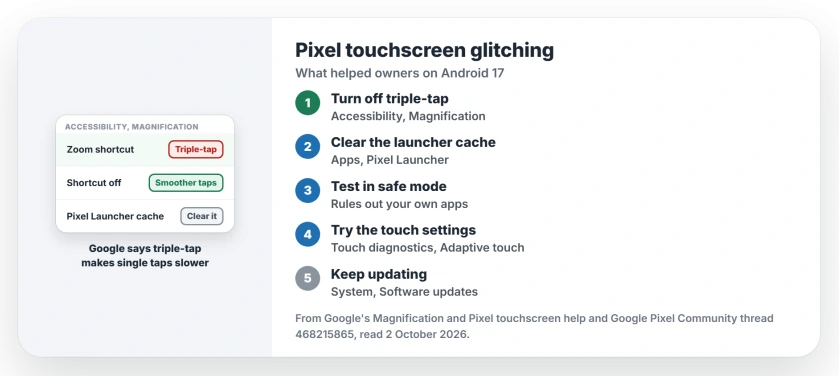
Status: checked 2 October 2026. No Google fix is confirmed. Turning off the triple-tap Magnification shortcut helped owners; Google suggested clearing the Pixel Launcher cache.
1. Turn off the Magnification shortcut
Owners report this step working, and one Pixel owner wrote on 1 October: "This has worked for me so far". Their route: Settings, Accessibility, Magnification, then turn off the Magnification shortcut.
Google's Magnification help explains why it can matter, because Google says triple-tap "may slow down your device."
Google adds the detail: "single taps take slightly longer. This short delay lets your device find out if your tap is part of a triple-tap."
Need zoom? Keep Magnification and switch its shortcut from triple-tap to the accessibility button. TechRadar reported that turning triple-tap off worked "slightly more widely" than Google's own advice. Try it first.
2. Clear the Pixel Launcher's cache
Google's suggestion, given in a reply on Reddit and reported by Android Police: Settings, Apps, See all apps, Pixel Launcher, Storage and cache, Clear cache.
Ours: clearing the cache, not the storage, leaves your home screen layout alone. User-reported results are mixed, so treat it as a second step, not the cure. It takes seconds.
3. Test in safe mode
Google's other suggestion was safe mode, and its touchscreen help agrees. A restart takes you out of it again. Safe mode turns off downloaded apps, so a clean result points at an app you installed.
If touch behaves in safe mode, remove recent apps one at a time. If it misbehaves there too, the fault sits in the system, and step 1 is your best lever.
4. Try the touch settings for your model
Google's touchscreen help splits by model. On a Pixel 9, open Display and touch in your Settings, then Touch diagnostics, and then try Adaptive touch on and off.
On a Pixel 8a or older, the same help points to Screen protector mode under Touch sensitivity. Google also suggests removing the case or screen protector for a test. Note what changes each time.
5. Keep updating, and try Smooth Display
Google's first general step is a system update, under System, Software updates. Install each one you are offered, since a later build may carry the fix.
One owner told Android Police that turning off Smooth Display fixed it, and it stayed fixed after they turned it back on. That is a single user-reported case, but it takes seconds.
What has not helped
A Pixel 8 owner in the same thread had tried the usual list: "I tried all the suggestions - there really is something wrong." The suggestions before theirs, a shorter touch and hold delay and Screen protector mode, had not settled it.
If your Pixel freezes outright or the screen goes black, the Android 17 games and heat page covers that fault. And if signal drops too, the no service page has Google's September fix.
Why is my Pixel touchscreen glitching after Android 17?
Owners have reported reversed swipes, ignored taps and racing scrolls since Android 17 arrived. Google has not named a cause, and the September update did not end it for all of them.
How do I turn off triple-tap zoom on a Pixel?
Open Settings, then Accessibility, then Magnification, and turn off the Magnification shortcut. You can also keep zoom and switch the shortcut away from triple-tap.
Should I factory reset my Pixel for touch problems?
Try the shortcut, the launcher cache and safe mode first. Owners in the thread did not report a reset helping, and it costs you your setup.
The Short Version
- Android 17 brought touch faults to some Pixels.
- Swipes go the wrong way or taps are ignored.
- Turn off the triple-tap Magnification shortcut first.
- Google says triple-tap slows single taps.
- Clear the Pixel Launcher cache next.
- Test in safe mode to rule out apps.
- Keep installing system updates.
Where to Next
Check Settings, Accessibility, Magnification now. If the shortcut is on, turn it off and use your Pixel for an hour.
If your screen still swipes the wrong way afterwards, tell me your Pixel model and build. Each new owner fix goes on this page.

Isaac Smith is the founder and editor of PC Glance, a website that covers computers, laptops, and technology. He is a tech enthusiast and a computer geek who loves to share his insights and help his readers make smart choices when buying tech gadgets or laptops. He is always curious and updated about the latest tech trends.