

You click More details in Task Manager and the window closes, every single time. It is worrying when you opened Task Manager to fix something else on the PC. I would look at one startup entry before any repair.
Owners traced it to the Claude desktop app. A Microsoft Q&A question about the crash has 10+ people with the same problem, and its accepted fix has 100+ helpful votes.
Two signs it is this crash
The first sign is in your error report: the question's report names Taskmgr.exe with "Exception Code: c0000005", and the crash comes the moment Task Manager switches to its detailed view.
The second sign is Claude on your PC. Lukas Weilguny had the same crash with "claude + pycharm running", and Nodnarb had "Just installed Claude yesterday in fact".
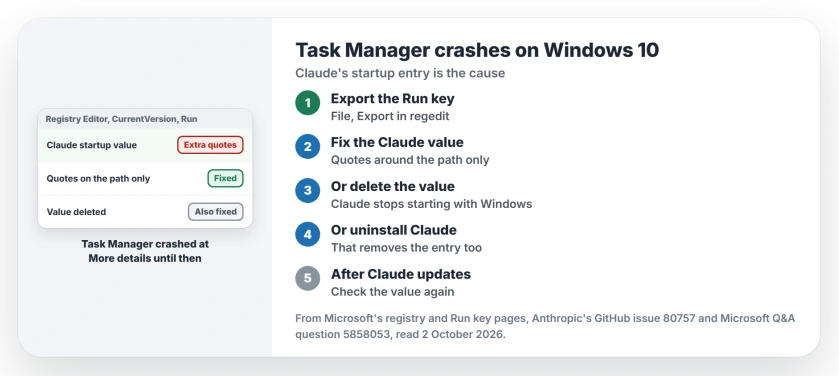
Status: checked 2 October 2026. A bug report in Anthropic's public tracker is still open. Fixing or deleting Claude's startup value, or uninstalling Claude, ends the crash.
1. Back up the Run key first
Microsoft's registry backup help covers it: open regedit, select the key, then choose File and Export.
The key is Computer\HKEY_CURRENT_USER\SOFTWARE\Microsoft\Windows\CurrentVersion\Run. Keep the exported file until Task Manager behaves.
2. Fix the quotes in Claude's entry
Tonny Wildeman's accepted answer found the fault in that key: "Look at the key for Claude and you can see that the start up key is wrong".
Claude writes its startup value with an extra layer of quotes and backslashes. The difference looks like this, where yours stands for your Windows user name:
Wrong: "\"C:\Users\yours\AppData\Local\AnthropicClaude\claude.exe\" --startup"
Right: "C:\Users\yours\AppData\Local\AnthropicClaude\claude.exe" --startup
Double-click the Claude value and change it to the right form. The person who asked replied: "Thank you very much, it helped me".
Microsoft says "The data value for a key is a command line". The bug report adds that the value should carry quotes only around the program path, "matching every other entry in the same registry key".
3. Or delete Claude's entry
If editing the value feels risky, delete the whole Claude value instead. The bug report in Anthropic's tracker says deleting it "makes Task Manager work normally again".
Claude then stops opening with Windows, so you start it yourself from the Start menu.
The slow startup page covers the other programs that start with your PC.
4. Or uninstall Claude Desktop
Uninstalling removes the entry too, as Nodnarb found: "Just uninstalled it and Task Manager is working again".
Akshay Kumar confirmed it on 20 September: "Yep, uninstalling Claude Desktop fixed my issue as well". One owner, Dave Johnson, did the same and decided: "I will stick with app or web version of Claude then".
5. Check again after a Claude update
All of this is user-reported, and the reports span months. One names Claude 1.2.234 in April, and another names 1.24012.1 in July, with the same broken value in both.
Ours: if Task Manager starts closing again after you update or reinstall Claude, open the Run key before anything else.
What you do not need
An adviser suggested "an in-place repair with the Windows 10 ISO". An automatic answer on the same page offered system file scans and updates.
Tonny Wildeman urged people to skip those, in their words: "Those are like using a nuclear bomb to take out pea shooter". Owners fixed it without touching Windows itself. Your trouble is one registry value.
And if Task Manager opens but shows a process you do not know, the strange .exe page helps you check it.
Why does Task Manager crash when I click More details?
The detailed view loads the Startup tab, which reads every Run entry. In the bug report's words, Task Manager's parser "chokes on that value and dies with an access violation".
Is it safe to edit the Run key?
Changing only the Claude value is a small, contained edit to one line for you. With the exported backup, File and Import in regedit puts everything back as it was.
Does this happen on Windows 11?
The reports here come from Windows 10, where the crash report shows Task Manager version 10.0.19041.6280. I have not seen it reported on Windows 11.
The Short Version
- Claude Desktop's startup entry crashes Task Manager.
- The crash comes at More details.
- Export the Run key before you change it.
- Fix the quotes in the Claude value.
- Or delete the value, or uninstall Claude.
- You do not need a Windows repair.
- Check the value after Claude updates.
Where to Next
Open regedit, export the Run key, and fix or delete the Claude value. Then open Task Manager and press More details.
If it still closes, tell me what your Run key holds now. I will add the day Anthropic ships a fix to this page.

Isaac Smith is the founder and editor of PC Glance, a website that covers computers, laptops, and technology. He is a tech enthusiast and a computer geek who loves to share his insights and help his readers make smart choices when buying tech gadgets or laptops. He is always curious and updated about the latest tech trends.