
You hold the button on Microsoft's prove you're human page, the bar fills, and it just says Try again. That is frustrating when you only want to sign up or sign in. I would change the browser before you try anything else.
That one step worked for owners in both directions. The biggest Microsoft Q&A question about the check has 200+ people with the same problem, and four more sit between 40+ and 100+.
Where the button fails
The 200+ question describes the loop: releasing as the bar fills fails, holding past it fails, and "Prolonged holding of the button also does not lead to successful verification".
It turns up when you create a Microsoft account, sign back in to one, or join Teams as a new user. One owner locked out of their account wrote: "I have tried repeatedly to sign back into my account", and the button stopped them each time.
Some owners never even get a working button on the page. JohnNeu saw a gray block in Edge, where "pressing it makes it turn a darker gray but holding it in that dark-gray state does nothing".
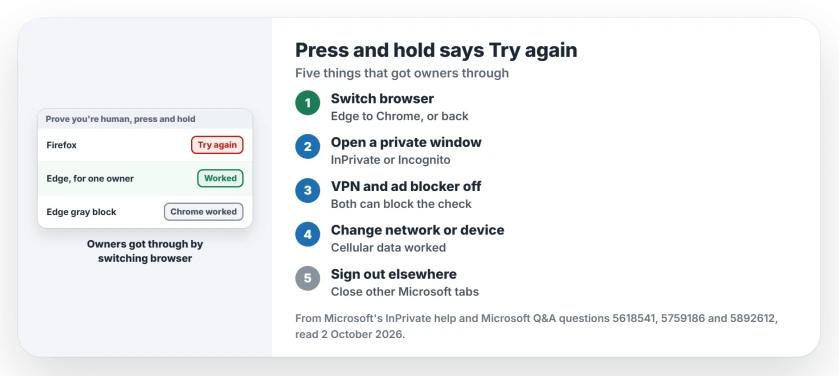
Status: checked 2 October 2026. No Microsoft fix for the loop. Owners got past it by switching browser, using a private window, or changing their network or device.
1. Switch to the other browser
Mike Walker's answer has 30+ helpful votes: "The answer for me was to use Edge, it wouldn't work Firefox".
The reverse happened too: an owner stuck in Edge wrote "So, I tried Chrome and yippee it worked". Harold Faulkner said in July: "You must use Chrome to verify your account".
And a disabled owner who started on Chrome "switched to the Edge browser and it worked the first time". So try whichever one you did not use.
2. Open a private window
On the 60+ question, one owner reported: "Incognito worked". A Microsoft support moderator lists the same step, InPrivate, as one "which Microsoft recommends for verification issues".
Microsoft's InPrivate help shows the quick way in Edge: right-click the Edge icon on your taskbar and pick New InPrivate window.
Microsoft says InPrivate clears "cookies and other site data" when you close it, so each private window starts with a clean slate.
3. Turn off ad blockers and VPNs
The same moderator explains why a VPN hurts: "Microsoft often blocks verification challenges if traffic appears masked or coming from a risky IP range". Disconnect the VPN completely before you hold the button again.
Taz, a volunteer moderator, says extensions, "especially ad blockers, can interfere with the verification process". Charles Wigginton added that some people use "browsers with in-built ad blocking", so a plain browser helps there.
4. Change the network or the device
The moderator also suggests trying from a phone hotspot instead of your home Wi-Fi, or from another device entirely.
On 1 October an owner got through on a phone like yours. They said "it worked from Outlook mobile app" on cellular data, not their home internet.
Another owner moved computers: "the moment I used my linux mint laptop (same wifi as my windows), it worked like a charm". Both of these are user-reported, one person each.
5. Sign out of other Microsoft accounts
The moderator's last warning surprises people: "Even being signed in to another Outlook/Hotmail account in a separate tab can break verification".
Ours: close every Microsoft tab, or use the private window from step 2, which starts signed out.
Locked out rather than stuck at the button? The account recovery page covers Microsoft's form.
What did not help
Holding the button longer failed for the starter. P Obloj tried three browsers and a physical mouse, and in their words, "nothing works".
Once you are in, Outlook.com may nag you about recovery methods, and the recovery method pop-up page covers that box.
Brian Simon answered the moderator's whole list with: "None of these fixes the issue and there are no other accessibility options to choose from".
Why does Microsoft's press and hold keep saying try again?
The check fails when something blocks or hides it: an ad blocker, a VPN, or a browser that never loads the button for you. Microsoft has not posted a fix for the loop.
Which browser works for Microsoft's human check?
It varies. Edge worked for some owners and Chrome for others, so switch to the one you did not use first.
Can I do the human check on my phone instead?
It can work. One owner got through in the Outlook phone app on cellular data, and Microsoft's moderator suggests another device too.
The Short Version
- Holding the button longer did not help.
- Switch to the other browser first.
- A private window worked for one owner.
- Turn off VPNs and ad blockers.
- Try cellular data or another device.
- Sign out of other Microsoft accounts.
- Microsoft has no fix for the loop yet.
Where to Next
Open the page in the browser you did not use, in a private window with your VPN off. Then hold the button once.
If none of it works, tell me which step you were on: creating an account, signing in, or joining Teams. I will add what worked for you to this page.

Isaac Smith is the founder and editor of PC Glance, a website that covers computers, laptops, and technology. He is a tech enthusiast and a computer geek who loves to share his insights and help his readers make smart choices when buying tech gadgets or laptops. He is always curious and updated about the latest tech trends.