

You open Outlook.com and a box asks you to keep access to your account with a recovery method, again, though you checked them yesterday. That gets annoying fast. I would look at your browser before your account.
The box started repeating for owners in mid-September 2026. Two Microsoft Q&A questions about it have 20+ people each, and a volunteer there reproduced the cause.
What the box asks
It asks you to "keep access to your account with a recovery method" and offers Review recovery method. That button opens Microsoft's own security page, on account.live.com, in a new tab.
Microsoft says, in its account security help, that adding another way to sign in or verify "makes it easier to recover your account if it's hacked". That is the point of the reminder, and the trouble is only the repeat.
One owner: "I already have the recovery options set up, have checked them, said all's OK but the pop up continues".
Why it keeps coming back
Hornblower409, a volunteer, tested it with private and normal windows. In a normal window: "Using a normal browser session and I only get prompted once per account". In a private one, the box came back every time.
Their reading: "My guess is that Outlook Web is looking for some kind of marker in your browser local storage that indicates you have already completed the check".
So anything that wipes your browser data brings the box back. Private windows do it, and so do cookies set to clear when the browser closes.
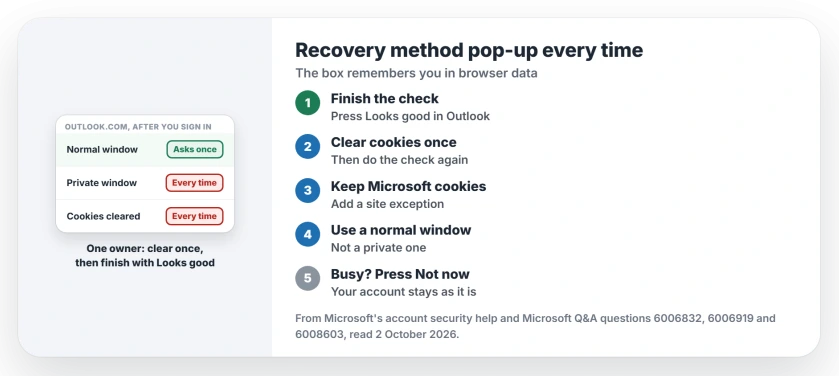
Status: checked 2 October 2026. No Microsoft fix. The box remembers you in browser data, so private windows and cleared cookies bring it back. One owner fixed it by clearing once.
1. Finish the check, including Looks good
An independent advisor gave the full sequence: select Review recovery method, confirm your methods are current, then "Go back to the 'Outlook.com' page and select 'Looks good'".
Ours: that last screen sits in the Outlook tab, not the security tab, so it is easy to miss. Switch back and answer it.
2. Clear cookies once, then repeat the check
karingK-0370 got it to stick this way: "I followed your steps after clearing the history and cookies from my Firefox browser, and so far it works".
A Microsoft moderator confirmed it for them: "Clearing browser's history and cookies is the solution in your situation".
Before you clear anything, the clearing cookies page explains what else it signs you out of.
Five days later they added that it still asks once per sign-in, then stops: "It doesn't come up again for the rest of the session". In their words, that is "Still annoying, but tolerable".
3. Keep Microsoft's cookies between sessions
If your browser clears cookies when it closes, the box has nothing to remember.
For one owner, an advisor put it this way: "The setting to clear cookies and site data when the browser closes may be the reason the reminder keeps coming back".
The advisor's middle way: "You could then keep cookie clearing enabled but add an exception for the Microsoft/Outlook sign-in sites".
That owner switched Outlook's cookies to allow, then "logged into Outlook and still got the pop-up". Treat this as a useful step, not a full cure.
4. Use a normal window for Outlook
Len Halgryn only browses in private mode, and found that "every time you log out of private mode, your cookies get deleted automatically, and the setting is lost".
Ours: open Outlook.com in a normal window and keep private windows for everything else, so your answer to the box can survive.
5. Press Not now when you are busy
The box can wait. Javier Luna's plan: "I'll just keep hitting Not Now until it magically goes away".
Ours: dismissing it leaves your account as it was, so you can do the check another day.
What did not help
If the press and hold check blocks your sign-in first, the press and hold page covers that.
Changing the password did not stop it, as LS found: "I changed my password, went into manage account and clicked Up to date several times only to get this ridiculous annoying popup".
Reviewing the methods again and again failed too. The first asker: "I've reviewed the recovery stuff many times and still get this persistent prompt".
Is the keep access pop-up real or a scam?
In the volunteer's test, the genuine box opened account.live.com, Microsoft's own address. Check the address bar before you type anything.
Why does the recovery method box keep coming back?
It looks for a marker in your browser that says you already finished the check. When cookies or site data are gone, it asks again.
Do I need to add another recovery method?
Not to stop the box. An automatic answer on Microsoft Q&A says adding one does, but owners who already had several saw it anyway.
The Short Version
- The box repeats when browser data is wiped.
- Finish the check, including Looks good.
- Clear cookies once, then do it again.
- Keep Microsoft's cookies between sessions.
- Use a normal window for Outlook.com.
- Not now is fine when you are busy.
- Microsoft has not fixed the repeat.
Where to Next
Open Outlook.com in a normal window, review your methods, and press Looks good in the Outlook tab. Then sign out, and sign in again.
If the box still returns every time, tell me your browser and how it handles cookies. I will add it here, and the day Microsoft fixes it.

Isaac Smith is the founder and editor of PC Glance, a website that covers computers, laptops, and technology. He is a tech enthusiast and a computer geek who loves to share his insights and help his readers make smart choices when buying tech gadgets or laptops. He is always curious and updated about the latest tech trends.