
You open classic Outlook and Gmail or Yahoo fails with error 0x800CCC0E, though the same mail works in a browser. That is frustrating, because Outlook never asks you to sign in again. I would clear one saved sign-in so it has to.
Microsoft documents this fault and the workaround on its own known-issue page. On its Q&A board, owners who followed it wrote that their mail came back, and one question about it has 10 people marked as having the same problem.
Why Outlook stops syncing
Microsoft says some Gmail and Yahoo accounts "stopped syncing as of February 26, 2026". It adds: "Accounts could also stop syncing after a password change".
The key detail comes next. In Microsoft's words, "when Outlook stops syncing you are no longer prompted to sign in to your account". Outlook keeps trying an old sign-in that Google or Yahoo no longer accepts, and gives up quietly.
You may also see 0x800CCC0F or 0x80070057 when you send an email, alongside the receive error. Microsoft lists those with the same fault.
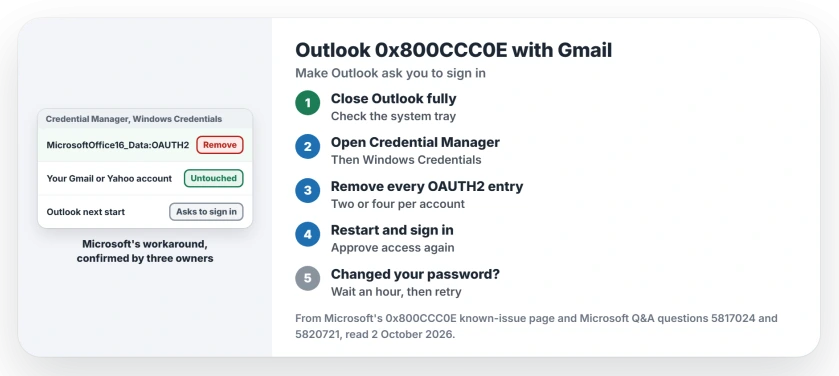
Status: checked 2 October 2026. Microsoft fixed the original fault in March, but a password change can bring it back. Removing Outlook's saved OAUTH2 sign-ins makes it ask again.
1. Close Outlook completely
The fix only works while classic Outlook is shut. Check the system tray as well, because Outlook can keep running there. Then wait a moment.
2. Remove the saved sign-ins
From the Start menu, search for Credential Manager and open it, then choose Windows Credentials. Under Generic Credentials, look for entries starting with MicrosoftOffice16_Data:OAUTH2.
Microsoft says "There are two or four of these credentials for each Gmail & Yahoo account so make sure you remove each of them". Expand each one and select Remove. Take your time.
This is safer than it looks. Microsoft states: "These steps do not remove or otherwise affect the account".
Our page on saved passwords in Windows explains what else Credential Manager holds, so you only remove these.
3. Restart Outlook and sign in
Start classic Outlook again. An owner, squeem, described what happens next: "Outlook will show a warning that the account needs to sign in again". A Google sign-in page opens in your browser, and you approve Outlook's access to your mail.
Paul B had the same Gmail fault, and in their words "the fix worked like a charm". They added: "When I logged back into Outlook, I had to re-accept all the privacy T's and C's and then my email synced".
Two more owners confirmed it under squeem's steps. One wrote that the steps "seems to have resolved matters", and another simply: "problem resolved".
4. Give it time after a password change
If you changed your Gmail or Yahoo password recently, Microsoft notes a delay: "After you change your password, it usually takes one hour for the OAuth token to expire".
Ours: wait that hour, then remove the credentials again if Outlook still has not asked you to sign in. Patience helps here.
5. If it comes back, use Microsoft's second method
Some owners only got a break. Batman57 found the steps "did in fact resolve the problem, temporarily", and another owner had it back after a day.
Microsoft's known-issue page has a second method for that case. It removes the account's identity key in the registry, which again forces a fresh sign-in the next time you open Outlook.
Not Gmail or Yahoo?
The same error code can mean other things. One owner with an iiNet address in Australia was pointed by an advisor to an article about "updating outgoing SMTP settings" from the provider.
Ours: for any other provider, compare Outlook's server settings with what your provider publishes today. Both of the fixes for Gmail are user-reported, by owners on Microsoft's board.
Gmail in the new Outlook has a separate fault with deletes, with its own workaround.
What does error 0x800CCC0E mean in Outlook?
Outlook cannot connect to your mail server to sync. With Gmail and Yahoo, Microsoft ties it to an expired sign-in that Outlook does not ask you to renew.
Will removing the credentials delete my emails?
No. Microsoft says the steps do not remove or otherwise affect the account. You sign in again, and your mail syncs back down into Outlook over the next few minutes.
Why does the error keep coming back?
A password change can expire Outlook's saved sign-in again. Microsoft's second method, clearing the account's identity key, helped owners when the first did not last.
The Short Version
- 0x800CCC0E hits Gmail and Yahoo in classic Outlook.
- Outlook stops asking you to sign in.
- Close Outlook completely.
- Remove every MicrosoftOffice16_Data:OAUTH2 credential.
- Restart Outlook and sign in again.
- Wait an hour after a password change.
- Microsoft's registry method is the backup.
Where to Next
Close Outlook, open Credential Manager, and remove the OAUTH2 entries for your Gmail or Yahoo account. Then start Outlook and sign in when it asks, using the same Gmail or Yahoo password as the web.
If the error returns within a day, tell me which provider and Outlook version you use. I will compare it with Microsoft's notes and add the result here.

Isaac Smith is the founder and editor of PC Glance, a website that covers computers, laptops, and technology. He is a tech enthusiast and a computer geek who loves to share his insights and help his readers make smart choices when buying tech gadgets or laptops. He is always curious and updated about the latest tech trends.