
A crossed-out speaker icon has appeared on your screen since a Windows update. It floats over every window you open and will not budge. I would unplug the monitor before you change anything in Windows.
On Microsoft's Q&A board, 20+ people said they have the same question. The owner who asked it got rid of the icon with that one step.
Whose icon it is
One owner asked on Windows 11 Home 25H2. In their words, the icon "has appeared on my monitor" the evening they installed an update.
A Microsoft moderator answered that it is likely coming from the monitor or a helper app, "rather than a native Windows process". More than 100 people marked that answer as helpful on the board.
Ours: a monitor with speakers draws its own volume and mute symbols over the picture. Windows never sees them. Windows cannot remove an icon it did not draw, which is why the usual Windows fixes changed nothing.
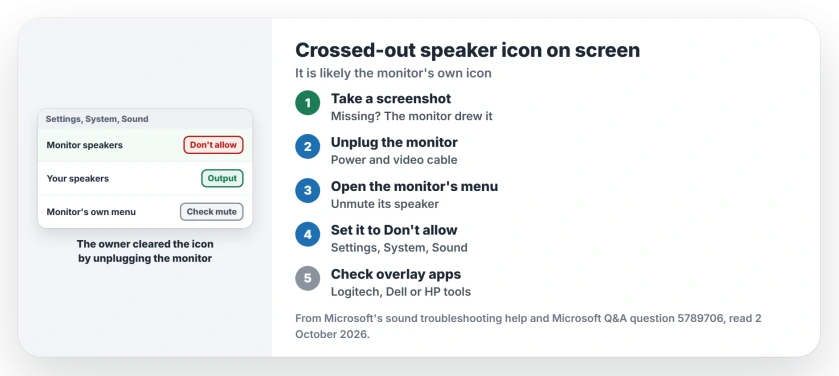
Status: checked 2 October 2026. The owner who asked cleared the icon by unplugging the monitor for a few minutes; 20+ people marked the question as theirs.
1. Take a screenshot to see who drew it
Ours: press Windows + Shift + S and capture the corner with the icon. Open the capture and look for it.
If the icon is missing from your screenshot, the monitor drew it, and the next step fixes it. If it shows up, a program on the PC drew it, so go to step 5.
2. Unplug the monitor, not just the PC
The moderator's first suggestion was a hard reset of the screen itself, "unplugging the power and display cables for 30 seconds". The power button alone is not enough.
The owner switched the monitor off, then "unplugged it from the pc tower and left it while having a cuppa". They reported back: "When I hooked it back up and switched it back on the floating icon had gone".
They had already restarted the PC before that. The monitor kept its stuck state through the restart, because restarting a PC does not cut the monitor's power.
3. Check the monitor's own menu
Open the monitor's own on-screen menu with its buttons. The moderator's advice: "Look for an audio section to ensure the monitor itself isn't muted".
If the monitor's speaker is muted there, unmute it or turn its volume up a notch. Your monitor's manual names the button that opens the menu, which is often on the back or under the bottom edge.
4. Stop Windows sending sound to the monitor
Go to Settings, System, Sound, select the monitor in the Output list, and choose Don't allow. In the moderator's words, "This prevents Windows from using the monitor as a speaker, which usually kills the associated mute icon".
Then pick your real speakers or headphones. Microsoft says to "select the device you want to use for playback as your output device" in its sound troubleshooting help.
If your sound then goes missing altogether, no sound on a computer works through the rest in order.
5. Check overlay software
Helper apps can draw icons too. The moderator named Logitech G HUB, Logi Options+, Dell Display Manager and HP Display Center, which "often trigger these overlays".
Open whichever one you have, look in its settings for on-screen notifications, and switch them off before you restart the PC. A screenshot that caught the icon in step 1 points here first, since only a program on the PC shows up in one.
What did not help
Before unplugging anything, the asker restarted the PC, restarted the Windows Audio service, switched the speaker off and on, and turned off audio enhancements. Driver updates and rollbacks did nothing either.
All of that is user-reported. It makes sense, too. None of it reaches a symbol the monitor draws for itself, on its own circuit board.
Why is there a crossed-out speaker icon on my screen?
Probably your monitor's own mute symbol. A Microsoft moderator said it is likely not a Windows process. Unplugging the monitor cleared it for the owner.
Will restarting Windows remove the floating speaker icon?
Not for the owner here. A restart does not cut the monitor's power, so the icon survived. Unplugging the monitor for a few minutes cleared it, after every Windows fix the owner tried had failed.
How do I stop Windows using my monitor's speakers?
Open Settings, System, Sound, select the monitor under Output, and choose Don't allow. Windows then stops sending sound to it. Your sound settings let you pick the speakers you do want.
The Short Version
- The icon is usually the monitor's own mute symbol.
- A screenshot shows whether Windows drew it.
- Unplug the monitor's power and video cable.
- The owner's icon was gone after a short wait.
- Check the monitor's audio menu for mute.
- Or set the monitor to Don't allow in Sound.
- Overlay apps from Logitech, Dell or HP can draw it too.
Where to Next
Switch the monitor off and unplug it, power and video cable, for a few minutes. That one step cleared the icon for the owner who asked.
If the icon comes back after the next update, tell me your monitor model in the comments. A pattern by brand would help the next reader.

Isaac Smith is the founder and editor of PC Glance, a website that covers computers, laptops, and technology. He is a tech enthusiast and a computer geek who loves to share his insights and help his readers make smart choices when buying tech gadgets or laptops. He is always curious and updated about the latest tech trends.