
You open Microsoft Solitaire Collection, or another Xbox game on your PC, and it will not sign you in to Xbox Live. It shows 0x8004A97E and offers guest play. I would clear the saved Xbox sign-in before you reinstall anything.
It started for many people on 23 and 24 September. One question on Microsoft's Q&A board has drawn 60+ same-question votes, and owners posted what got them back in.
What owners saw
One asker had played "every day for months" while signed in. Then, in their words, "It gives me an error code of 0x8004a97e". Repairing and resetting the app changed nothing.
Another owner dated the wave to "Wednesday, September 23rd". Games that sign in failed, while a game that needs no sign-in still played. One owner found it "fails for Microsoft Solitaire Collection and Microsoft Mahjong" on the same PC.
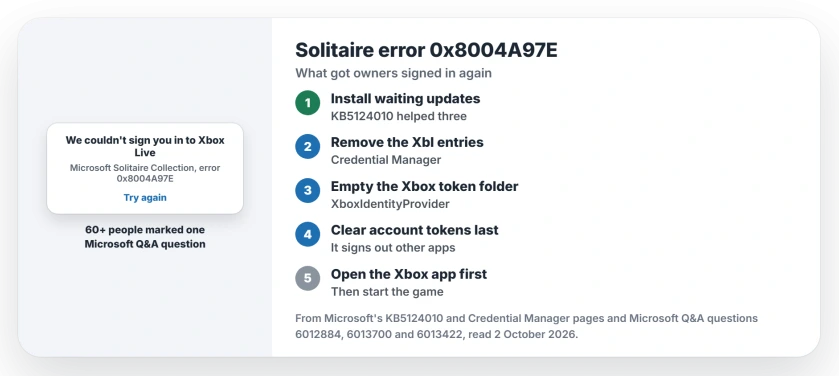
Status: checked 2 October 2026. No Microsoft statement yet. Owners fixed it by clearing saved Xbox sign-ins or installing the September preview update; for some it cleared by itself.
1. Install the updates waiting for you
The fix owners repeated most often was an update, so check yours first. One wrote that they "just did Update (KB5124010) (26200.9550), and can now login and play". A second confirmed it: "Problem Solved". A third tried it and it worked.
If you are on Windows 11, KB5124010 is September's optional preview. Microsoft's KB5124010 page puts it under Settings, Windows Update, Advanced options, Optional updates.
Ours: I would not read too much into it. Its notes say nothing about Xbox. One owner fixed the error by removing it instead, and Windows 10 PCs without it had the error too.
The same update also fixed a File History fault, so it is a useful one to have anyway.
2. Remove the Xbl entries in Credential Manager
Microsoft says you open it by typing credential manager into taskbar search, in its Credential Manager help.
Choose Windows Credentials. Under Generic Credentials, one owner advised to "remove entries that start with or contain Xbl", then restart the PC.
That owner said "This is what worked for me just now". A second followed it and reported that it "seems to be working" now. A third owner had removed them with no luck, so keep going if yours stays stuck.
If you are new to that screen, where Windows keeps your saved passwords shows what else lives there.
3. Empty the Xbox sign-in token folder
Close the game and the Xbox app first. Then press Windows + R, paste this path and press Enter:
%localappdata%\Packages\Microsoft.XboxIdentityProvider_8wekyb3d8bbwe\AC\TokenBrokerDelete everything inside that folder, not the folder itself, and restart the PC before you open the game. The owner who found it was candid: "I don't know if it will work for all cases, but it worked for me".
4. Clear the Microsoft account tokens, last
The original poster of another thread went further and reported that "The game launched successfully with no further sign-in errors". In Credential Manager they removed the MicrosoftAccount and SSO_POP entries.
Then they emptied the token folder of Windows' sign-in broker, at this path:
%localappdata%\Packages\Microsoft.AAD.BrokerPlugin_cw5n1h2txyewy\AC\TokenBrokerOurs: this signs you out of other Microsoft apps too, so Outlook, Teams and OneDrive may ask you to sign in again. I would keep it for last.
5. Sign in to the Xbox app first
Restart, then open the Xbox app before the game and wait until it shows your gamertag. In that owner's steps: "Open the Xbox app first and sign in successfully". Only then start Solitaire.
What did not help
Owners repaired and reset the games, the Xbox app and the Microsoft Store. They reinstalled Gaming Services, ran wsreset, sfc and DISM, and changed DNS. None of it moved the error.
One owner put it simply: standard repair, reset and reinstall "flows do not touch the token cache". All of this is user-reported.
What does error 0x8004A97E mean?
It appears when your sign-in to Xbox Live fails before the game starts. One owner blamed a stale sign-in token stored on the PC, and the fixes that worked all clear saved sign-ins.
Did KB5124010 cause the 0x8004A97E error?
Not on its own. Three owners said installing it fixed the error, one said removing it did, and Windows 10 PCs without it had the error as well.
Why does Solitaire still work as a guest?
Guest play does not sign in to Xbox Live, so your broken sign-in never runs. A game that needs no sign-in, Vampire Survivors, kept working on one owner's PC too.
The Short Version
- 0x8004A97E is a failed Xbox Live sign-in.
- A wave started on 23 September.
- The September preview update fixed it for three owners.
- Removing Xbl credentials fixed it for two.
- Emptying the Xbox token folder fixed it for one.
- Clear the Microsoft account tokens last.
- Then sign in to the Xbox app before the game.
Where to Next
Start with Windows Update and the Xbl entries in Credential Manager, then restart. That pair covers most of the confirmed fixes.
If none of it works, leave a comment naming the game and your Windows version. A pattern would help the next person stuck at the same screen.

Isaac Smith is the founder and editor of PC Glance, a website that covers computers, laptops, and technology. He is a tech enthusiast and a computer geek who loves to share his insights and help his readers make smart choices when buying tech gadgets or laptops. He is always curious and updated about the latest tech trends.