
A "News Roundup" panel drops over your apps on a Moto G, full of headlines you never asked for. You look for it in Settings, Apps to uninstall it, and it is not there.
I would turn off Glance, Motorola's lock screen content service, and then disable the Glance app itself, because an owner on Android Enthusiasts did both and has not seen News Roundup since.
The question on Android Enthusiasts has had 6,464 views since late July.
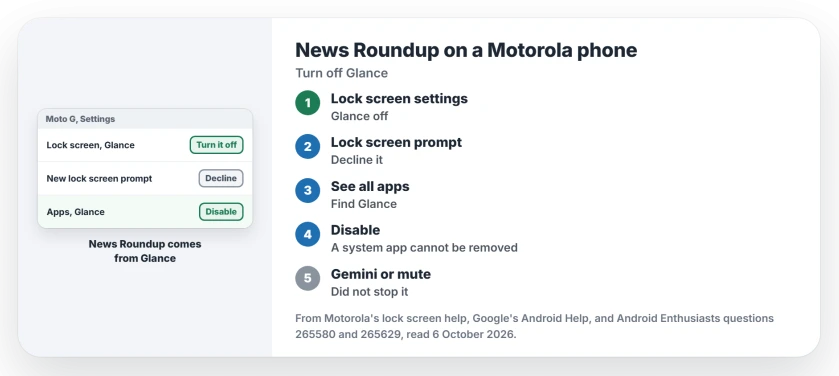
Where News Roundup comes from
The owner saw it on a Moto G Stylus, dropping over Google Messages with Gemini's blue star on it. So they blamed Gemini first. In their words: "Turning off Gemini in Messages did not stop it".
Status: checked 6 October 2026. A News Roundup panel kept appearing on Moto G phones. An owner found Glance behind it, disabled the app, and the panel stopped.
The real source was Glance. A prompt for a "New Home/Lock Screen Experience" kept coming back, and its small print said that accepting it meant using Glance.
1. Turn Glance off on the lock screen
Motorola's route on its lock screen help page is Settings, Home and lock screen, Lock screen, Glance. Turn it off there.
Motorola notes that "Not all carriers and countries support this feature". So your menu may look a little different.
2. Decline the new lock screen prompt
When the New Home/Lock Screen Experience prompt appears, decline it, as the owner did once more just before disabling Glance. It has not come back for them.
3. Disable the Glance app
Open Settings, Apps, See all apps, find Glance and tap Disable. Google's Android Help says plainly: "You can also disable system apps that came with your phone".
After that the panel stopped for the owner. Their verdict: "So I think Glance was the problem, and Disabling it is the solution".
Another answer quotes a forum owner who went one step further: they "un-installed its updates, cleared its data, and Disabled it". The same post says this keeps Glance off the lock screen and away from Play updates.
Why you cannot uninstall it
Glance comes as a system app on these phones. A member put it bluntly: "If it's a system's app you can't uninstall it unless with root". Disable is the closest you get.
Ours: disabling hides Glance and stops it running. You can switch it back on from the same screen if you ever want it.
Things that did not stop it
I would skip the Gemini switch: turning off Gemini in Messages changed nothing, as the owner found. Neither did the panel's own gear, which only offers to mute it for a day or 8 hours.
The owner also tried the notifications route first: "Turning off Notifications from the Glance app did not stop it". Only disabling the app worked.
Which Motorola phones show it?
Owners reported it on a Moto G Stylus and a Moto G Play running Android 14; Motorola's Glance page is general, so other Moto models with Glance can show the same panel.
If your phone has felt sluggish since this appeared, an Android phone that got slow explains storage versus memory. For drain, Android battery draining fast starts with the usage screen.
The Short Version
- News Roundup on a Moto G comes from Glance, not from Google Messages.
- Turn Glance off in Settings, Home and lock screen, Lock screen, Glance.
- Decline the New Home/Lock Screen Experience prompt.
- Disable the Glance app in Settings, Apps.
- Glance is a system app, so you cannot uninstall it without root.
- Muting the panel or its notifications did not stop it.
Where to Next
Open Settings, Apps, See all apps now and look for Glance. If it is there, disable it and watch for the panel over the next day.
Which Motorola model do you have, and did News Roundup stop? Tell me in the comments.

Isaac Smith is the founder and editor of PC Glance, a website that covers computers, laptops, and technology. He is a tech enthusiast and a computer geek who loves to share his insights and help his readers make smart choices when buying tech gadgets or laptops. He is always curious and updated about the latest tech trends.