
Your laptop's screen goes dark seconds after you step away, long before the timeout you set in Settings. Sit in front of it, though, and it stays on for minutes. It feels as if the camera is watching you. It may be.
I would look for a presence sensor before blaming Windows, since an owner with a ThinkPad on Super User timed the blackout, and the accepted answer traced it to Lenovo's own presence feature.
Asked in July 2025, it has 3,822 views, and the owner came back later to report what happened next.
What the owner timed
The owner had a ThinkPad X1 running Windows 11 Pro, with the screen set to switch off after 25 minutes. It did not wait that long. Out of the camera's view, it took "about 25 seconds for the display to begin to turn off".
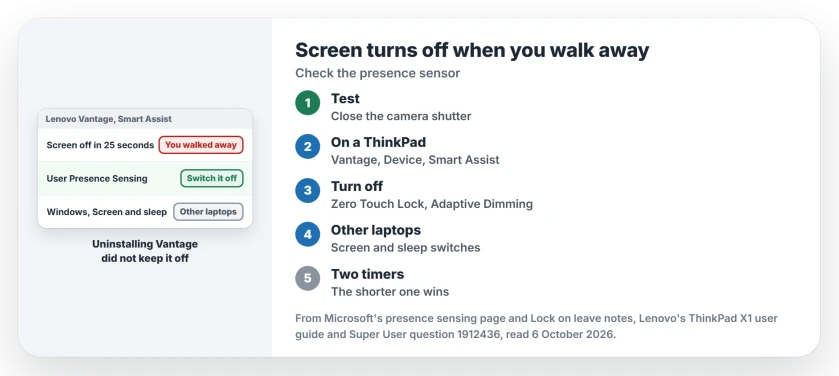
Status: checked 6 October 2026. A ThinkPad screen went dark 25 seconds after its owner walked off. Lenovo's User Presence Sensing did it, and the Vantage app turns it off.
Sitting at the desk, in front of the camera, they could go "multiple minutes" without it. Their own guess, which they expected to sound crazy, was close: "It's almost like the camera is watching me".
They searched Settings for Windows' own switch for this and could not find it. That was the clue.
Two places the sensor is set
Microsoft says on its presence sensing page that "Some Windows 11 PCs have a presence sensor built in".
With one, "you can have your screen turn off automatically when you leave", and the switches sit in Settings, System, Power & battery, Screen and sleep.
Microsoft also warns that your PC may not show every option, depending on "the capabilities enabled by your device manufacturer". That fits the owner's case. The Windows switch was missing, and Lenovo's app turned out to run the sensor.
1. On a Lenovo: Vantage, Device, Smart Assist
The accepted answer, posted the same day, named it at once: "That's a Lenovo feature". Lenovo calls it User Presence Sensing, and its user guide puts the settings in the Vantage app under Device, then Smart Assist.
You can turn off Zero Touch Lock there, which locks the laptop when you leave. Adaptive Dimming sits beside it and dims the display whenever you face away from it. Or switch off User Presence Sensing for the whole lot. That stops all three.
Lenovo says the feature stays off while "the computer display or camera shutter is closed", and also when "the computer is connected to an external display".
Ours: slide your camera shutter closed for ten minutes and carry on working. If the early blackouts stop, you found the cause. Then open the shutter again.
2. On other laptops: Windows' Screen and sleep switches
Some laptops leave it to Windows. Where Settings shows them, Microsoft names two switches: "Automatically turn off my screen when I leave" and "Automatically wake up my device when I approach". Turn the first one off.
Or keep it on with a longer wait, because its More options page has "Then, turn off my screen after this amount of time". Microsoft's design notes add a detail on timing: "The screen turns off 5 seconds before the selected timeout".
The same notes cover your normal screen timeout as well. When both are set, "the more aggressive setting wins". The shorter one always fires first. Still going dark too soon? Check the two Windows timeouts next.
Why uninstalling Vantage did not stop it
A commenter suggested removing the Vantage app, reasoning that software which cannot see you cannot switch the screen off. The owner tried it. Some time later, the setting came back on its own. The app was already gone.
In their words: "I would not recommend uninstalling vantage for this reason". Ours: keep Vantage installed and turn the feature off inside it, where it stays off. I would recheck the switch after big Lenovo or Windows updates, just in case.
Does the camera record me?
Lenovo says no. Its guide says the feature uses the camera to detect you, and that "Lenovo does not collect or store any personal data from the camera". Windows lists the apps allowed to use a presence sensor under Settings, Privacy & security, Presence sensing.
If you want a lock when you leave, without any camera involved, Dynamic Lock pairs the PC with your phone over Bluetooth instead. I would pick that on a desktop with no sensor.
The Short Version
- A screen that dies seconds after you leave means a sensor.
- On a ThinkPad, it is User Presence Sensing in Vantage.
- Turn off Zero Touch Lock, Adaptive Dimming, or the whole switch.
- Other laptops keep it in Settings, Power & battery, Screen and sleep.
- The shorter of the two timers wins.
- Uninstalling Vantage did not keep it off.
Where to Next
In Vantage, open Device, then Smart Assist, and switch off User Presence Sensing, or open Screen and sleep on other laptops.
What brand is your laptop, and where did you find the switch? Tell me in a comment.

Isaac Smith is the founder and editor of PC Glance, a website that covers computers, laptops, and technology. He is a tech enthusiast and a computer geek who loves to share his insights and help his readers make smart choices when buying tech gadgets or laptops. He is always curious and updated about the latest tech trends.