
You plug your phone into a Windows PC and pick File Transfer on the phone, but nothing shows up in File Explorer. The phone charges, and that is all. Device Manager shows an entry called MTP Device with a yellow warning triangle.
I would check which driver Windows chose before you swap cables, since a Super User owner found Windows picking a driver from phone tools over Microsoft's own.
Asked in November, their question now has 6,252 views. The biggest Microsoft Q&A thread on a phone that only charges has a Same question count of 50+.
What Device Manager shows
The Super User owner had installed phone repair tools, such as Chimera Tool, which add drivers of their own. From then on, every phone or GPS they plugged in showed as MTP Device, with an exclamation mark and Code 1 in its properties.
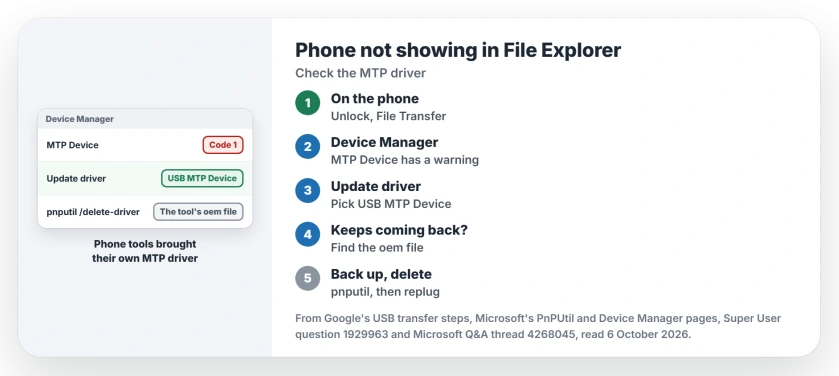
Status: checked 6 October 2026. Windows gave every new phone a third-party MTP driver that failed. Picking USB MTP Device fixed it, and deleting that driver stopped it coming back.
Nothing appeared under This PC, and Microsoft's table names Code 1 CM_PROB_NOT_CONFIGURED, meaning your device has no working setup. What each Device Manager code points to covers the other numbers.
Check the phone side first
Google's steps for a USB transfer start with unlocking your phone. Connect it, tap the "Charging this device via USB" notification, and choose File Transfer under Use USB for.
Ours: no notification at all? Try another cable before anything else. Some cables only charge, and you cannot tell them apart from data cables by looking.
1. Pick Microsoft's driver from the list
The owner's own workaround works on the spot: in Device Manager, right-click MTP Device and choose Update driver. Pick Browse my computer for drivers, then take the option to pick from a list of available drivers.
Choose USB MTP Device. In their words, "it works, the exclamation mark disappears". The entry then takes your phone's name, for them an S24, and the phone opens in File Explorer like a drive.
A Microsoft Q&A owner met a variant: their phone sat under Android Composite ADB Interface, a driver for developer tools. They switched it the same way to USB Composite Device. Then they plugged the phone in again.
Confirmed by an owner: "It worked for me". If your phone shows that ADB name instead of MTP Device, try their choice.
2. Delete the tool's driver so it stops coming back
The pick only lasts for that phone. The owner's next new device got the bad driver again, so the accepted answer removes it from Windows for good. Open Terminal (Admin) and list your connected devices with their drivers:
pnputil /enum-devices /connected /drivers > drivers.txtOpen drivers.txt and find the MTP Device entry. Note the driver it lists as installed, an oem file such as oem42.inf. Then back it up and delete it, with your own oem number:
pnputil /export-driver oemNN.inf C:\MTPbackup
pnputil /delete-driver oemNN.inf /force
Make the C:\MTPbackup folder first, since the answer warns the "directory must exist". Microsoft's pnputil reference says /force will "delete driver package even when it is in use by devices".
Ours: oem files are always third-party, so pnputil cannot remove Microsoft's own MTP driver, wpdmtp.inf, this way. I would still check the provider line names the tool's maker.
Running that tool again may put its driver back, so repeat this after you use it.
When the phone only charges
The Q&A asker's phone worked on another laptop, running Windows 10. On their Windows 11 one it only charged. Same phone, different PC, so the fault sat with that PC.
Ours: that is the quickest test you have. If your phone opens on another PC, work through steps 1 and 2 on yours. I would run that test with a cable that has moved files before.
Need a few files right now? Send them over Bluetooth without the cable.
The Short Version
- Unlock the phone and choose File Transfer.
- A warning on MTP Device means the wrong driver.
- Choose USB MTP Device from the list.
- Delete the tool's oem driver with pnputil.
- Back it up first, into a folder that exists.
Where to Next
Plug the phone in, update MTP Device to USB MTP Device in Device Manager, and look in File Explorer.
Which phone tool put its driver on your PC? Share it in the comments.

Isaac Smith is the founder and editor of PC Glance, a website that covers computers, laptops, and technology. He is a tech enthusiast and a computer geek who loves to share his insights and help his readers make smart choices when buying tech gadgets or laptops. He is always curious and updated about the latest tech trends.