
A Windows 11 pop-up keeps telling you "This module is blocked from loading into Local Security Authority", and it names mdnsNSP.dll in a Bonjour folder. You may never have installed anything called Bonjour.
I would update Bonjour before touching any security setting. It is Apple's network discovery service, and it came with iTunes or a printer driver.
The biggest Microsoft Q&A thread on the pop-up has Same question at 60+. In a second thread with 20+, an owner who updated Bonjour wrote that the warning went away.
Why Windows blocks the file
Local Security Authority protection keeps unsigned add-ons out of the process that handles your sign-in. Bonjour's mdnsNSP.dll tries to load into it, and Windows refuses.
Microsoft's LSA protection page explains the logs it writes. Microsoft says: "These events can help you identify LSA plug-ins and drivers that fail to load due to signing reasons."
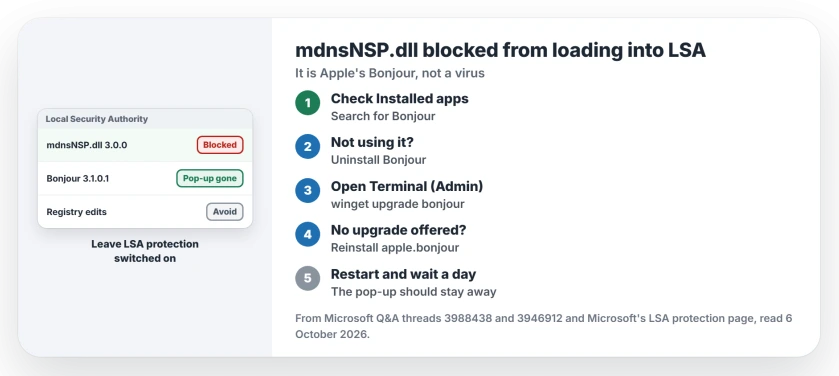
Status: checked 6 October 2026. The pop-up names Bonjour's mdnsNSP.dll on Windows 11. Updating Bonjour with winget from 3.0.0 to 3.1.0.1 cleared it, and a reinstall worked too.
The block itself means the protection is working. What stops is Bonjour, and iTunes can lose sight of your iPhone, as it did for the Super User asker.
1. Check that Bonjour is installed
Open Settings, then Apps, then Installed apps, and search for Bonjour. The top answer in the 60+ thread was simply: "Check if you have Bonjour installed. That should be the problem."
Found it? If you never use iTunes or a Bonjour printer, uninstall it, and otherwise update it.
2. Update Bonjour with winget
This is the fix one owner confirmed. Right-click Start, open Terminal (Admin), and run:
winget upgrade bonjourThey had started seeing the pop-up after the 24H2 update. In their words: "It upgraded me from 3.0.0 to 3.1.0.1". Then: "The error seems to have gone away."
Ours: the owner's report points at the old 3.0.0 build. A restart loads the same file again, which is why it does not help.
3. Or reinstall it
If winget says there is no upgrade, remove it and install Apple's package fresh:
winget uninstall bonjour
winget install apple.bonjour
The owner who did that noticed two packages with similar names and picked Apple's. Days later they wrote: "Havent had the error in a few days now".
Owners report other routes too, and another fixed it with Repair in Control Panel, under Programs and Features: "Solution worked for me". A second owner said repairing did not help them, so I would use winget first.
Should you turn LSA protection off?
No, and I would leave it on. Some answers tell you to unregister the DLL in the registry or switch the protection off. One owner who edited the registry wrote that "my PC fails to boot" and had to use a restore point.
The Super User asker removed Bonjour's entries with a startup tool, and "it put my computer at a perpetual restart loop". A pop-up does not justify that risk.
If Windows Security then shows its own warnings, our page on the red X in Windows Security and the false Defender turned off notice cover both.
Is mdnsNSP.dll a virus?
Not in this case, because the file sits in Apple's Bonjour folder, and the block comes from its signing, not from a scan. If it shows up somewhere else, run a full scan.
The Short Version
- The pop-up means Windows blocked Bonjour's mdnsNSP.dll from the sign-in process.
- Bonjour comes with iTunes and some printer drivers.
- Run winget upgrade bonjour in an admin terminal.
- Or uninstall it, then winget install apple.bonjour.
- Do not edit the registry or turn LSA protection off.
- Not using Bonjour at all? Uninstall it.
Where to Next
Open Terminal (Admin), run winget upgrade bonjour, and restart. Then wait a day for the pop-up.
Which app put Bonjour on your PC, and did the update stop the warning? Tell me in a comment.

Isaac Smith is the founder and editor of PC Glance, a website that covers computers, laptops, and technology. He is a tech enthusiast and a computer geek who loves to share his insights and help his readers make smart choices when buying tech gadgets or laptops. He is always curious and updated about the latest tech trends.