
Your app or Docker container will not start, and the error says an attempt was made to access a socket in a way forbidden by its access permissions. netstat shows nothing on that port.
I would check which ports Windows has set aside before hunting for a rogue program. A Stack Overflow question asking what reserves these port ranges has 53,393 views, and a Super User one about deleting them has 46,944.
Windows can reserve ports in blocks
Windows keeps a list of excluded ports that no program may bind to. Owners report Hyper-V and the networking behind WSL 2 and Docker adding blocks, usually 100 ports each.
The blocks can move after a restart. So your port works one day and fails the next. One command shows the list:
netsh interface ipv4 show excludedportrange protocol=tcp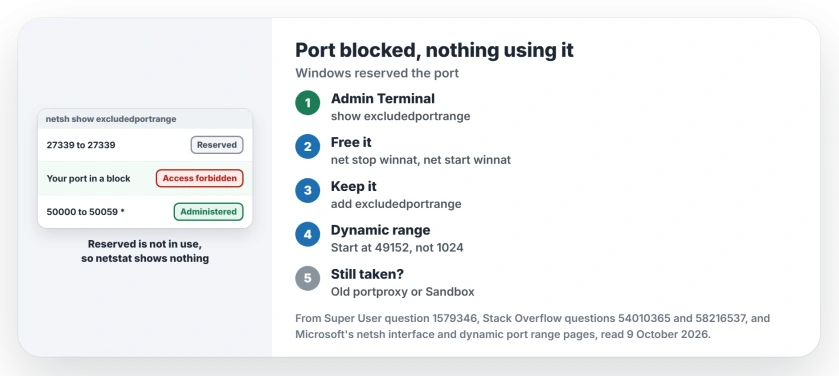
Status: port lists pulled on this laptop and owner threads checked, 9 October 2026, Windows 11 25H2. Restarting winnat, reserving a port or fixing a low dynamic range freed it.
Ours: this laptop lists only two exclusions, port 27339 and 50000 to 50059, the second marked as administered. Its dynamic range starts at 49152.
1. Restart the winnat service
This fix has the most confirmations. Run both lines in an administrator Terminal:
net stop winnat
net start winnat
On the Super User question, the accepted answer gives the stop command, and owners kept confirming it. One had been "Searching for months now for a solution" before this worked.
Another on Stack Overflow said it "worked immediately, didn't even require a restart" on Windows 10 Pro. Check the list again afterwards, and your port should be gone from it.
It has two costs. The author of the top Stack Overflow answer found their WSL 2 terminal lost its internet connection until a reboot brought it back.
One owner had net stop winnat hang, with the service stuck in STOPPING, and rebooted anyway.
Our page on WSL 2 with no internet covers that side if it stays broken.
2. Reserve your own port before Windows does
Restarting winnat frees the port today. To keep it free, add your own exclusion while it is free:
netsh int ipv4 add excludedportrange protocol=tcp startport=1313 numberofports=1Change the number to your port. I would reserve each port you use. Microsoft documents this command on its netsh interface page. Your exclusion stays after a restart unless you say otherwise.
Your range then shows with an asterisk as an administered exclusion. The accepted Stack Overflow answer on administered exclusions shows Hyper-V placing its own blocks around a range reserved this way.
An owner running Hugo, which uses port 1313, turned Hyper-V off, reserved the port, turned Hyper-V back on and rebooted. That "fixed it", they wrote.
Why delete gives Access is denied
Owners try netsh int ipv4 delete excludedportrange first and get Access is denied, even as administrator. Microsoft says the delete works on "a previously set exclusion". The start port and count must match one you created yourself.
That fits what owners see: you did not create the blocks Hyper-V adds, so delete refuses them and the fixes go around them.
3. Check the dynamic port range
Programs that connect out borrow ports from a dynamic range. If yours starts at 1024 or 1025, Windows can reserve blocks right where your own tools listen. Check it:
netsh int ipv4 show dynamicport tcpYour range should match the default on Microsoft's dynamic port range page: "The new default start port is 49152, and the new default end port is 65535".
One owner's PC started at 1025. Docker then reserved ports inside the 1025 to 5000 range. This sets yours back, then reboot:
netsh int ipv4 set dynamicport tcp start=49152 num=16384One reader warned that outgoing connections need these ports too. Keep your range generous.
Other things owners found
Do you forward ports from WSL 2 to Windows? One owner found an old netsh portproxy listener holding the port. netsh interface portproxy show all lists yours, and deleting the stale one freed it.
Another uninstalled Hyper-V and the blocks stayed. After several attempts they found Windows Sandbox, which runs on the same virtualization, was the cause and uninstalled it.
What to leave alone
You will see netcfg -d in Docker threads. It removes network adapters, and one person reported it left Docker unable to start even after reinstalling Hyper-V. I would try everything else first.
Settings has its own network reset, which removes adapters too. Our network reset page lists what it wipes, Hyper-V switches included.
Turning Hyper-V off may not help you either. The Super User asker had already moved Docker to WSL 2, and the ranges still changed after every reboot.
The Short Version
- List the blocks: netsh interface ipv4 show excludedportrange protocol=tcp.
- Restart winnat as administrator; reboot if WSL 2 loses internet.
- Reserve your port with add excludedportrange while it is free.
- Check the dynamic range starts at 49152, not 1024.
- Look for an old portproxy listener or Windows Sandbox.
Where to Next
Which port was blocked, and what was holding it on your PC? Put the tool and the port in a comment. These ranges vary a lot between machines.

Isaac Smith is the founder and editor of PC Glance, a website that covers computers, laptops, and technology. He is a tech enthusiast and a computer geek who loves to share his insights and help his readers make smart choices when buying tech gadgets or laptops. He is always curious and updated about the latest tech trends.