
Your Notepad text has jumped to the right edge, and new typing builds leftward. Periods land at the wrong end of your sentences. You only pressed a few keys.
I would undo it with the same kind of key pair that caused it. Ctrl with the right Shift key switches a line to right to left. Ctrl with the left Shift switches it back.
Super User has 193,651 views on its August 2011 question about the flip. A Lync chat box with that switch drew a 300+ question on Microsoft Q&A.
The key pair that flipped your text
The new Notepad on your Windows 11 PC is built on RichEdit, Microsoft's text control, and a post on Microsoft's RichEdit blog explains its hot keys.
RichEdit tells your two Shift keys apart. The post says this lets it "handle the Ctrl+RightShift hot key to switch the BiDi paragraph directionality to RTL (right to left)".
The next sentence there: "Similarly, Ctrl+LeftShift switches to LTR". BiDi means text that can run in both directions, as Arabic and Hebrew do.
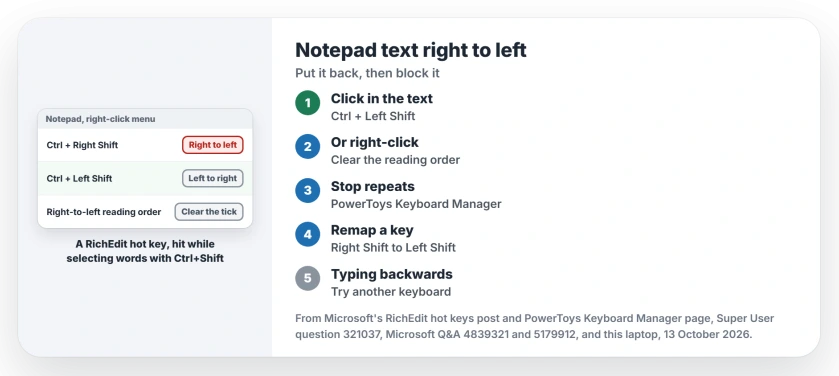
Status: on 13 October 2026, Notepad 11.2607.14.0 on Windows 11 25H2 still has the switch. Ctrl+Left Shift or the right-click menu puts your text back to left to right.
Ours: the Notepad package on this laptop, version 11.2607.14.0, ships the RichEdit files. Its menu text includes the line Right-to-left reading order.
Only the US English layout is installed here, and the menu item is still there, as it will be on yours.
Put it back
Press Ctrl with the left Shift key
Click in your text. Press Ctrl and the left Shift key together. Either Ctrl key works.
Confirmed by an owner on Windows 11 in January 2024, with a UK keyboard and the default Notepad: Ctrl with left Shift "causes alignment left-to-right", and Ctrl with right Shift "causes alignment right-to-left".
Or use the right-click menu
Right-click anywhere in the text. If Right-to-left reading order has a check mark, click it to clear it. The accepted Super User answer gave exactly this, and the asker replied that they had never spotted the option before.
On the Lync thread, the answer about that menu item was marked helpful by 300+ people. Its author called the menu item "very obvious" once you know where to look.
Stop it happening again
The trap is a shortcut you probably use all the time without thinking. Ctrl+Shift with an arrow key selects a word at a time. Press the right Shift a fraction early and you get the direction switch. It happens mid-sentence.
Microsoft says on its Keyboard Manager page that PowerToys lets you "remap keys and shortcuts on your keyboard". Remap the right Shift key to the left Shift key, and Ctrl+Right Shift can no longer reach Notepad.
That idea came from Super User. One commenter suggested blocking Ctrl+Right Shift outright with AutoHotkey, and another tried it and found it "breaks ctrl+RShift+arrow for word highlighting".
Mapping the right Shift key to the left Shift key kept both working, they wrote. A 2024 answer did the same in PowerToys.
One catch from Microsoft's page: remapping only works while PowerToys runs. In its words, "If PowerToys is not running, key remapping will no longer be applied".
If you never use the right Shift key on its own, that remap costs you nothing at all. I would set it once and forget it. Shift has another accidental trick, by the way: five taps turn on Sticky Keys.
Other text boxes flip the same way
Chat boxes and Word do it too. On a 2022 Q&A thread marked 20+, a person with Hebrew and Arabic installed found the switch fired in Word all the time. They reported that before an RTL language was installed, Ctrl+Shift only selected words.
So if you added Arabic or Hebrew for one job, more apps will now honor the switch. Removing that keyboard, once you no longer need it, is the other way out.
Settings' Change Key Sequence does not help either, the same person found, since it lists only the input language and layout switches.
Is all your typing backwards, everywhere?
That is a different fault. In July 2026 an owner on Q&A had text boxes where the cursor stayed left and typing came out backwards. It was the keyboard itself. They swapped in an old one and the fault was gone. Try another keyboard before anything else.
If your keys put out odd characters instead, our page on an apostrophe that needs pressing twice covers layouts that hold keys back.
The Short Version
- Ctrl+Right Shift turns a line right to left. Ctrl+Left Shift turns it back.
- Or right-click and clear Right-to-left reading order.
- To stop it: remap right Shift to left Shift in PowerToys Keyboard Manager.
- An Arabic or Hebrew keyboard makes more apps honor the switch.
- Typing backwards in every box points to the keyboard itself.
Where to Next
Were you selecting words with Ctrl+Shift and an arrow when it flipped? Drop a comment with what you were doing. I collect these slips, and a pattern helps me warn others.

Isaac Smith is the founder and editor of PC Glance, a website that covers computers, laptops, and technology. He is a tech enthusiast and a computer geek who loves to share his insights and help his readers make smart choices when buying tech gadgets or laptops. He is always curious and updated about the latest tech trends.