
A menu item you clicked, or a small Close label, is frozen on your screen. It floats over every window, clicks go straight through it, and closing the app that made it changes nothing.
I would see it as a drawing leftover, not a program still running. Windows fades out the item you click, and sometimes the fade never finishes.
Super User's 2009 question on this ghost now counts 325,381 views. A 2025 Microsoft Q&A question about a stuck Close label is marked 10+, with replies into 2026.
What you are looking at
Microsoft says what causes it in its SystemParametersInfo reference. "The selection fade effect causes the menu item selected by the user to remain on the screen briefly while fading out after the menu is dismissed".
Briefly is the plan. Your stuck item is that fade frozen halfway.
The 2009 asker described the leftover well: "The floating label never moves and is transparent to mouse input". You can click right through it. A tooltip can freeze the same way, sometimes leaving only its shadow behind.
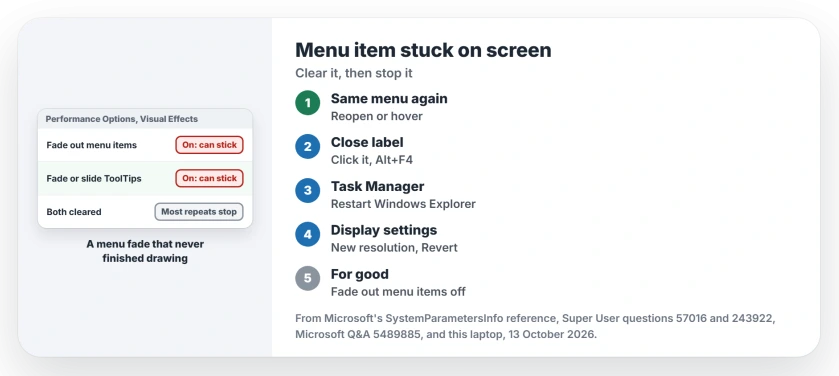
Status: fixes as found on Windows 11 25H2, 13 October 2026. Reopen or hover, then restart Explorer or redraw the display. Turning off menu fading stops most repeats.
Ours: on this laptop all three fade effects are switched on, as Windows set them. The Performance Options list names the one behind this fault Fade out menu items after clicking.
Clear it now, smallest step first
Make the same thing appear again
Open the same menu again, or hover over the same button. A new copy often replaces the stuck one. On a stuck tooltip thread, one person wrote: "I believe I solve this each time by getting it to appear again, from the same program".
Microsoft's Q&A support specialist gave the same first step for the Close label: move your pointer back onto the X that made it.
A stuck Close label: Alt+F4
Click the label once, then press Alt+F4. Confirmed by an owner in February 2026: "Alt F4 worked for me." Their label sat over Edge and Chrome tabs.
Alt+F4 closes whichever window has focus, though. Save your work first, in case the click lands on your document instead.
Restart Windows Explorer
Press Ctrl+Shift+Esc for Task Manager. Find Windows Explorer under Processes, right-click it and choose Restart. Your taskbar blinks out and comes back.
This fixed a stuck balloon tip for one Super User asker, whose question was about exactly that. For another person with a tooltip shadow, it did nothing. If yours stays, try the next step.
Redraw the display
The 2009 asker's answer, which they accepted, says changing the screen resolution resets the desktop window manager. That clears the leftover.
In Settings, open System, then Display. Pick another resolution for your screen and choose Revert when asked.
A commenter with a laptop on two screens did it faster, by pulling the HDMI cable out of the monitor for a moment, which you can do in seconds.
Windows + Ctrl + Shift + B also redraws everything by restarting the graphics driver. I have no owner report for this exact leftover. Treat it as a try.
I would not end dwm.exe in Task Manager, though older answers told you to. One commenter warned it "can cause a whole lot of problems to other apps", and a Windows 10 user was forced to restart.
Stop it coming back
Press Windows + R and run SystemPropertiesPerformance.
Or open Settings, System, About, Advanced system settings, then Settings under Performance, if you prefer clicking. Clear the box Fade out menu items after clicking, and click OK to save it.
That box switches off the selection fade Microsoft describes, the one leaving your ghost behind.
On Super User, commenters called it "the best long term solution" and "the definitive solution". One added that your menus open a little faster too.
It does not cover everything. One commenter still had "a network status popup get stuck on-screen" with it off. Tooltips have their own box. Clear Fade or slide ToolTips into view as well.
If something else hangs on your screen, a crossed-out speaker is often the monitor's own icon, not Windows.
Does restarting the PC fix it?
Yes, a restart clears it every time it happens, though it can come back later. In the 2026 Q&A replies, one person wrote that their label "intermittently appears and restarting is the only discovered fix." If it returns often, the Performance Options change is the lasting step, and one owner found a crashing mouse utility behind theirs.
The Short Version
- The stuck item is a menu fade that never finished drawing.
- Open the same menu or hover the same button again.
- A Close label: click it, then Alt+F4, after saving your work.
- Restart Windows Explorer, or change the resolution and choose Revert.
- Turn off Fade out menu items after clicking to stop most repeats.
Where to Next
What was frozen on your screen: a menu line, a Close label or a shadow? Comment with the app it came from. A list of programs that still leave them is my next job here.

Isaac Smith is the founder and editor of PC Glance, a website that covers computers, laptops, and technology. He is a tech enthusiast and a computer geek who loves to share his insights and help his readers make smart choices when buying tech gadgets or laptops. He is always curious and updated about the latest tech trends.