
Your Outlook reminder fired, but it opened behind your browser or spreadsheet, and you only spotted it after the meeting started. Or, in the new Outlook, the pop-up showed for a moment and vanished on its own.
I would fix this with Outlook's own setting before trying anything clever. Classic and new Outlook both have one. Neither switches it on for you.
Super User's March 2011 question, from someone who kept missing reminders behind other windows, has 234,543 views. New Outlook users were still raising it on Microsoft Q&A in October 2026.
Classic Outlook: one box, unticked by default
Go to File, Options, Advanced. In the Reminders section, tick Show reminders on top of other windows, then click OK.
Microsoft documents that box on its Outlook reminders help page, with a limit: "This feature is only available to Microsoft 365 subscribers on Version 1804 (Build 9226.2114) or higher".
Outlook 2021 and older do not have it. To check yours, open File, Office Account.
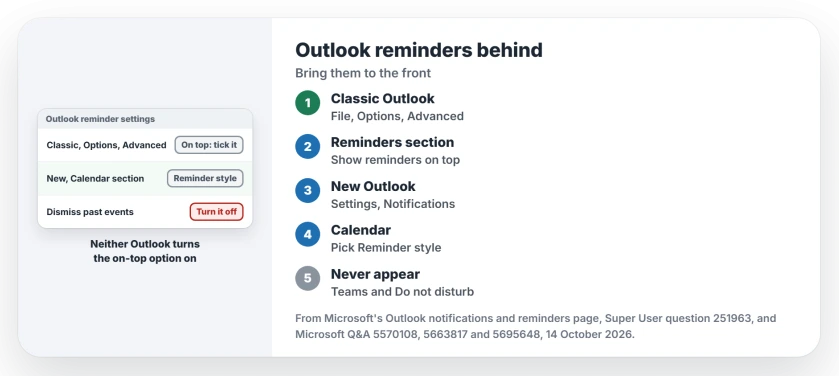
Status: checked against Microsoft's reminders page on 14 October 2026. Classic Outlook has the on-top box; in new Outlook, pick the Reminder style.
A 2018 answer on that old question announced the box and noted "It does not appear to be enabled by default". The person who asked in 2011 replied seven years later with thanks.
A commenter added a fair caution: the window jumps to the front when it fires, so you are less likely to miss it. It does not stay pinned there while you click other windows. That is usually enough.
New Outlook: choose the Reminder style
New Outlook keeps this in Settings, General, Notifications. Expand the Calendar section under Notify me about and choose the Reminder style rather than a plain notification.
Microsoft says that style shows your reminders "in a separate window that opens on top of other programs". A Microsoft Q&A answer from September 2025 listed the same Calendar section, with a Show reminders on top of other windows check box.
Then find the switch for Automatically dismiss reminders for past events. It matters. With it on, reminders for anything that already started vanish. I would turn it off if you are ever away from your desk when a meeting begins.
An owner on Q&A wrote in February 2026 that the thread led them to "the setting to keep them active until I actively dismiss them". That was the fix.
A Microsoft moderator had tested new Outlook version 1.2025.1210.100 and saw undismissed reminders stay in the window.
Not every user got the same result. One person in June 2026 wrote "After a week or so they disappear", even with the switch off. Watch it for a week.
No Reminder style in your Calendar section?
That choice arrived in new Outlook in stages. In January 2026 a Q&A moderator wrote that the separate reminders window had reached only some preview and Insider builds and some organizations.
If your Calendar section shows only notification choices, your build does not have it yet. Classic Outlook still has the old window. If your organization allows it, the New Outlook toggle at the top takes you back while you wait.
A request on Microsoft's feedback portal asks for a reminder pop-up that stays open. You can vote for it. Q&A users were still pointing people to it on 7 October 2026.
Outlook 2021, 2019 or 2016: no box to tick
Microsoft's page says the on-top box is not in Outlook 2021 or older. There is no switch.
Owners on those versions wrote a short macro in ThisOutlookSession that pushes the reminder window to the front, and one called it a fix that "works very well".
That route needs macros enabled and a self-signed certificate. It also breaks when the window title changes, which it does with the count of open reminders.
One owner said it stopped after an Office upgrade. The macro route is user-reported, not something Microsoft documents.
I would rather move to a Microsoft 365 build than keep a macro alive.
No reminder shows up, ever?
That points somewhere else. Microsoft says your status in Teams "might be set to Do not disturb", or Windows Notifications, Focus Assist or Do not disturb might be on. Any of those can block new Outlook's notification style. Start with Teams.
We walked through clearing Do not disturb when pop-ups stop showing for another app; the switches are the same. Classic Outlook also reminds only while it runs, so if it closes and will not reopen, fix that first.
One more case from Q&A: someone moved to a new PC and imported their calendar. Appointments they created on the new PC reminded them, and the imported ones never did.
Another owner, whose daily reminders stopped after two weeks off, got them back only by deleting and re-creating each one.
The Short Version
- Classic Outlook: File, Options, Advanced, then tick Show reminders on top of other windows.
- That box needs Microsoft 365 Version 1804 or later; Outlook 2021 and older lack it.
- New Outlook: Settings, General, Notifications, Calendar, then pick the Reminder style.
- Turn off Automatically dismiss reminders for past events if reminders vanish.
- No reminders at all: check Teams status, Windows Notifications and Do not disturb.
Where to Next
Are you on classic or new Outlook, and does your Calendar section offer the Reminder style yet? Tell me in a comment. I am tracking how far the new reminder window has rolled out.

Isaac Smith is the founder and editor of PC Glance, a website that covers computers, laptops, and technology. He is a tech enthusiast and a computer geek who loves to share his insights and help his readers make smart choices when buying tech gadgets or laptops. He is always curious and updated about the latest tech trends.