
You try to open or map a share with a different username. Windows answers with System error 1219. Sometimes it appears at sign-in instead, under Restoring Network Connections, when a mapped drive fails to reconnect.
I would drop the old connection with one net use command, then connect again. Windows allows one username per server name. That rule explains the whole error.
Tim asked how to switch the user on a share back in 2010, and the Super User thread has collected 351,394 views. Two Microsoft Q&A copies of the error, both about drives failing to reconnect, have 300+ and 100+ same-question clicks.
One username per server name
Windows' own text for the error spells out the rule: "Multiple connections to a server or shared resource by the same user, using more than one user name, are not allowed". Read it literally.
So if anything already reached \\NAS as one user, the second user is refused. That first connection can be a mapped drive, an open File Explorer window or a backup tool you forgot about.
Ours: we reproduced it against this laptop's own share. We connected to \\localhost\IPC$ as the signed-in user, then asked for the same share as a second user. We got System error 1219.
The same request by IP address, \\127.0.0.1, got past that check and failed only on our made-up password. So the rule follows the name. Then we deleted the first connection, and the name stopped saying 1219.
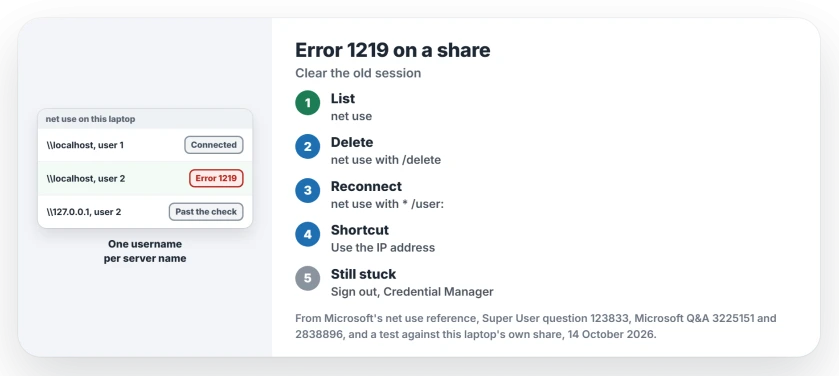
Status: reproduced on this laptop's own share on 14 October 2026. A second username still gets error 1219, and deleting the first connection still clears it.
1. Delete the old connection, then connect again
Start by listing what your PC is connected to. Note the exact server name. I would run this first every time, because it shows connections you forgot about.
net useDelete the connection to that server, using the name the list shows. Microsoft documents the switch in its net use reference, in five words: "Cancels the specified network connection".
net use \\NAS\share /deleteThen connect again as the user you want. The asterisk makes Windows ask for the password.
net use \\NAS\share * /user:yournameTim tried that form on the share and wrote back that net use worked. Owners report the /delete route lasting too. One comment on it says it "Still works 9 years later".
One owner noticed the old session lingered for about a minute after deleting it. Wait a moment before you connect again.
Typing net use * /delete clears every connection at once, mapped drives included, and Windows asks you to confirm first. I would only use that if you can map them again.
2. Or reach the server by its other name
Windows treats \\NAS and \\192.168.1.10 as two different servers. One Super User answer uses that: if the name is in use, open the share by its IP address, or the other way round.
Ours: that is exactly what happened in our test, where the IP address took the second username without a 1219.
Then keep using that path. The answer warns you have two sessions with different users, so a backup tool pointed at the other path will pick up the wrong one.
3. Still 1219 after deleting everything?
Sign out and back in. One answer found Windows kept using cached credentials until a fresh sign-in, even after the saved entry was gone. A commenter agreed that nothing else worked for them until they logged out and in again.
Check the saved credentials. Windows can keep a password for the server in Credential Manager and reuse it without asking you. We covered clearing that in the stale entry Windows saves for a share.
Two drives, two users, one server. By the same rule, if you map two shares on the same NAS as different users, one of them fails at sign-in with this error. Give both the same user, or map one of them by IP address, so they no longer clash.
Admin windows keep their own connections. That is also why a mapped drive can disappear in an admin window.
The Short Version
- Error 1219 means Windows already has a connection to that server under another username.
- Run net use to list connections, then net use with /delete on the old one.
- Connect again with net use, an asterisk and /user: your name.
- Or open the server by its IP address, which counts as a different server.
- Still stuck? Sign out and in, then clear the server's saved credential.
Where to Next
The sign-in version, where a mapped drive fails to reconnect, has the most votes on Microsoft Q&A. Was yours a NAS or another Windows PC? Say which in a comment, with the brand if it was a NAS.

Isaac Smith is the founder and editor of PC Glance, a website that covers computers, laptops, and technology. He is a tech enthusiast and a computer geek who loves to share his insights and help his readers make smart choices when buying tech gadgets or laptops. He is always curious and updated about the latest tech trends.