
You switch your laptop on, touch the fingerprint reader, and nothing happens, so you type your PIN. Restart it, or wake it from sleep, and the same finger works at once.
I would not delete your fingerprints over this. Microsoft fixed a cold start fault in its 13 October 2026 update, KB5127648, and one owner timed the reader before and after it.
That owner's Microsoft Q&A question shows 5 on Same question within two weeks, and a 26H2 owner described the same pattern under an older question with 30+.
Why a restart works and a cold start does not
Microsoft's notes for the October update say it "fixes an issue where fingerprint sign-in might not work after a cold boot on some devices". A cold boot is a start from fully off.
Microsoft says nothing more about which readers, but an owner with an MSI Prestige 16 and a Goodix reader filled that gap.
The September preview, KB5124010, started it for them, and from then on their reader needed 85 to 92 seconds after each cold boot.
In their words, "The delay happens only at boot". Unlocking later worked normally, but Sign-in options in Settings froze while the reader waited.
Their Biometrics log showed why: the service failed to set the reader up six times per boot, about 20 seconds apart.
You can open the same log yourself. Ours: this laptop has no fingerprint reader and never took the September preview, yet its Biometrics log opened without admin rights and listed every sensor the service set up.
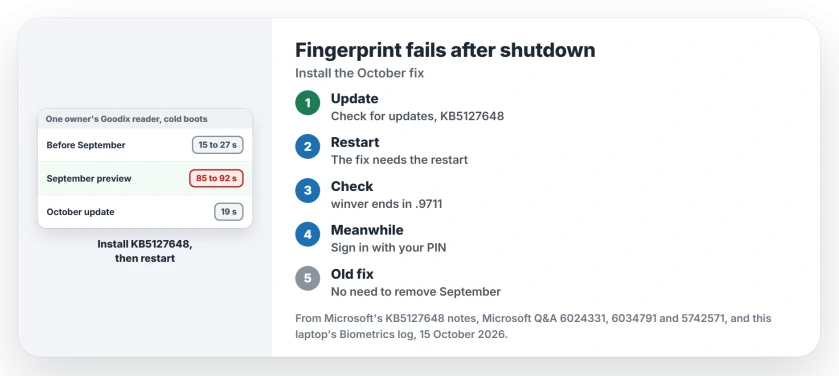
Status: Microsoft's 13 October notes and one owner's timed cold boots, both checked 15 October 2026. The fix needs KB5127648 plus a restart; no fingerprint was reset here.
1. Install the 13 October update, then restart
Go to Settings, Windows Update, then Check for updates. KB5127648 is the October update for Windows 11 24H2, 25H2 and 26H2, and its builds end in .9711.
The owner installed it on 14 October and came back the same day with a post that began: "Update: the October 2026 cumulative update fixed it for me". The next cold boot had the reader ready in 19 seconds, and no failures were logged.
"Fingerprint sign-in worked straight away at the sign-in screen," they added. Same driver, same settings. Only the update changed.
Restart when Windows asks, because your fix is not in place until you do.
Ours: this laptop lists KB5127648 as installed on 14 October, but it last started on 7 October. Windows Update flags a restart as pending, and the build still reads 26200.9457.
2. Check the number after the restart
Press Windows+R and enter winver. Your build sits on the second line.
You want .9711 at the end: 26100.9711, 26200.9711 or 26300.9711. A lower number means your restart has not finished the job yet.
3. Until then, use your PIN
A PIN always works at the sign-in screen, and it is also the stopgap the owner suggested to others. Your fingerprint comes back once the reader is ready.
An owner on another question, from 12 October, sees it after every restart instead: "My fingerprint reader stops responding after every laptop restart". Restarting the Windows Biometric Service in services.msc brings it back for them.
"However, the problem returns every time I restart the laptop," they wrote. The Goodix owner hit the same limit. A service restart helps once you are signed in, but it does nothing for the sign-in screen.
4. A reader in the power button? Same pattern
A Lenovo ThinkBook 16p Gen 5 owner saw it on 26H2 and wrote: "Everything was working fine before the Windows 11 Pro 26H2 update". Pressing the power button from off no longer signed them in.
After sleep or a restart, the reader worked. "The fingerprint sensor works later on," they added. Three people marked their reply helpful.
They even reinstalled: "I reinstalled the system using the 26H2 ISO, but it didn't fix the problem". That points at Windows, not at your saved fingers.
Should I uninstall the September update instead?
No longer. "Uninstalling KB5124010 fixed it" for the Goodix owner, with cold boots of 15 to 27 seconds. Then "Reinstalling it brought the problem back".
That was the only way out before 13 October, but the October update now carries the fix plus that month's security changes. I would install it and keep it.
Does Fast Startup make a difference?
It can hide the fault. The owner ran with Fast Startup off, so every shutdown was a full cold start. Their PC maker's support could not repeat the fault.
The owner quoted the reason: "MSI could not reproduce it with Fast Startup on, which is the default". That fits how your PC starts, because with Fast Startup on, a shut down and a restart are not the same start.
Is your reader unavailable all the time, not only at power on? Then you have a different fault. Two owners fixed theirs at the USB controller.
The Short Version
- Microsoft's 13 October 2026 update, KB5127648, fixes fingerprint sign-in after a cold boot.
- One owner went from waits of 85 to 92 seconds to 19 seconds.
- Install it, restart, then check winver for a build ending in .9711.
- Until then, sign in with your PIN.
- No need to delete your fingerprints or reinstall Windows.
Where to Next
Did the October update wake your reader at power on? Tell me your laptop model and reader brand, and I will learn which readers Microsoft caught.

Isaac Smith is the founder and editor of PC Glance, a website that covers computers, laptops, and technology. He is a tech enthusiast and a computer geek who loves to share his insights and help his readers make smart choices when buying tech gadgets or laptops. He is always curious and updated about the latest tech trends.