
Your receipt or label printer worked for months, then the August 2026 Windows update arrived and the jobs stopped coming out. You reinstalled the driver, and nothing changed.
I would stop swapping drivers. Microsoft fixed this on 13 October 2026 with KB5127648, and your driver was fine all along.
A Rollo that has never installed needs the processor and installer checks; that differs from a printer that stopped after an update.
The IT admin who raised it on Microsoft Q&A had around 450 reports from their own users by 1 September, and removing the August update kept them printing.
What broke in August
Microsoft's notes for KB5127648 cover it in one line. Microsoft says printing "could fail in some applications and on devices using RAW or Generic Text Only printer drivers after installing the August 2026 security update".
That August update is KB5121003, from 11 August, and receipt and label printers often print this way. Their software sends the printer's own commands as they are, or plain text.
The admin saw it on Cognitive TPG thermal printers, and they pointed to a Reddit poster with the same failure on Epson, TSC and Avery printers.
They tested it the hard way, much as you may have. In their words, "So far to mitigate it we have uninstalled the update and blocked it from deploying, that is fixing it in the short-term".
Ours: this laptop holds the Generic / Text Only driver in prnge001.inf, plus two receipt printer drivers, POS58ENG and POS80ENG. Every printer queue on it uses the RAW data type.
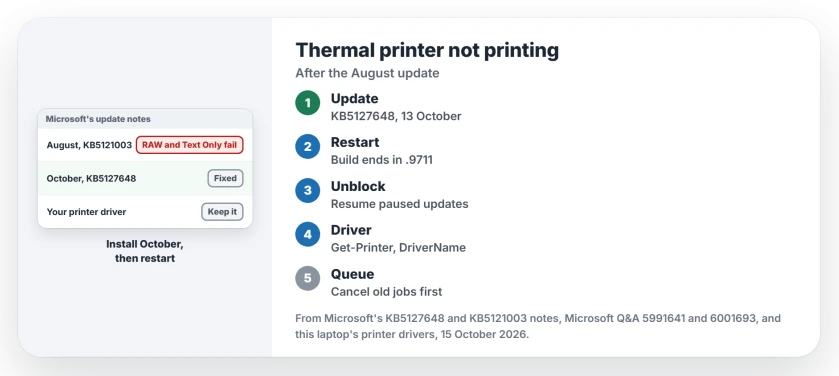
Status: Microsoft names RAW and Generic Text Only drivers, checked 15 October 2026. The printer drivers on this laptop were listed only; nothing was printed, installed or removed.
1. Install the October update and restart
Open Settings, go to Windows Update and choose Check for updates. The fix, KB5127648, covers versions 24H2, 25H2 and 26H2 of Windows 11.
Restart once it finishes. Then type winver in the Run box that Windows+R opens. Your build should end in .9711.
Ours: this laptop installed KB5127648 on 14 October, yet a day later it still showed build 26200.9457. The restart was pending, and the new build arrives only with it.
On 24H2 Home or Pro, this matters twice. 24H2 Home and Pro got their last update that day. October is the fix you get on that version.
2. Took the August update off? Let October back in
The admin's way out was to uninstall, then block. That kept receipts printing. It also kept every later security fix off those PCs.
I would undo the block now. If you paused updates, choose Resume updates on the Windows Update page, then let KB5127648 install.
Keep your driver, too. The admin saw no fault in it: "the driver works just fine prior to the update". The fix is in Windows, not the driver.
3. Check which driver each printer uses
Want to know whether your printer was in the group Microsoft named? Open PowerShell and run this:
Get-Printer | Format-Table Name, DriverName, DatatypeA printer on Generic / Text Only is in that group. Ours: the command worked here without admin rights, and all four queues said RAW, Print to PDF included. So that column alone does not settle it.
4. Old jobs stuck in the queue?
One owner on Microsoft Q&A, on 12 September, said of a thermal printer that "it will not print all jobs get stuck in the queue". I would cancel every waiting job before your first test print.
The steps for a queue that will not clear are on the printer that will not print page. If label printer software is also eating your processor, the Spooler SubSystem App page covers that.
Which printers does this hit?
Microsoft names drivers, not brands. Thermal receipt and label printers fit, and so do older dot matrix printers set up as text only.
The brands in the reports so far are Cognitive TPG, Epson, TSC and Avery. All four come from that one admin's question.
Why did Microsoft not list it in August?
It never showed as a known issue on the release health pages for 24H2 or 25H2, and the adviser who answered the admin on 2 September said the same about the August notes.
The October line is the first time Microsoft put it in writing. The admin had found little else: "I have seen no other reports online besides a thread in reddit on this". If your searches came up empty, that is why.
The Short Version
- The August 2026 update, KB5121003, broke printing through RAW and Generic Text Only drivers.
- Microsoft fixed it on 13 October 2026 in KB5127648.
- Install it, restart, and check winver for .9711.
- Removed or blocked the August update? Unblock it and let October install.
- Keep your printer driver, which was never the cause.
Where to Next
Is your till printing again after October? Post your printer model under this article, so I can track which brands the August bug hit.

Isaac Smith is the founder and editor of PC Glance, a website that covers computers, laptops, and technology. He is a tech enthusiast and a computer geek who loves to share his insights and help his readers make smart choices when buying tech gadgets or laptops. He is always curious and updated about the latest tech trends.