
You gave a desktop shortcut a Shortcut key, say Ctrl+Alt+N. Some days it opens at once, other days nothing happens for several seconds, yet a double-click is always instant.
I would hunt for one stalling program first. Windows asks every open window a question first, and one slow answer holds your key up.
The Super User question has 48,754 views since 2012, and its asker added in 2023 that Windows 10 still did it.
Why Windows asks every window first
Raymond Chen of Microsoft explained it in 2012. Before Explorer opens the shortcut, it checks whether a window already owns that key, so a second press switches to the copy you have open.
The question is a message, WM_GETHOTKEY. If one does not reply, Explorer waits, and in Chen's words, "After about three seconds, Explorer gives up".
His short answer: "There is a program running on your machine that occasionally stops responding to messages". Find it, and the delay goes.
Ours: I sent all 441 top-level windows on this laptop the same question with the same three-second limit. Every answer together took 320 ms.
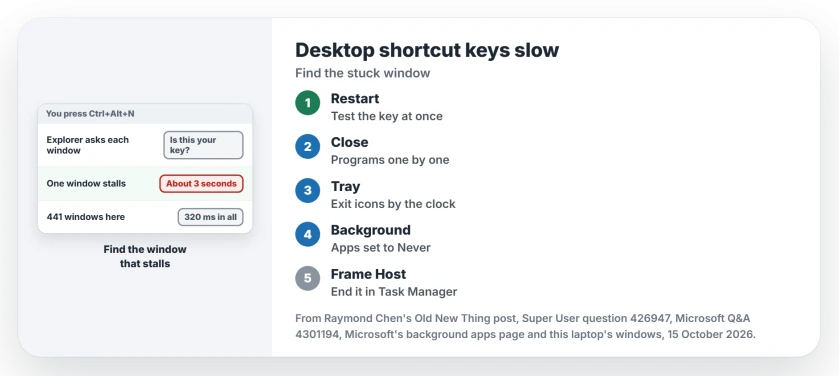
Status: the window query ran here, under Windows 11 Home 25H2, on 15 October 2026, beside Raymond Chen's explanation and Microsoft's background apps page. Nothing was closed or turned off.
1. Close programs one at a time
This is how the top answer, at 97 votes, finds the culprit. Restart and try your key before opening anything.
Fast? Then open your usual programs and wait. Then close them one by one, trying the key after each.
Include the icons by the clock. Right-click each one, choose Exit and try again.
Owners report a long list of culprits found this way: Steam, Akamai NetSession, Logitech's SetPoint, Dropbox and Adobe Creative Cloud.
If the program you found is a name you do not know from Task Manager, the strange .exe page helps you check it.
2. Stop background apps you never use
Windows 10 added a new kind of culprit: apps parked in the background without a window. The top answer named Calculator, the Store and Settings itself.
An owner on Windows 10 1709 confirmed it: turning off background apps "did the trick" and shortcut keys opened programs at once.
On Windows 11 the switch is per app. On its background apps page, Microsoft says these apps "can perform actions such as syncing or sending notifications" while you are not using them.
Open Settings, Apps, Installed apps, then the app's Advanced options. Under Let this app run in background, pick Never.
3. End Application Frame Host
A 2015 answer with 29 votes named ApplicationFrameHost.exe, the process that holds Store app windows. Ending it in Task Manager removed the delay for several owners.
One wrote: "Killing ApplicationFrameHost.exe eliminated the delay for me". Ending it also closes any Store app windows you have open.
Ours: it was running and answering here. Three windows from ASUS's Armoury Crate did not answer at all, and Windows had already flagged them as hung, so the query passed them at once.
Does turning off SysMain help?
Sometimes, and not for long. One owner turned off the SysMain service and had no delays for a month, then the three seconds came back.
Another credited SysMain with starting Application Frame Host in the first place. I would keep SysMain running.
Moved the shortcut and the key stopped working?
That is a separate quirk. A Microsoft Q&A answer from January 2023 says dragging a desktop shortcut into a folder and back makes its key stop working "for a time" on Windows 11 too.
That question shows 10+ on Same question. Leave the shortcut where it is and give Explorer a moment before you test it again.
To set or change the key, open the shortcut's Properties and click in the Shortcut key box on the Shortcut tab. The Run as administrator page covers the Advanced button on that same tab.
The Short Version
- Explorer asks every open window whether it owns your key and waits about three seconds for any that stall.
- Restart, test the key, then close programs and tray icons one by one to find the staller.
- Turn off background apps you never use under each app's Advanced options.
- End Application Frame Host in Task Manager as a quick test.
- Leave SysMain on; owners found it only delays the problem.
Where to Next
Steam, Dropbox, a tray icon or something odder: which program was stalling your keys? Write it in the comments, since I add each one to a list I keep of programs that hold keys up.

Isaac Smith is the founder and editor of PC Glance, a website that covers computers, laptops, and technology. He is a tech enthusiast and a computer geek who loves to share his insights and help his readers make smart choices when buying tech gadgets or laptops. He is always curious and updated about the latest tech trends.